
There’s a Hidden iPhone Feature Most People Miss—Here’s How to Find It

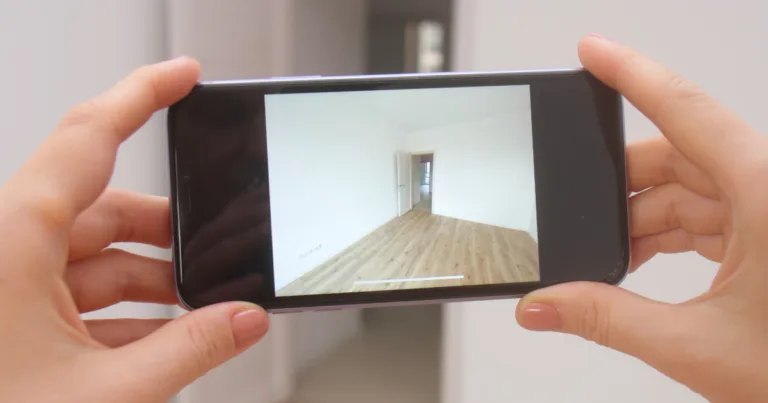
A person holds up an iPhone, using its camera to scan an empty room, illustrating how LiDAR helps map physical spaces.

The iPhone's LiDAR sensor lets it scan and measure real-world spaces with precision.

// 11 surprisingly useful things your LiDAR sensor can do
Sara J. Nguyen
Jul 08, 2026
Icon Time To Read4 min read
Icon CheckEdited ByBrenna Elieson

A few months ago, I was looking to buy a new pull-out couch. I grabbed my tape measure to check if it would fit against the wall, but I still had a hard time picturing it. I was worried that the color would clash with my wall art or look out of place with the rest of the furniture.

If only I knew about LiDAR sensors.

Your iPhone has a built-in depth sensor that's made to help with moments like these. I could've used it to scan my room for accurate measurements, then add a virtual version of the couch to see how it would look in my space.

It got me thinking — what else can LiDAR sensors do? Let's talk about how LiDAR sensors work and 11 ways they can help you, from special occasions to everyday life.


What is the LiDAR sensor on iPhone?

LiDAR (Light Detection and Ranging) is a remote sensing system that measures distances using laser light. It's similar to how bats use echolocation. But instead of sound waves, LiDAR uses laser pulses. It sends a pulse at a target, and it measures how long it takes for the laser to bounce back.

Apple introduced LiDAR sensors for augmented reality (AR) technology. Regular phone cameras can't accurately measure 3D depth information, and LiDAR solves this problem. This lets virtual objects seamlessly interact with the real world.

But LiDAR does a lot more than AR. You can use it in everyday life too.


What can the iPhone LiDAR sensor do?

The iPhone LiDAR sensor has some useful built-in features. But you can also download an app to use LiDAR for other tasks. Here are some ways you can use the LiDAR sensor:

  • Faster autofocus: No more missing a great shot because your camera took too long to focus. LiDAR measures distance quickly, so it locks onto your subject faster.
  • Better low-light photos: Taking pictures in dim lighting is tricky because the shutter needs to stay open longer to gather enough light. The end result is a blurry photo. LiDAR can focus instantly, which cuts down the time the shutter needs to stay open.
  • Create 3D models: Point your camera at any object, and your phone will create a detailed 3D model of it. You can even use the model for 3D printing. You'll need an app to create 3D models, like Scaniverse, 3D Scanner App, or Polycam.
  • Map Wi-Fi signal coverage: Walk around your home and see exactly where your Wi-Fi is strongest. You can do it with an app like Wifiman that measures signal strength. It'll create a map of your home and show you where the weak spots are. Then you can correct the issue.
  • Place furniture in a new home: Scan a room and see how your furniture fits before you move. It beats thinking something will fit and realizing that it doesn't after you haul it in.
  • Try out new furniture: Shopping for a new couch? Using a LiDAR sensor can accurately measure where it will fit in a room and what it will look like. You could test out furniture before you buy it. Furniture is typically scaled to size, so what you see is close to the real thing.
  • Measure distances: The free Measure app calculates distances. It's handy for planning a renovation. You can also skip the level tool. The Measure app can help you straighten your picture frames.
  • Holiday decorating: See how your holiday decorations will look before you spend hours putting up lights. It's useful to plan your setup and make sure your vision will come to life.
  • Hear your environment described: Point your camera at your surroundings and get an audio description of what's there. The Magnifier app can provide live descriptions of your surroundings. You can also use it to detect doors, people, and objects, and determine how far away they are from you. This app is especially helpful for people with visual impairments.
  • Play games: LiDAR makes AR games more immersive. Virtual objects realistically interact with your physical environment. It can make characters look like they are sitting on your bed.

How do I use the LiDAR sensor on my iPhone?

The LiDAR sensor lives on the back of the device, right next to the camera. It's built in, working automatically with no setup needed. LiDAR works for the Measure app and camera.

You'll find the LiDAR sensor on iPhone 12 Pro models and later Pro models, as well as iPad Pro 11-inch and 12.9-inch models from 2020 or later.

You can also download apps that tap into the LiDAR sensor to unlock even more capabilities.

Best apps that use iPhone LiDAR

Since Apple introduced LiDAR, many apps have been built to take advantage of it. Here are a few popular ones that may interest you:

  1. Scaniverse: Create a 3D image of the real world with Scaniverse. You use your camera to capture as much of the object as possible. Then Scaniverse will give you a 3D image.
  2. magicplan: Accurately measure floor plans in real time. It's a great app for remodeling projects.
  3. Canvas: Capture an entire room in a 3D image. It's ideal if you are looking to redecorate or remodel and need a reference point.
  4. IKEA: The IKEA app has a feature that lets you "try on" IKEA furniture in your house. You create a 3D replica of your room, and the app will scale furniture automatically to the right size.

Found this useful? Follow Reviews.org on Instagram, Facebook, LinkedIn, or catch us on YouTube

You can also add us as a preferred Google search source for the latest in tech and home services.

Sara J. Nguyen
Written by
Sara J. Nguyen is a freelance writer, specializing in online security. She aims to help people enjoy technology while protecting their data and privacy. Sara's work has appeared on reputable platforms like Frontier Internet, All About Cookies, and more. When she's not writing, she's planning her next international trip.

Related Articles

A couple sits on the floor amid moving boxes, looking at a laptop together, with a T-Mobile Fiber speech bubble beside them.
Comparing Internet Options for Your Home: How T-Mobile Fiber Home Internet and Leading Providers Stack Up on Speed, Value, and Coverage
Fiber is the best internet option for most homes where it’s available, followed by cable...
Two people sit outdoors with a laptop, comparing home internet plans, with a T-Mobile Fiber speech bubble.
How to Choose the Right Fiber Internet Provider: What to Know Before You Sign Up
Choosing a fiber internet provider isn’t just about finding the one with the fastest speeds....
Two people gather and look at a PureTalk cell phone device
PureTalk Deals for 2026 Just Dropped to $15: What to Know Before You Switch
Consumers can access the current PureTalk deal for $15 a month. PureTalk phone deals are...
Mbps vs. Gbps Do You Need Gigabit Internet
The Cheapest Frontier Internet Plans: Save Money on Wi-Fi
Frontier is a rare gem with steeply discounted introductory prices and free perks. Keep reading...