
Getting there and getting there fast are not the same thing
Is Google Maps Sending You the Long Way?

 3 min read
 Edited ByKelly Huh
It’s dark, late, and you don’t know how to get where you need to be. Like billions of drivers worldwide, you may lean on Google Maps to get you from point A to point B quickly and safely in this type of situation, especially if you’re in a rush. So it’s particularly frustrating when your app intentionally sends you the long way.
To find out why Google Maps sometimes sends drivers on the longest, strangest, or most circuitous routes imaginable, I spoke to a mapping app builder, a geospatial land surveyor, and a real-life explorer to get their take on this conundrum. I also researched how frustrated, need-to-get-there-now drivers can easily fix this issue.

Why you can trust us
At Reviews.org, our team takes its editorial independence seriously. We may earn money when readers click affiliate links, but we don't work for our brand partners, and they don’t approve our pieces before publication. To learn more, visit our About us page.
Key Takeaways
- Google Maps is used by over 2 billion unique users monthly
- Google Maps provides directions for more than 250 million global locations
- When arrival times are similar, Google Maps suggests fuel-efficient routes by default, instead of shortest or fastest ones
On this page:
Meet the expert

I love to write about consumer tech. I use Google Maps primarily for walking around cities and towns I’m unfamiliar with. It hasn’t led me into an impassable cow pasture, at least not yet, but there’s always tomorrow!

Reviews.org
What algorithm does Google Maps use?
Google Maps uses several algorithms, plus machine-learning models, to map out the route it determines will be best for your trip. Google doesn’t publicly disclose which algorithms it relies upon most, or which one is used as its main model.
Even though the full details are proprietary, we know that Google Maps utilizes a graph model to visualize roads, road segments, and intersections. A known foundation of Google Maps graphing system is Dijkstra’s algorithm variant A*. This algorithm utilizes a heuristic (problem-solving method) to identify and rank the most viable route between two points.
Google also relies upon anonymous location data from people’s smartphones, daily and hourly traffic patterns, and incident reports to make its route recommendations to drivers, cyclists, and walkers.
Despite its multi-tiered approach, this is not a fool-proof system. Nor is it designed to default automatically to the shortest possible route. “Is Google Maps always accurate? No map is,” says Ross D. Blankenship, a mapping app builder based in Avon, Colorado. “A map is a copy of the world, and the world changes faster than its depiction can. Roads close. Businesses move. Accidents happen,” he adds.
How does Google Maps decide which route you should take?
In any given situation, Google Maps will layer real-time data into its algorithmic formula, to come up with a suggested route that makes sense. “Google Maps’s predictive calculations focus mostly on the fastest time to get to your destination. This is not always the shortest distance,” says Atlanta-based land surveyor, Oluwaseun Ipede.
Google Maps considers the following variables:
- Real-time speed and location data from phones actively using the app
- Incident data being reported by local governmental agencies and news agencies
- Construction alerts
- Road closure alerts
- Weather reports
- Road characteristics
- User preferences
“Google chooses the route it predicts will get you there fastest. A longer highway route can beat a shorter city route on paper, since Google weighs live traffic, speed limits, turns, and lights. If the traffic guess is off, you drive the long way for nothing, says Blankenship.
The eco-friendly route may not be the shortest one
User preferences such as “avoid tolls,” “avoid highways,” and “avoid ferries” can lengthen your route. You may intentionally choose those settings, but miss the default “fuel-efficient route” setting, which is chosen for you.
If fuel-efficiency is toggled on, Maps will default to this route instead of the shortest or fastest one, provided that arrival times are similar. Given the cost of gas, you may understandably prefer to keep this setting on. If you’re in a hurry, however, it may make sense for you to untoggle it, at least temporarily.
To test out the differences between settings, I had Maps calculate multiple routes for mileage and length with the eco-friendly setting turned on and off:
Google Maps length of trip and mileage for fuel-efficient and standard settings
The standard routes only save a few minutes for short distances like going from Los Angeles to Downey, California. However, those few minutes can add up for longer distances, like a long-distance drive from Bennington, Vermont to Harbor, Maine.
Does Google Maps ever get it completely wrong? Yes, it does
You hear stories occasionally about Google Maps sending people over bridges where no bridge exists, and other mishaps. Long, short, or somewhere in between, if you’re hoping to get to your destination at least eventually, adventurer James McNally, the managing director of a vehicle hire company, has a cautionary tale for you.
“I was driving out to a coastal trail I hadn’t visited before. Google Maps flagged a back road through the countryside that looked like a nice drive, so I took it,” he shared. After about 15 minutes of driving, the roads started to narrow, and the app kept recalculating the route. Instead of a clear road ahead, McNally saw a temporary barrier and a pile of drainage pipes. “I did a slow, slightly embarrassing three-point turn between two diggers and headed back the way I came,” McNally explained.
Now, McNally always makes an effort to cross-check unfamiliar routes on a second app before committing. This is a good habit to get into so that you can see your options, instead of relying solely on Google Maps.
How-to set your Google Maps preferences for shortest or fastest route
Here’s how you can avoid taking the long way by reviewing and modifying your settings in Google Maps:
1
Open the Google Maps app
If you walk or cycle, you’ll have the option of choosing a “shortest-distance” setting. Drivers aren’t given this as a clear-cut option.
2
Tap your profile picture
You’ll find this in the upper right-hand corner.
3
Select settings, and click on navigation
Untoggle the “prefer fuel-efficient routes” option, and any other option you choose that may lengthen your trip.
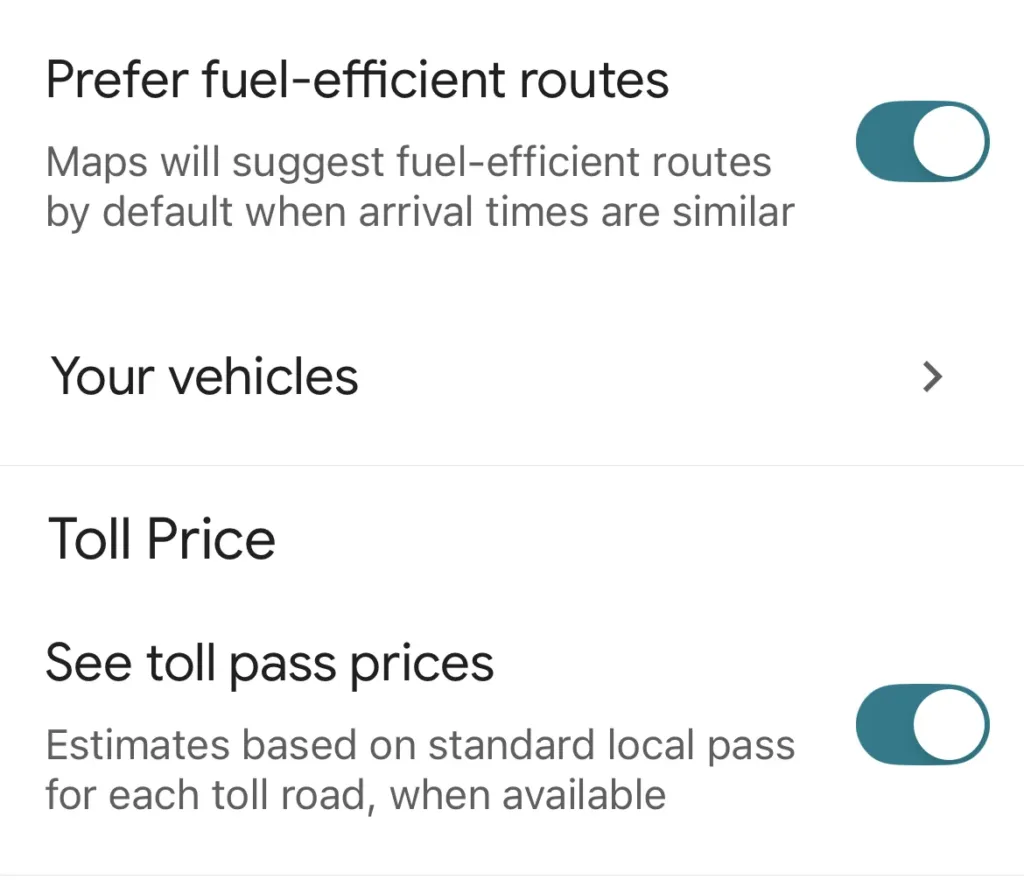
Google Maps automatically defaults for fuel-efficient routes, unless you untoggle this setting.
Screenshot courtesy of Corey Whelan, Reviews.org
What to read next



Frequently asked questions (FAQ)
Why does Google Maps lie about the fastest route?
Maps isn’t intentionally lying; rather, it's giving you the route that’s optimized for fuel efficiency and other variables, like traffic conditions.
Who is more accurate, Waze or Google Maps?
Both apps are owned by Google, and have different uses: Maps is most accurate for longer trips and reliable arrival times; Waze may be more accurate for hyperlocal conditions that affect trip speed.
Is Google Maps run by AI?
AI and machine learning play a role, but aren’t the only factors that impact navigation recommendations.

Related Articles

Is Google Maps Sending You the Long Way?
Is it taking a surprisingly long time to get your destination? Be careful — your...

What Is T-Mix? How T-Mobile’s New Plan Lets You Choose What’s Included
T-Mix is T-Mobile’s new approach to customizable phone plans. Here’s how you can choose your...

I Cut Off My Parents. Do I Have to Leave Their Phone Plan Too?
Untangling your phone bill can be complicated, but leaving it opens a door for more...

Why an Unpaid Internet Bill Can Get You Turned Down by a New Provider
Unpaid WiFi bills can make it hard to get a new ISP. If you have...


