
AI isn’t just for your homework—it can help fix your internet problems
How to Use Claude to Fix Your Internet (With 4 Copy-and-Paste Prompts)

 6 min read
 Edited ByKelly Huh
Dropped connections, slow speeds, and iffy Wi-Fi signal strength plague most of us. In fact, 43% of Americans named slow speeds as one of their top frustrations with their internet provider, according to Reviews.org’s Consumer Trust Survey 2026.
Speaking from personal experience, I can connect the dots between computer woes and what feels like epic blood pressure spikes. Yes, that was me screaming full throttle at my computer to speed up already.
When things go wrong, reaching out to your internet service provider (ISP) may be the fix you go for first, but that isn’t always productive or fast enough. You may spend a lot of time trying to get someone to chat with online, or talk to you on the phone – a blood pressure spiker in and of itself.
To find out if there’s a better way, I connected with several AI experts, to see if Claude, Anthropic’s AI assistant, could help diagnose the hidden reasons behind common internet snags. I also used the free version of Claude to ask questions about best usage strategies.
Read on to learn the Claude prompts that can help you handle your gnarliest internet issues. Your blood pressure will thank you.
Key Takeaways
- Claude has a free plan with a limit to how many prompts you can send in a window of time. Paid individual plans start at $17 per month with annual subscription discount ($200 billed up front) or $20 if billed monthly
- Claude’s mobile app had about 104 million monthly users in May 2026, according to Similarweb (Anthropic doesn’t publish official figures)
- Claude works best when you give it detailed, specific prompts
On this page:
Meet the expert

I specialize in science, health, and consumer tech. I’ve been researching and writing about the ways technology affects the lives of everyday people for more than 10 years. Since I’m not a tech wizard, I know how overwhelming technology can be. Full disclosure: I also fully believe that simplest is best. For that reason, I strive to help people like me figure out easy hacks for making their lives simpler and better.

Reviews.org
What is Claude?
Claude, an AI assistant, was developed by Anthropic, an AI research company based in San Francisco. Anthropic calls Claude a thinking partner. When I asked Claude to describe itself, I got this answer:
I’m an AI assistant and large language model, which means I was trained on a huge amount of text to understand and generate language. In practice, that lets me do things like answer questions, explain concepts, write and edit text, help with code, analyze documents and data, brainstorm ideas, and talk through problems step by step.
Claude made sure to let me know that it isn’t a person, doesn’t have a body, and can make mistakes. It also mentioned that its knowledge has a cutoff date, since its answers are based on readily available online information. Recent or updated findings on any topic may be missed by Claude.
Claude’s popularity is growing, but it’s used far less often than ChatGPT. ChatGPT’s mobile app reached 1.12 billion monthly active users in May 2026, compared with 103.9 million for Claude’s app, according to Similarweb. Still, the experts I spoke with said Claude can help diagnose common internet issues.
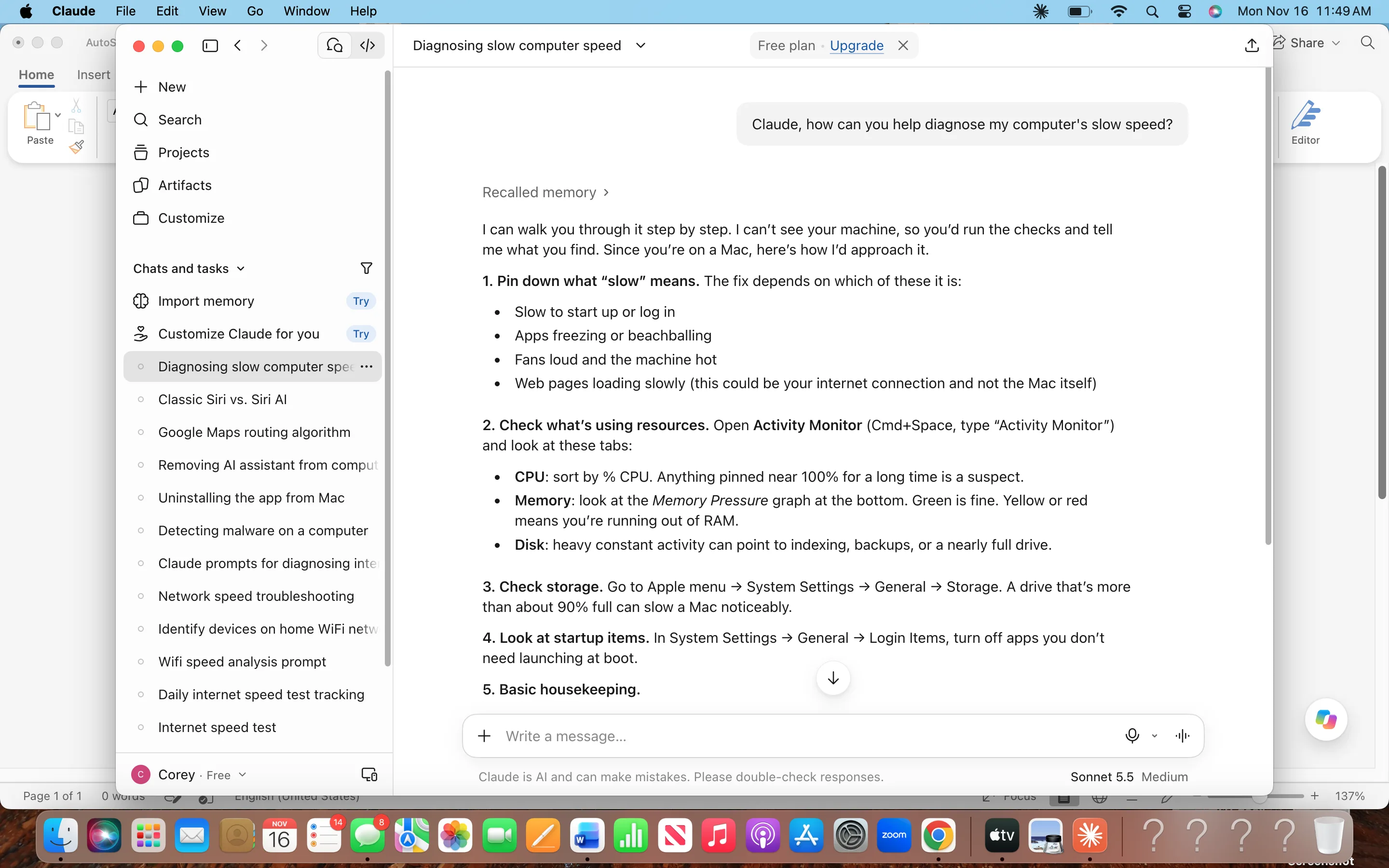
Broad, undetailed prompts can be helpful, but may not give you enough information. Screenshot by Corey Whelan, Reviews.org
How to write a good Claude prompt
As I learned firsthand, Claude is most effective at providing solutions when your prompts contain full and complete information. If you ask vague or broad questions, you’ll probably still get useful answers, but it may not be enough to quickly solve the issue you’re asking about. Experts I spoke with agreed on three simple rules:
1
Describe the problem in clear detail
Give Claude as much comprehensive information as possible about your system, and the issue you’re grappling with. Also explain why you need additional support. Paste in tangible evidence such as error messages, screenshots, or lists wherever possible.
“The more detailed your instructions, the better Claude is able to understand and process what’s going on,” says Russell Twilligear, who heads AI research and development at a content creation firm in Fort Worth, TX.
2
Provide additional context
Claude works best with screenshots and the exact wording of settings you’re dealing with. Mathieu Romary, a Paris-based AI consultant and former Amazon product leader who trains teams on using AI tools, advises users to explain what outcome they want and give examples. “The real hack is to show Claude what you’re seeing, instead of overengineering the prompt,” he said.
3
Prompt twice
Iteration helps Claude give you what you want. Think of the first prompt as a trial run. If you need more info, drill down into more specifics.
Claude prompts you can use to solve common internet problems
Let’s go through common issues you might encounter with your internet connection, and how you can solve them with Claude.
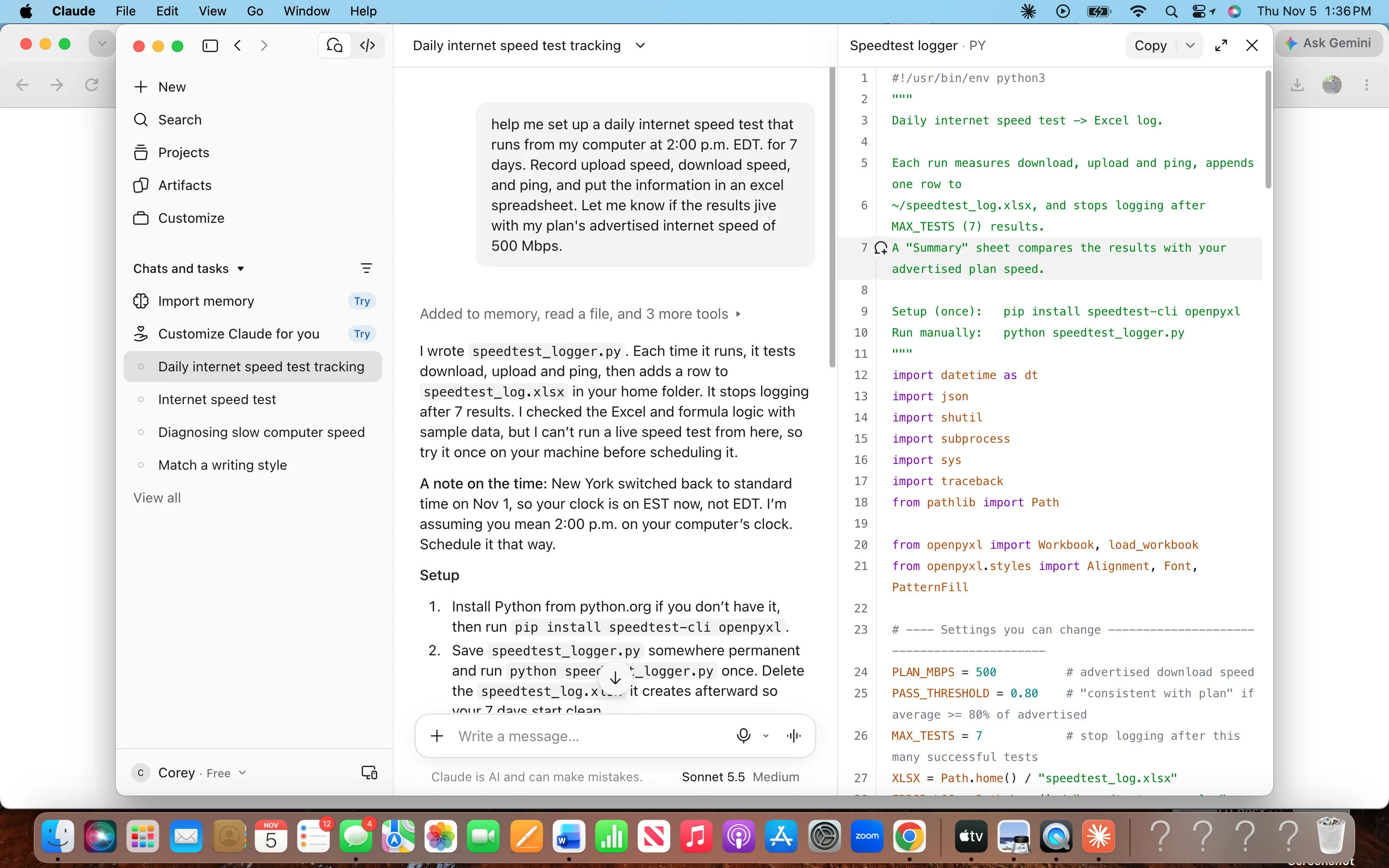
Claude functions best when you provide it with highly detailed prompts. Screenshot courtesy of Corey Whelan Reviews.org
Am I getting the speed I’m paying for from my ISP?
Video buffering, slowdowns during gaming, and slow upload and download speeds are common complaints about home internet. It’s possible that you’re not getting as much speed as your plan is supposed to deliver. A week of quick speed tests can help show whether your internet company is delivering what you pay for, and Claude can help you figure that out.
Copy this Claude prompt:
Prompt 1
I'd like your help making my home internet faster. My plan is supposed to give me [X] Mbps download speed, and I want to know if I'm getting it. I'm not very technical, so please guide me like a patient friend who knows about computers, not like an IT manual. How I'd like you to help:
- Ask me a few simple questions first to understand my setup and the problem (for example: what's slow, which devices, whether it's Wi-Fi or a cable, and roughly when it happens).
- Ask no more than 2–3 questions at a time.
- Give me one step at a time, then wait for me to tell you how it went before moving on.
- Use plain, everyday language. If you have to use a technical word (like "router" or "bandwidth"), explain it in one short sentence.
- Tell me exactly what to click, press, or look for.
Once you submit this prompt, Claude will likely provide a questionnaire for you to fill in. It may suggest you take a speed test at the same time every day and then provide you with additional troubleshooting steps.
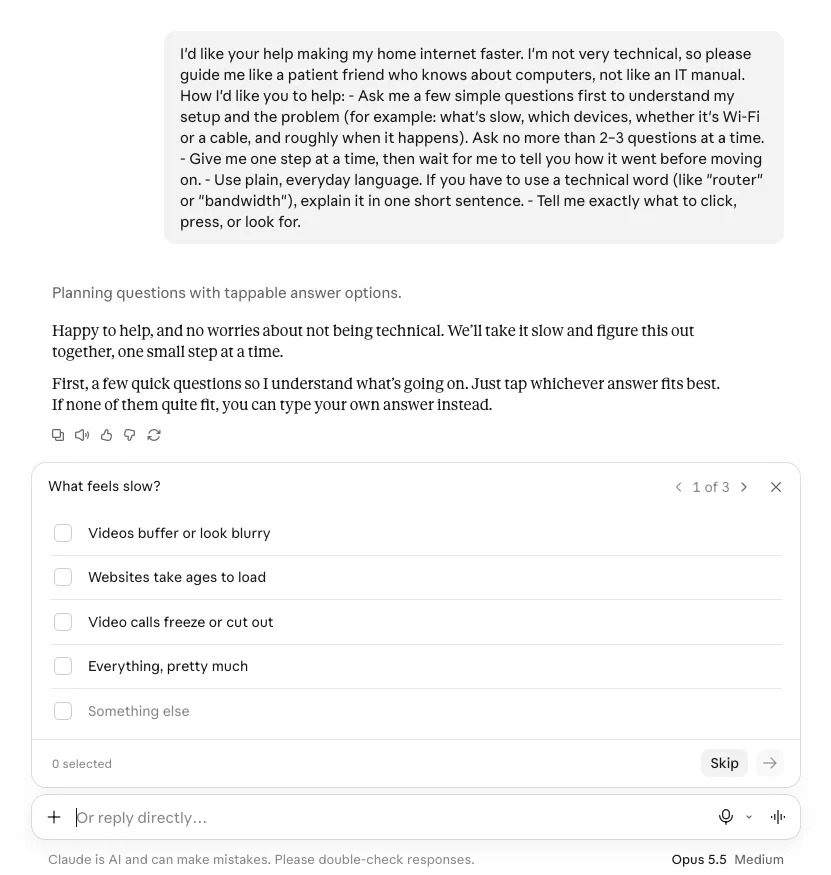
Claude provides a questionnaire to fill in to help diagnose your internet issues. Screenshot by Kelly Huh, Reviews.org
Do you have to be polite to Claude?
Unlike your great-aunt, you won’t be penalized for not saying “please.” Being polite won’t affect your final answer, and being clear and direct is the way to go. That being said, Anthropic updated its Usage Policy to ban "sustained and needless abusive or cruel behavior toward [its] models."
Why can’t I load websites onto my computer?
If you’re connected to Wi-Fi but can’t get websites to load fully or at all, a Domain Name System (DNS) error may be at fault. A DNS problem can look like your internet is down when it isn’t. Before you call your ISP, use this Claude prompt to sleuth it out:
Prompt 2
I’m connected to Wi-Fi but websites won’t load fully, or at all. Is it a DNS problem? If so, how do I test and fix it?
Once you submit this prompt, Claude will likely walk you through a few quick checks, such as loading a site on another device or restarting your router. If it’s a DNS issue, it may suggest clearing your computer’s DNS cache or switching to a free public DNS service like Google Public DNS or Cloudflare. If websites still won’t load after these steps, the problem may be on your ISP’s end — and that’s when you might have to pick up the phone and call customer service.
What background computer settings are slowing down my system?
Graphics, animation, hidden background apps, and other “bandwidth hogs” can slow down internet speed. To find out if hidden settings are reducing your system’s speed, copy this Claude prompt:
Prompt 3
Using the diagnostic information I’ve provided, analyze my network’s configurations. List everything in order of significance that might be affecting the speed of my connection. Include changes I can make that will solve any issues you find.
Since Claude isn’t hardwired to your device, it can’t fix computer issues automatically for you. It can, however, instruct you on how to investigate and fix issues on your own or ask to link up to cloud services. Keep that in mind when you write any prompt to Claude.
Has malware invaded my system?
AI-accelerated malware attacks increase annually by around 44%. Ironically, AI can help you diagnose viruses, trojan horses, botnets, and other malware forms.
If you suspect your system has been infiltrated, copy this Claude prompt:
Prompt 4
I have a (computer model / version). Over the past (fill in timeframe), I’ve noticed these symptoms (fill in the symptoms that are concerning you, such as slowness, pop-ups, homepage changes, etc.) It started after (what you think triggered it, such as clicking on a link, installing an app, opening an email attachment, etc.) I’ve already tried (anything you’ve done) but nothing solved the issue. Walk me through how to check for malware step by step, and tell me what to look for at each step. Also tell me how to fix what I find.
Claude will likely start with the security tools already built into your computer, such as Windows Security on a PC. It may also have you review recently installed apps and browser extensions and remove anything you don’t recognize. If you think your passwords or banking information may have been exposed, change them from a different, trusted device. If the symptoms don’t go away, consider taking your computer to a professional.
Additional Claude prompt tips
I find Claude’s language model to be a bit more sophisticated than ChatGPT. Since I’m not a natural-born tech wizard, I get overwhelmed easily by techno-speak. For that reason, I asked Claude to provide my responses at a 5th grade level. You can do that for any topic you find challenging, from medical issues to aeronautics.
Claude supports multiple languages, which you can set up in your profile. No matter what settings you use, however, you can chat with Claude in any language. It typically answers in the same language, even if a different one is listed in your profile.
If you’re not sure how to get the best results from your prompts, ask Claude to write the prompt that will be most effective for you. I did this several times and used them either verbatim or with personalized modifications.



Frequently asked questions (FAQ)
What are the best prompts for Claude AI?
The best prompt depends on what you want Claude to do. Ask specific and clear prompts rather than general questions to get the best results.
What are some cool things Claude AI can do?
Claude can analyze complex files, automate daily tasks, and, once you connect your apps, organize your inbox and calendar.
What AI is everyone using now?
ChatGPT still leads, followed by Google Gemini and Claude.

Related Articles

How to Use Claude to Fix Your Internet (With 4 Copy-and-Paste Prompts)
Slow speeds, Wi-Fi drops, or sites that won’t load? Here’s how to use Claude to...

Your Marriage Is Over. Who Keeps Paying for the Phones?
Phone bill payment instructions should always be included in divorce agreements, especially if children have...

Can Anything Stop the Billions of Spam Calls America Gets Each Year?
Here’s how to use carrier tools, spot red flags, and keep spammers from reaching you...

T-Mobile Holiday Deals 2026: iPhone 18 Pro or Galaxy S26+, No Trade-In Needed
Explore T-Mobile holiday deals for 2026 on the iPhone 18 Pro or Galaxy S26+, with...


