Here’s What You Need to Know Before Buying a Kindle Paperwhite in 2026

Woman wearing glasses and a beige sweater smiling while holding a tablet device in her hands, sitting in a chair with a potted plant in the background.

Woman enjoying reading and digital content on her tablet at home. Image Credit: FreshSplash, iStock

// Everything I’ve learned about the Kindle Paperwhite since buying one this year
Morgan McDougal
Aug 17, 2026
Icon Time To Read4 min read
Icon CheckEdited ByKelly Huh

I was 12 years old when I got my first Kindle and I think that it’s safe to say the e-reading landscape has changed quite a bit since then. The first Kindle came out in 2007; and the most recent ones were released in 2024 — the Kindle Paperwhite 12th generation and the Kindle Colorsoft. Oh! And now, there are add-ons.

Back in the day, add-ons meant protective cases, fun stylus colors, and screen protectors. Of course, those are all still available (and way more fun, now).

So, let’s talk about it. Let me give you the run down on features you need to know about, add-ons to consider, and whether or not the Kindle Paperwhite is truly worth the money in 2026.

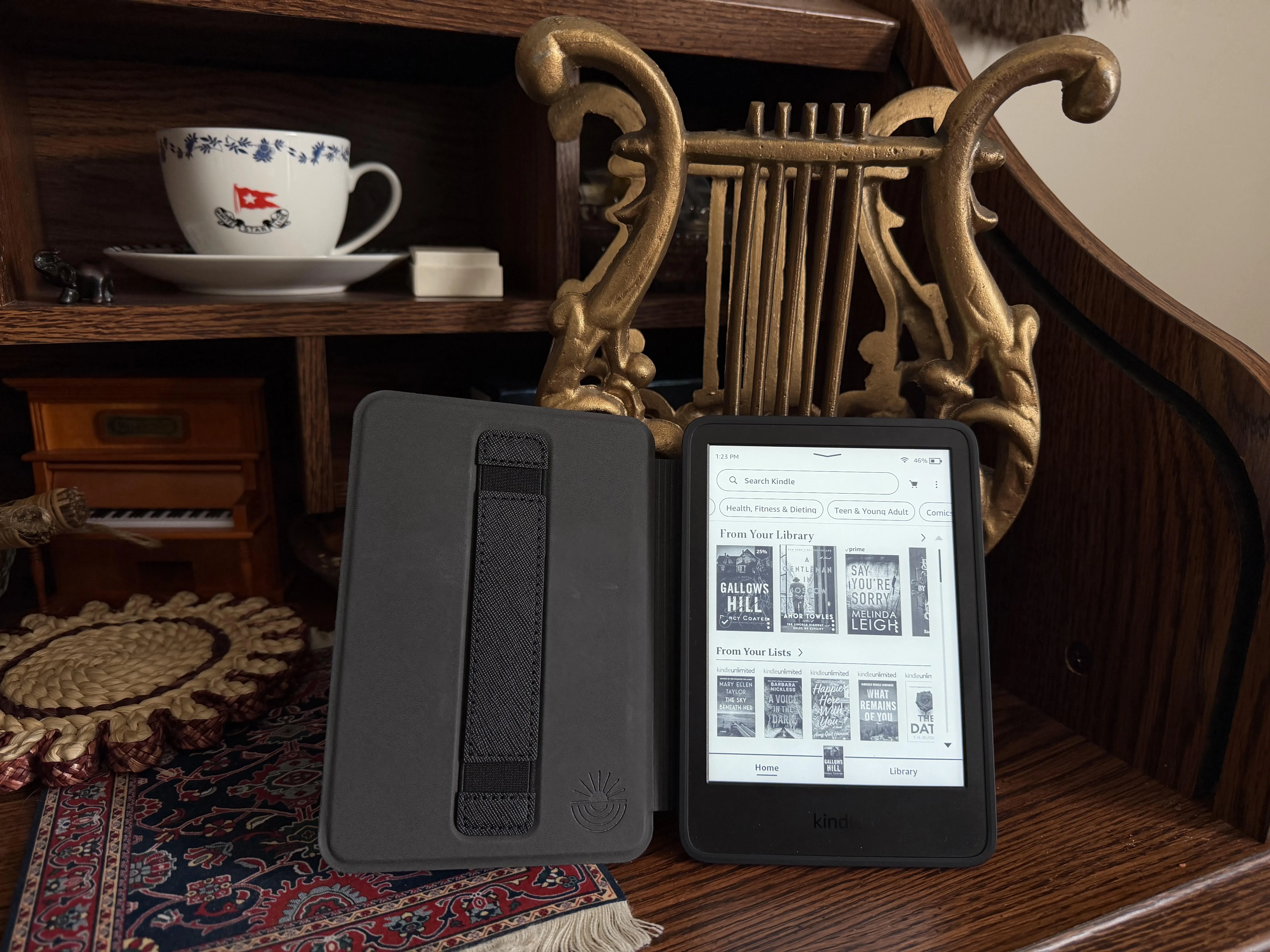
A Kindle Paperwhite 12 Generation lays open on a desk. The screen shows a library including current reads, books from my list, and a search bar.

My Kindle Paperwhite includes both the ad-free and Kindle Unlimited add-ons—a definite upgrade to my reading experience  Image courtesy of Morgan, McDougal, Reviews.org

What cool Kindle features can I expect with the 12th generation Kindle Paperwhite?

The 2024 release of the Kindle Paperwhite came with some pretty cool features. The Kindle now has a 7-inch screen with a high contrast ratio and glare-free screen. Page turns are a whopping 25% faster than they were before, creating a fairly seamless reading experience.

And my favorite part? The battery life.

A single charge can last up to 12 weeks and I’ve personally tested it. It’s August right now, and the last time I charged my Kindle was nearly 3 months ago; I still have a 43% charge. Compared to the maximum of 10 weeks the Kindle Paperwhite 11th generation offered, those two weeks make quite the difference.

Like the 11th generation, the current Kindle Paperwhite is waterproof, which is a huge relief if you’re a beach-reader or want to catch up on the latest James Patterson novel while taking a relaxing bath.

There is still some room for improvement, though.

Many readers have reported disappointment that the screen doesn’t rotate 360 degrees — you have to keep the power button on the bottom. Oh, and speaking of buttons, there aren’t any page turning buttons on the side. You’ll have to stick to swiping on the screen, which is a drawback for some users.


Which Kindle Paperwhite should I get?

There are three Kindle Paperwhite options you have from the 2024 release:

  • Kindle Paperwhite
  • Kindle Paperwhite Kids
  • Kindle Paperwhite Signature Edition

While most of the basic components are the same, they do have slight variations as reflected in their varying prices. Let’s break it down a bit more.

Kindle Paperwhite

The Kindle Paperwhite is easily the most popular choice, running $159.99 on Amazon. It holds up to 16GB worth of storage and, by default, shows lock-screen ads, though this can be removed by paying for an add-on. It has light settings that allow you to manually adjust the brightness and warmth for each reading situation. The Kindle Paperwhite has a standard 1-year warranty.

Kindle Paperwhite Kids

The Kindle Paperwhite Kids is slightly pricier at $179.99, but comes with 6 months free of Amazon Kids+ and a kid-friendly lockscreen that is ad-free. You also get an easy-to-use parent dashboard through The Parental Controls that allows you to add books, review reading progress, adjust age restrictions, and set a bedtime (gone are the days of sneaking your electronics under the pillow and convincing your parents you fell asleep hours ago). It also includes a protective case and you can choose between four fun designs. The Kindle Paperwhite Kids come with a longer, 2-year warranty.

Kindle Paperwhite Signature Edition

The Kindle Paperwhite Signature Edition is the priciest of the three, but for a good reason. It’s priced at $199.99 on Amazon, and comes with high-end features like wireless charging, double the storage at 32GB, auto lighting that adjusts for you, and an ad-free lock screen by default. The Kindle Paperwhite Signature Edition comes with a standard 1-year warranty.


Real talk—what’s the price?

Between the three Kindle devices and choices for add-ons, you’ll likely be spending anywhere between $159.99—$229.99 if you pay the full price. Many users wait for Amazon sales events, like Prime Day, to drop the price significantly.

What add-ons are available? And which ones are worth the price?

When purchasing your Kindle, you will have to face two choices:

  • First, are you going to pay the additional $20 to remove ads from your lockscreen?
  • Second, do you want to upgrade your reading experience to include 3 months of Kindle Unlimited?

Ad-free vs. ad-supported

By default, Kindle Paperwhite screens show various ads on the lock screen and, sometimes, the bottom of the home screen. These are generally not the most intrusive, but it’s possible that when you pick up your Kindle, instead of seeing the cover of your current read, you will see an ad for another book or Amazon product. Some readers feel like they don’t mind the trade-off and barely notice the ads, but for others, it puts a strain on the reading experience.

Kindle Unlimited

Kindle Unlimited typically costs $9.99 per month with a free 30-day trial, but you can also group this into your initial payment by upgrading for an additional $20. You get 3 months included, so it’s almost like getting a free month. Depending on how fast of a reader you are, this can definitely be a much-needed perk. I know a reader who reads a minimum of six books per month and Kindle Unlimited saves them quite a bit. But if you like to take your time, you might end up paying for unused novels.

Our Methodology

To create this review, I focused on my own real-world experience of using a Kindle Paperwhite and interviewed other Kindle users to see varying viewpoints. Combined with deep research into the Kindle Paperwhite and its features, I was able to create this comprehensive review.

Overall, the Kindle Paperwhite 12 Generation is a well-received release from loyal Kindle readers and newcomers alike. With an upgraded reading experience and a variety of choices to upgrade your device, the 2024 release is a solid device that holds up, even after being on the market for two years.

Prices as of publish date. 


Found this useful? Follow Reviews.org on Instagram, Facebook, LinkedIn, or catch us on YouTube

You can also add us as a preferred Google search source for the latest in tech and home services.

Morgan McDougal
Written by
Morgan brings her passion for nitty-gritty research and writing to Reviews.org. Before pursuing her passion for writing, Morgan worked as a worldwide editorial photographer, where she acquired her passion for storytelling. After graduating with her Bachelor's degree in Creative Writing, Morgan worked across several channels, including HighSpeedInternet.com, to help make readers' lives easier when choosing mobile, home internet, and streaming service providers. In her free time, you can find her cuddled up with a book, in the boxing gym, or on a flight to her next bucket list destination.

Related Articles

Woman wearing glasses and a beige sweater smiling while holding a tablet device in her hands, sitting in a chair with a potted plant in the background.
Here’s What You Need to Know Before Buying a Kindle Paperwhite in 2026
Learn about the Kindle Paperwhite's features, pricing, and add-ons to decide if it's the right...
Illustrated man emerging from a TV screen pointing upward with a five-star rating speech bubble, surrounded by cable TV provider logos
The 5 Best Cable TV Providers of 2026: Our Expert Guide
We'll help you find the best cable TV provider for you by comparing price, contract,...
happy woman with curly hair sitting on couch using laptop
Cox vs. Quantum Fiber: Fiber Internet Wins the Duel for Your Dollars
Quantum Fiber is the obvious standout with fast, reliable service but Cox also serves up...
An Honest Spectrum Internet Review, According to Customers
Charter Spectrum has no-contract service and no modem fee, but what’s the catch? Read our...