
We’ll walk through every method of how to pay your T-Mobile bill, step by step.
How to Pay Your T-Mobile Bill (Online, T-Life App, Bill Pay, In-Store & More)

 2 min read
There are multiple ways you can pay your T-Mobile bill. If you're looking to quickly pay your bill, head over to the T-Mobile Guest Pay portal. All you need to get started is your phone number.
For other payment options, keep reading for how to get set up with AutoPay, the T-Life app, bill pay, and more.

Why you can trust us
At Reviews.org, our team takes its editorial independence seriously. We may earn money when readers click affiliate links, but we don't work for our brand partners, and they don’t approve our pieces before publication. To learn more, visit our About us page.
Key takeaways
- The easiest way to pay your bill is to sign up for AutoPay. AutoPay automatically charges your account on file so you don't have to think about when your next payment is.
- Other convenient ways to pay your bill include one-time payments through the T-Life app, website, or through bill pay via your bank account.
- Less convenient ways to pay your bill include mailing a check, paying in-store, or over the phone with Customer Care.
How to pay your T-Mobile bill:

Meet the expert
Hi, I’m Kelly. I've been a T-Mobile customer for almost 10 years, and love the premium value I get out of my plan. I've had AutoPay set up from the very beginning, so I never have to worry about missing a payment.

Deputy Editor, Reviews.org
Set up T-Mobile AutoPay
The easiest way to take care of your bill is to just enroll in autopay. With auto pay you’ll never have to think about having to arrange to pay for your bill. There are no late fees or logins you need to remember (after the first time you set it up).
1
Log in to your T-Mobile account
Click here to set up AutoPay.
2
Link an eligible payment method
You can either link your bank account (Pay by Bank), your T-Mobile Visa card, or a debit card.
3
Ensure you have funds every month
Payments will be withdrawn around two days before your bill due date. If the payment arrangement fails, your AutoPay will be unenrolled.
Pay with the T-Mobile T-Life app
You can pay your T-Mobile phone bill with your phone. Just download the T-Mobile app and follow these simple steps.
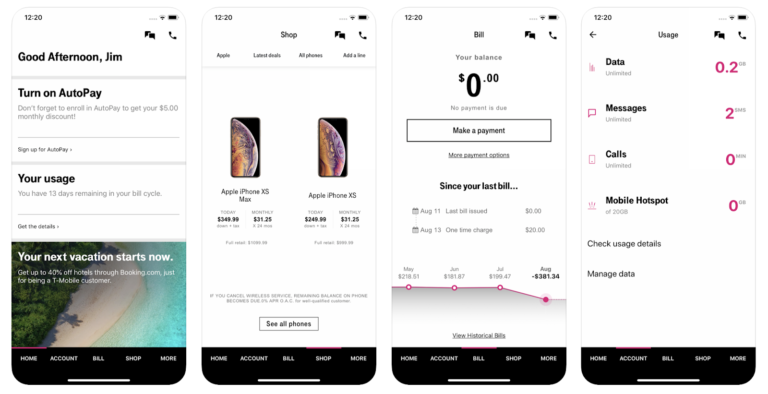
Image credit: App Store
1
Download the T-Life app
2
Sign in to your account
3
Find "Make a Payment" under the "Billing and payments" section
4
Select your payment method and input the required information
Looking for better T-Mobile plans?
Take a look at the latest lineup of T-Mobile plans and deals.
T-Mobile bill pay through your bank account
T-Mobile also offers "Pay by Bank" or T-Mobile bill pay via your bank account. Rather than entering your bank account number, the connection is encrypted and directly connected.
1
Sign in to your bank account.
Or contact your bank to get set up.
2
Add T-Mobile as a payee
You may need to enter this information in manually:
Payee name
T Mobile
Payment address
T Mobile
P.O. Box 742596
Cincinnati, OH 45274 2596
3
Include your T-Mobile account number
Enter your T-Mobile account number exactly as it appears in your T-Mobile app or bill
Paying on T-Mobile’s website
There are actually two online portals where you can pay your T-Mobile bill. One is for those who have a T-Mobile ID and another is for those who don’t.
Pay on the web using a T-Mobile ID
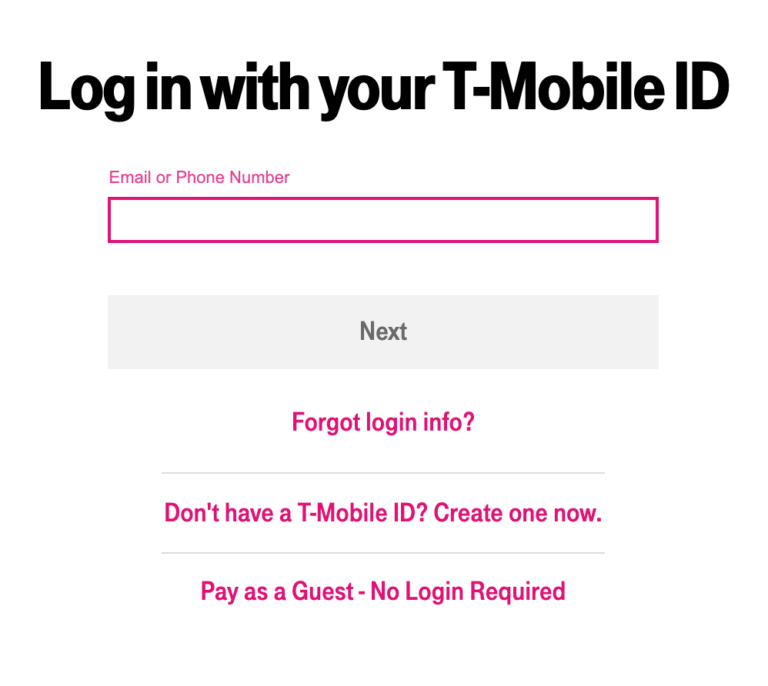
If you’ve got a T-Mobile ID (or want to sign up for one), you can check your account and make a payment using this T-Mobile website. When you go to the page you’ll see something like this:
1
Sign in
2
Enter the dollar amount of your payment
3
Select a payment method or input a new one
4
Review your transaction and submit
Pay on the web without a T-Mobile ID (pay as a guest)
T-Mobile has another webpage for a “quick and easy one-time bill payment.” Here’s how you can pay as a guest.
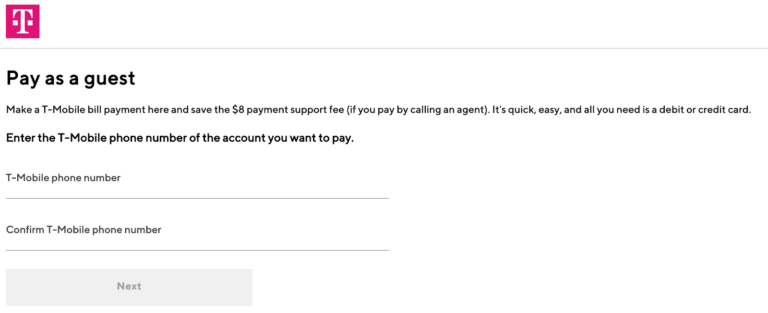
Screenshot from T-Mobile's bill pay page.
1
Enter your T-Mobile phone number
2
Enter the dollar amount of your payment
3
Select a payment method or input a new one
4
Review your transaction and submit
Paying by phone
You can pay your T-Mobile phone bill by calling the company the old-fashioned way. But we don’t recommend it.
For one, it’s harder for most people to call than to just pay online. But the biggest problem with paying by calling an agent is that T-Mobile will charge you an $8 service fee! You can get a phone plan for almost the same price.
If you’re still set on paying your bill over the phone, just follow these steps:
1
Call T-Mobile
Call 1-800-937-8997 or dial 611.
2
Follow the prompts to make a payment
Input your payment method. A $10 payment support fee applies.
Pay bill by sending mail to T-Mobile
There’s nothing quite like writing out a check, addressing an envelope, sticking a stamp on it, and sending it through the post. How quaint!
Here are the steps for sending your T-Mobile bill payment through the mail:
1
Write a personal check
Include the amount you want to pay and address it to T-Mobile.
T-Mobile
P.O. Box 742596
Cincinnati, OH 45274-2596
2
Send your check in the mail
Allow at least five days for your payment to reach T-Mobile.
Pay in person at a T-Mobile store
Some people never want to leave the house (me). But apparently, there are these extroverted people who want to venture into the world and chat with other humans. If you’re one of these people, then find your nearest T-Mobile store and pay your bill there.
We recommend calling before you go to check that the store is actually open.
Once you’re in the store, you might as well ask about upgrading your device or your plan.

Related Articles

What Age Should Your Kid Get a Phone?
When should you get your kid a phone? A smartphone? A social media account? Find...

Quitting Her Job for Instagram Was Easy. Making It Work Took Years
After going full-time on content creation without a plan, one influencer went back to a...

FTTH or FTTN: Is FTTN Internet a Smart Choice for Families with Kids?
Both FTTH and FTTN are solid choices for fiber internet, but FTTN might be the...

Fiber vs. HFC Internet: What’s the Difference for Everyday Users
Fiber-powered internet delivers faster speeds than traditional cable. Xfinity delivers fast, fiber-rich data to homes...
