Logitech’s Mouse Is Now the Benchmark: Here’s What Sets It Apart

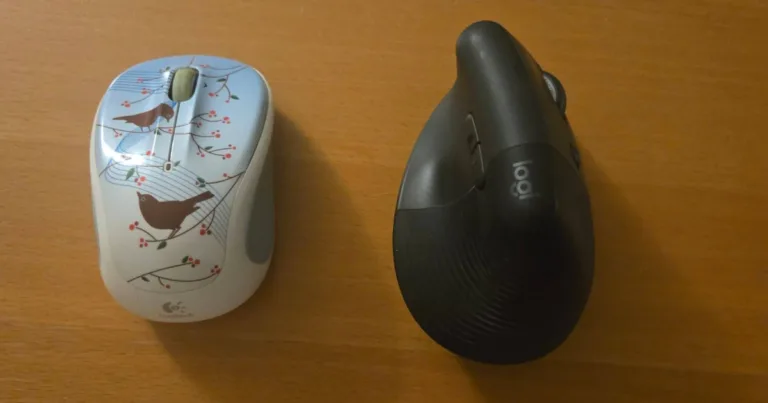
A side-by-side display of a Logitech M325 Wireless and a Lift Vertical Ergonomic mouse. The M325 has a blue design that is decorated with birds on a branch. The Lift Vertical has a graphite color.

My Logitech M325 Wireless and Lift Vertical Ergonomic Mouse side-by-side. Image courtesy of Benjamin Lee, Reviews.org

// A Logitech mouse improves my everyday experience.
Benjamin Lee
Aug 01, 2026
Icon Time To Read5 min read
Icon CheckEdited ByKelly Huh

When it comes to everyday use, the only device I need in hand aside from my phone is a mouse.

Whether it is for work or fun, a functional mouse is a must. The Logitech mouse is the benchmark, with outstanding core features that many others have imitated, but few can match. While some people are satisfied with a $15 mouse that just works, they don’t realize that a Logitech mouse can subtly, yet drastically, improve their computer tasks.

Logitech MX Master is the gold standard

The Logitech MX Master series is considered the gold standard of productivity mice. It not only performs its exact functions, but makes daily work and activities easier. 

What makes the MX Master series stand out is its unique Magspeed scrolling. The electromagnetic wheel is an innovative scrolling tool that features two settings: Ratchet Mode and Free Spin

  • In Ratchet Mode, you can have precise line-by-line scrolling; ideal for carefully reading articles and listed instructions. 
  • Free Spin increases the speed of standard scrolling while maintaining precision; you will no longer experience choppy scrolling when quickly searching through long documents and extended webpages.

Gizmodo tested the Logitech MX Master 3S and compared its scrolling to a conventional mouse, stating that the latter was “noticeably worse, which is the kind of product differentiation that no-name alternatives cannot replicate.”

The MX Master series also has unique software that the average mouse lacks. With Logitech Flow, you can connect your mouse to three computers, allowing you to drag a file from one computer seamlessly to the next. To make your workflow smoother, the MX Master series has six programmable buttons that you can tailor to your needs. This includes many quality-of-life commands like undo, refresh/reopen a webpage, take a screenshot, and even unmute the microphone. These functions are perfect for those who perform computer work like software engineers and data analysts. Suddenly, the mouse that is primarily used to drag files can now be used as the all-encompassing tool for your daily workflow.


The MX Master series also has the power to last. Logitech claims that the Master MX 3S can last about 70 days on a full charge. Ars Technica tested this model, leaving it on for 170.5 hours (about one week), with about 40 hours of active use (average work week), and the power only went down to 90%. You can focus on your work without worrying about your mouse dying on you.

How to Geek also highlights just how the MX Master series is the gold standard by calling it the Porsche 911 of mice: “There are some types of hardware that are just timeless and don't need to change… The MX Master series is exactly like that. The only thing Logitech can do at this point is refine it, and the only thing other mouse makers can do is try to copy it.”

Logitech’s best is not limited to the MX Master series

While the Logitech MX Master series is innovative, any Logitech mouse is certainly a gamechanger.

A side-by-side display of a Logitech M325 Wireless and a Lift Vertical Ergonomic mouse. The M325 has a blue design that is decorated with birds on a branch. The Lift Vertical has a graphite color.

My Logitech M325 Wireless and Lift Vertical Ergonomic Mouse side-by-side. Image courtesy of Benjamin Lee, Reviews.org

I currently use two different Logitech mice: the Lift Vertical Ergonomic Mouse for work and the M325 Wireless for leisure. 

Logitech’s ergonomic designs and unique functions set it apart from generic brands. The first time I used my Lift Vertical, it felt strange since it was my first ergonomic mouse. I soon discovered that the strange sensation was an ease on my wrist – after years of using the Lift Vertical, I no longer have wrist fatigue. Although not as advanced as the MX Master series, it still has customizable buttons to fit my workflow. 

The M325 is much simpler in design. Unlike a generic mouse, the sides have rubber contours which improve grip. Although it’s not as ergonomic as other models, I never felt any tension on my wrist or palm. Despite its simple appearance, it is not without its perks. The scroll wheel serves as a back and forward button. Simply tilt it to the left and it will go back a page and tilt it right to go forward. A teacher with Ed Tech Magazine has detailed how the intuitive nature of the M325 makes it a perfect and timeless tool for both students and teachers. For those who love to express themselves, the M325 model also has a unique array of designs that adds a bit more style to your setup – my work-from-home office is always blessed with my chirpy bird M325 Wireless. 

I also love how my mice have impressive battery life, each only needing a single AA battery. The M325 is listed to last 18 months with a single battery while the Lift Vertical lasts two years. In the five years of owning my M325, I still have trouble opening the battery compartment since I rarely need to change it. Thankfully, the Lift Vertical has a magnetic compartment that allows me to change the battery with ease; however, after using it for the past three years, I have only changed the battery once.

Logitech manages to improve upon the basic functions of clicking and tracking that is expected of a mouse. If you’re the type to be on your computer late at night or in a busy workplace, many of the Logitech mice are known for silent clicks — you’ll no longer receive glances for your monotonous clicking in the office. Perhaps my favorite function of the Logitech mouse is how it can work on most surfaces without a mousepad. Whether it be on a wooden desk, the couch cushion, a glass surface, or even my own leg, my Logitech mouse can slide around swimmingly without scratching any surface. This makes my M325 perfect for travel: its compact design allows it to fit in my pocket and I can use it on a plane or train if I need to work on the go.

The price makes it more worth it

Knowing all that the Logitech brand can provide, the price itself can still make you question if it is truly worth it. After all, the latest Logitech MX Master 4 costs $120 (at the time of writing) while imitators are selling for less. However Gizmodo reported that “no-name wireless mice… that do not hold up under a full workday sell for $40 to $90 on Amazon. The Logitech MX Master 3S, the mouse that most of them are trying to imitate, just dropped to $89, off its $119 list price … At this price the gap between the real thing and its imitators collapses entirely.” With Logitech making its products as affordable as its imitators, these mice truly are the most worthy productivity mice on the market.

Ultimately, the demand of a Logitech productivity mouse will depend on your overall need — whether you’re a coder who needs precise scrolling to find a line of code, or an esports gamer who needs zero latency, a Logitech mouse would work for you.

However, if you have no need for the bells and whistles and can truly get by with a mouse that simply clicks and drags, then spending less than $10 may be the safest bet. Personally, I have never considered spending $100+ on a mouse and would have been fine with a generic brand – the two I own were gifts. After using them for years, however, I can honestly say that I wouldn’t use any other brand.


Found this useful? Follow Reviews.org on Instagram, Facebook, LinkedIn, or catch us on YouTube

You can also add us as a preferred Google search source for the latest in tech and home services.

Benjamin Lee
Written by
Benjamin Lee doesn’t just strive to write, he strives to perfect. His writing style is informative and straightforward, with a dash of fun here and there. Starting out as a journalism major, he immersed himself in pop culture and media to write about the latest trends. As he journeyed through his career path, he realized just how much technology (from abundant streaming services to exciting apps) has entered the zeitgeist. He knew that writing in this field was his path.

Related Articles

A side-by-side display of a Logitech M325 Wireless and a Lift Vertical Ergonomic mouse. The M325 has a blue design that is decorated with birds on a branch. The Lift Vertical has a graphite color.
Logitech’s Mouse Is Now the Benchmark: Here’s What Sets It Apart
My Logitech M325 Wireless and Lift Vertical Ergonomic Mouse side-by-side. Image courtesy of Benjamin Lee,...
A shopper holds and compares two smartphones in a retail store, with more phones on display in the blurred background.
Test Phones for a Living — Here Are 5 Things People Never Check Before Buying
Comparing phones in-store, shoppers in 2026 are weighing battery life and long-term value more than...
Comic-style "AI?" text explosion graphic on an orange background.
AI-Generated Animation is Coming—And It Could Cut Production Costs in Half
As AI takes on more of the animation production process, the question isn’t just how...
Customer paying by phone at a shop card reader, with a speech bubble showing the T-Mobile for Business logo.
How to Use 5G Business Internet for Network Failover and Uptime (2026 Guide)
5G business internet adds a network failover layer with static IP options for uptime and...