

Remote Worker Internet Setup: What You Actually Need vs. What They Sell You

Woman wearing glasses and a green cardigan smiling while working at a wooden desk on a computer, with a brown and white small dog sitting beside her, in a bright home office with plants and natural lighting.

Woman staying productive while working from home with her dog nearby for companionship. Image Credit: iStock/Anchiy

// Fix internet connection problems before paying for more speed.
Sara J. Nguyen
Aug 22, 2026
Icon Time To Read4 min read
Icon CheckEdited ByKelly Huh

Starting a remote job might make you think you need the fastest internet plan available. But most people can handle everyday work with their current internet connection.

As someone who has worked remotely since 2017, I've never needed to upgrade to lightning-fast internet speeds. But some jobs and busy households need more bandwidth than others.

If you regularly upload large files, edit video, livestream, or share your connection with a busy household, you may need more bandwidth. This guide explains how much internet speed remote workers need, how to test your current setup, and when an upgrade makes sense.
Internet speeds explained

Internet providers often promote their fastest download-speed plans, but most remote workers only need enough bandwidth for their daily tasks and for everyone sharing the connection in the household.

Before we get into finding the right speed for you, let's clarify some terms:

  • Download speed: How quickly your internet receives data. High speeds mean your computer can load web pages and download files faster. Usually measured in megabits per second (Mbps) or gigabits per second (Gbps).
  • Upload speed: How quickly your internet sends data. It can help prevent your face from freezing on video calls and make sure you can send documents fast. Also uses megabits per second (Mbps) or gigabits per second (Gbps).
  • Latency: The delay between an action you took and your internet's response time. Lower latency helps video calls and other real-time work feel responsive. Measured in milliseconds (ms) and is also called ping or jitter.

For remote workers, both speeds matter. Download speeds keep apps and websites running, while upload speeds support reliable video calls and file sharing.

Your ideal speed depends on your work tasks and household usage, but generally, we recommend a minimum of 100Mbps download speeds and at least 20Mbps upload speeds.


You usually don't need the highest tier unless you do this type of work

Your current home internet plan can probably manage your everyday remote work, including web browsing, video calls, and routine file sharing. But that could change if you have to upload or download large amounts of data.

Upgrading your internet plan is a good idea if you regularly:

  • Upload or download raw video, design files, or other large project assets
  • Edit or collaborate on video and other media-heavy projects
  • Download massive files
  • Work in bandwidth-intensive fields, like game development
  • Host live events or livestreams

You may also need to consider an upgrade if there are multiple people working in your household. Sometimes one or two people doing light tasks are fine, but busy households may want to find an internet plan that can accommodate 200–300Mbps for more breathing room.

Even if your work fits one of these categories, test your current connection before assuming you need a more expensive plan.

Test your current setup before you upgrade

Maybe your internet is a bit slower than you'd like or you don't know what speeds you're getting. Before upgrading, test your current setup to see whether your plan is the problem.

Start by taking our internet speed test. Run this multiple times, so you can get the full picture of your connection. Here are a few situations to test:

  • In your usual workspace
  • Near your router
  • When you're the only person online
  • When everyone in your household is online
  • During a typical work task, like downloading a large file
  • While using a VPN, streaming, or on a video call
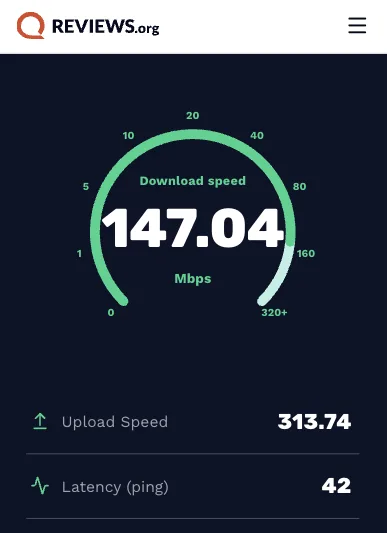
Screenshot of an internet speed test showing download speed, upload speed, and latency measured from a home workspace.

I used Reviews.org’s speed test to measure my home connection’s actual download speed, upload speed, and latency. Image courtesy of Sara J. Nguyen, Reviews.org

Once you have your results, take a look for any patterns:

  • Compare your plan with your work needs: Check if your internet speeds match what you need for everyday work tasks.
  • Consider how many people share the connection: Your internet speeds may slow down if multiple devices are using the internet at the same time.
  • Identify which tasks cause slowdowns: If a particular task slows your connection, decide whether it's a regular part of your job and whether more speed would solve the problem.
  • Pay attention to upload speed: You may need more upload capacity to complete your job tasks.
  • Account for busy work periods: A faster plan may help during the bandwidth-heavy parts of your day.
  • Upgrade for recurring problems: Consider upgrading when slowdowns consistently affect your work.

Check this before you upgrade

Before you hit "Upgrade" on your internet plan, make sure your equipment and home network aren't the problem.

Restart your modem and router, then run another speed test. You could also try connecting your computer to the router directly with an Ethernet cable. If cable internet is faster, it could point to a Wi-Fi issue, not the internet plan.

If Wi-Fi is the problem, move your workspace closer to the router or get a range extender. The Federal Communications Commission (FCC) also recommends placing your router in a central location to maximize Wi-Fi coverage in your home.

Should you upgrade your internet plan?

Take your speed test results and everyday experiences to decide whether it's time for a faster plan.

Upgrade your plan if:

  • You experience slow internet speeds that disrupt essential work tasks.
  • Multiple people in your household use the internet at the same time, and the connection regularly struggles.
  • You handle bandwidth-heavy work.

Hold off on upgrading if:

  • Your internet connection meets your work needs most of the time.
  • Your speed issue is related to Wi-Fi range, outdated routers, or high latency. Fix these problems first before deciding to upgrade your internet plan.

Found this useful? Follow Reviews.org on Instagram, Facebook, LinkedIn, or catch us on YouTube

You can also add us as a preferred Google search source for the latest in tech and home services.

Sara J. Nguyen
Written by
Sara J. Nguyen is a freelance writer, specializing in online security. She aims to help people enjoy technology while protecting their data and privacy. Sara's work has appeared on reputable platforms like Frontier Internet, All About Cookies, and more. When she's not writing, she's planning her next international trip.

Related Articles

Woman wearing glasses and a green cardigan smiling while working at a wooden desk on a computer, with a brown and white small dog sitting beside her, in a bright home office with plants and natural lighting.
Remote Worker Internet Setup: What You Actually Need vs. What They Sell You
Find out whether your home internet is fast enough for remote work, when to upgrade...
Group of friends gathered on a couch watching streaming content on a television, with snacks and drinks nearby
Is AI Better at Picking Your Next Show Than You Are?
A look at how AI recommendations work on streaming and whether or not it is...
Young woman smiling while making an online payment on her smartphone and holding a credit card, sitting on a blue couch with headphones around her neck
These Simple, Overlooked Tips Could Slash a Student’s Phone Bill by 50%
If you’re a student, you could probably stand to save some money on your phone...
Cox Internet Plans and Deals
Read about Cox Internet prices, plans, and deals for high-speed internet.