
The 'why' of WiFi 7 is found in futureproofed features that can elevate your home network to the next level.
The best WiFi 7 router, modem-router, and mesh WiFi system picks

 8 min read
In this guide:
- Best WiFi 7 router: Asus RT-BE58U, Netgear Nighthawk RS600, TP-Link Archer GE800
- Best WiFi 7 mesh: Amazon Eero Pro 7, Amazon Eero Max 7
- Best WiFi 7 modem: Vodafone Super Wi-Fi Modem, Telstra Smart Modem 4
- What is WiFi 7?
- WiFi 6 vs WiFi 7
- WiFi 7 upgrade
Every few years, there's a new WiFi standard. In 2025, the latest generation is WiFi 7, which has been around since the start of 2024. But while WiFi 5 devices are increasingly harder to find – that's a good thing given how ancient the tech feels nowadays – WiFi 6 networking gear is still popular among retailers, manufacturers and NBN providers.
WiFi 6 is a marked improvement over WiFi 5, but there are reasons to consider an upgrade to a WiFi 7 router, mesh WiFi system or modem-router beyond keeping pace with the new wireless tech on the block. If you're curious to know how the latest-gen WiFi compares in the WiFi 6 vs WiFi 7 debate, scroll on.
But before we break down our specific WiFi 7 router picks, if you're in the market for a new internet plan, here's a look at popular NBN plans from our database.
The best WiFi 7 router picks
To get the most out of a growing selection of WiFi 7 devices – including smartphones like the iPhone 17 and Google Pixel 10 Pro XL – you need networking gear that's WiFi 7 capable. That's where a WiFi 7 router comes in. If you want a WiFi 7 router, here are the ones we recommend based on what we've reviewed.
Asus RT-BE58U


You generally pay for the pleasure of new tech, but the Asus RT-BE58U bucks the new-tech tax with sub-$300 pricing. For context, around $300 is a good price point for a decent WiFi 6 router. But for the same price, the RT-BE58U is a dual-band WiFi 7 router with up to 3.6Gbps of wireless speed. That's plenty of spare WiFi bandwidth for the fastest NBN plans, which are compatible with this Asus router because of a 2.5Gbps internet (WAN) port.
While the local area network (LAN) ports are relegated to 1Gbps speeds, you're effectively being encouraged to stick to WiFi for higher-speed internet plans. As long as you're using wireless devices within the generous 5GHz coverage, WiFi speeds should be no issue. If you're in a larger home or one prone to wireless dead spots, pair the RT-BE58U with a compatible Asus mesh product to preserve good WiFi speeds.
Netgear Nighthawk RS600


If you want a more futureproofed WiFi 7 router, you'll have to pay for the pleasure. Take the Netgear Nighthawk RS600, for instance. This WiFi 7 router retails for around $800, but that extra investment covers a fully featured router. In terms of the base specs, you get a tri-band WiFi 7 router with up to 18Gbps combined wireless speeds. Tri-band devices typically have farther-reaching (but slower) 2.4GHz, faster (but shorter-range) 5GHz and fastest (but shortest-range) 6GHz wireless bands.
Note that while WiFi 7 networking gear is backwards compatible with older wireless generations, only WiFi 6E and newer devices will be able to use the 6GHz WiFi band. The RS600 has up to 250-square-metre coverage, and it has extra futureproofing via a 10Gbps internet port, which is ready for internet speeds beyond NBN 2000. While three of the four LAN ports are relegated to 1Gbps speeds, there's a 10Gbps LAN port for a priority wired device (like a NAS). The RS600 also has some great features, like automated Quality of Service (QoS) to intuitively divvy up finite internet download speed to preserve bandwidth-sensitive experiences like streaming, video calling and online gaming.
TP-Link Archer GE800

The TP-Link GE800 is even pricier than the Netgear Nighthawk RS600. But if you can get the $1,199 RRP on a decent special, you're buying a fully featured WiFi 7 router that should be a reliable network anchor for many years to come. You can usually safely expect that from gaming routers. But while gaming routers tend to have a premium price tag, they also tend to have performance benefits that benefit all network users.
For instance, the GE800 is a tri-band WiFi 7 router with up to 19Gbps of shared wireless speeds. The GE800 is also built for beyond NBN 2000 speeds, with a 10Gbps internet port. Local wired devices aren't left behind, either, with a single 10Gbps port and four 2.5Gbps LAN ports, which means the potential for full-speed wired connections for anyone on NBN 2000 plans. If you have WiFi dead spots, the GE800 also supports mesh expansion.
The best WiFi 7 mesh WiFi system picks
If you, like me, live in an apartment prone to WiFi dead spots (or if you're in a larger house), you should consider a WiFi 7 mesh system instead of a router. Mesh WiFi systems are a logical evolution over WiFi extenders, designed for low-effort expansion of a wireless home network. That's important for WiFi 7 devices because you get the best speeds from the 6GHz and 5GHz wireless bands, which don't have the same reach as the slower 2.4GHz band. Here's a look at the WiFi 7 mesh systems we've tested that are worth considering for your home.
Amazon Eero Pro 7


For the same RRP as the TP-Link Archer GE800, you can get a three-pack Amazon Eero Pro 7 mesh WiFi system. If you're in a smaller home that only needs one, you can get a single Eero Pro 7 for around $500. In my tests, a single Eero Pro 7 unit blanketed my home in speedy 6GHz wireless coverage, including my problematic study that usually has terrible WiFi. But a three-unit configuration meant better and more consistent WiFi throughout my home.
While each Eero Pro 7 unit is restricted to two Ethernet ports, both offer up to 5Gbps speeds, which is more than enough for the fastest NBN plans available today. Those Ethernet ports are also auto-sensing, so you can't accidentally connect an NBN connection box to a LAN port instead of the WAN port. That user-friendliness carries over to app-guided installation and ongoing management. And with up to 3,900Mbps tri-band WiFi 7 speeds, the Eero Pro 7 is as ready for NBN 2000 plans as it is for zippy local wireless transfers.
Amazon Eero Max 7


While almost every home should be comfortable with the Amazon Eero Pro 7, the Amazon Eero Max 7 is a pricey investment in fully featured futureproofing. Get past the single-unit $1,099.99 RRP – or nab it with an AGL NBN plan for $499 – and you're dealing with some seriously impressive specs. Tri-band WiFi 7, with shared speeds up to 4.3Gbps, and four auto-sensing Ethernet ports.
Even with an NBN 2000 plan, you could use one of the 2.5Gbps Ethernet ports to tackle the download/upload speed needs, saving the other 2.5Gbps port and two additional 10Gbps ports for priority wired devices. When NBN goes beyond 2Gbps speeds in the future, the Max 7 can keep up thanks to those two 10Gbps ports. Because the Eero ecosystem is compatible across generations, you can use the Max 7 as a speedy router, then pair it with other Eero units to expand your wireless coverage.
The best WiFi 7 modem-router picks
For the flexibility to shift between any NBN technology in Australia, it's worth considering a WiFi 7 modem-router. Additionally, if you live in a home connected to the NBN via Fibre-to-the-Node (FTTN) or Fibre-to-the-Building (FTTB), a modem-router is the most straightforward way to get online, given those technologies don't utilise an NBN connection box. While there aren't as many modem-router options as routers or mesh WiFi systems, some NBN providers are offering WiFi 7 modem-routers.
Vodafone Super Wi-Fi Modem
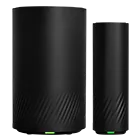
Officially, it's called the Arcadyan HWG2025. But you're more likely to encounter it by one of its provider names: the Vodafone Super Wi-Fi Modem, iiNet Wi-Fi Max, and whatever TPG ends up calling the same modem-router in 2026. Despite the name differences, it's all the HWG2025 modem-router. If you add one to your NBN plan order with Vodafone, iiNet or TPG, you get a dual-band WiFi 7 modem-router with a 2.5Gbps WAN port. Grab the Vodafone version if you want an included mesh expander.
There was no official word on the maximum shared WiFi speeds, but we measured around 2.9Gbps for combined 2.4GHz (270Mbps) and 5GHz speeds (2.6Gbps), which is fast enough for all residential NBN plans. There are only two 1Gbps LAN ports, but the HWG2025 also supports a home phone line from participating NBN providers. You also don't have to be with Vodafone, iiNet or TPG to use the modem-router (we tested with Exetel). Better yet, the HWG2025 has optional mobile backup via up to three mobile hotspots, which also helps to preserve the feature set of the performative modem-router.
Telstra Smart Modem 4
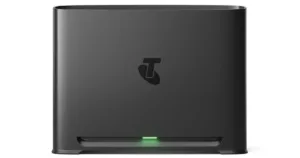
We haven't tested the Telstra Smart Modem 4 (yet), but the features and specs list suggest it's a worthy upgrade over the Telstra Smart Modem 3. On paper, the Telstra Smart Modem 4 is a WiFi 7 modem-router that's built to handle more wireless devices than its predecessor. It also has 5G backup for Telstra NBN customers (with up to 25/5Mbps backup speeds), instead of the 4G backup in the Telstra Smart Modem 3.
Strangely, Telstra has opted for 1Gbps Ethernet ports, which includes the internet port, meaning Telstra isn't likely to offer beyond-NBN 1000 plans. It also means this modem-router isn't a good choice if you shift to a provider that offers NBN 200 plans. Like the HWG2025, max potential wireless speeds aren't advertised, but you get a dual-band WiFi 7 modem-router with a home phone line. If you need more coverage, the Telstra Smart Modem 4 is compatible with the Telstra Smart Wi-Fi Booster 3. Additionally, Telstra customers get access to AI-powered SmartFix self-repair that can reportedly automatically fix connection issues.
What is WiFi 7?
WiFi 7 launched in 2024 and is the current wireless standard, succeeding WiFi 6 and WiFi 6E. Like WiFi 6E, WiFi 7 uses three wireless bands to connect devices: 2.4GHz, 5GHz and 6GHz. If you have WiFi 6E or WiFi 7 devices, they will benefit from faster wireless connectivity on a tri-band WiFi 7 router, modem-router or mesh WiFi system.
Like previous WiFi generations, WiFi 7 is backwards compatible with older wireless standards, meaning your WiFi 6 and WiFi 5 devices shouldn't have any issues connecting to a new WiFi 7 router. Note that those older devices don't have the full speed potential of WiFi 7 ones. WiFi 7 can theoretically hit combined speeds up to 46Gbps, which is more than enough for the fastest residential internet plans in Australia (today and, likely, whatever comes next).
WiFi 6 vs WiFi 7
Unlike most WiFi generations, WiFi 6 has two standards: WiFi 6 and WiFi 6E. The only difference between the two WiFi 6 standards is that WiFi 6E supports 6GHz, while WiFi 6 is relegated to the typical 2.4GHz and 5GHz combination. Practically speaking, WiFi 7 networking gear and devices also support 6GHz connectivity, which WiFi 6 does not.
The big difference in the WiFi 6 vs WiFi 7 debate is the maximum theoretical combined speeds. WiFi 6 and WiFi 6E can technically hit 9.6Gbps shared WiFi speeds. But WiFi 7 takes that up to 46Gbps. While both are more than enough to tackle the internet speeds of today, WiFi 7 also has other perks like lower latency and multi-link operation (MLO). MLO is a WiFi 7-exclusive technology that lets WiFi 7 devices simultaneously connect to available bands – 2.4GHz and 5GHz and/or 6GHz – for better reliability and faster speeds. That almost five-times speed boost also makes for faster local file transfers between devices.
When it comes to networking gear, WiFi 6 routers, modem-routers and mesh WiFi systems are typically stuck with 1Gbps internet ports. That's okay for most Aussie NBN users, but it'll halve the max download speed for NBN 2000 users. To get around this, you'd need at least a 2.5Gbps internet port, which you can find on most WiFi 7 and some WiFi 6E networking gear. Check out the table below for a breakdown of WiFi 7 vs WiFi 6 features.
So, should I upgrade to WiFi 7 now?
You should only upgrade to WiFi 7 under certain conditions. If you want NBN 2000 speeds and have started upgrading to WiFi 7 devices, you'll need a WiFi 7 router, modem-router or mesh WiFi system to get full wireless performance from those newer devices. Features like MLO can also help in homes prone to wireless interference, but only if you have a WiFi 7 network and are using WiFi 7 devices.
For everyone else, it's okay to stick with WiFi 6. If you still have WiFi 5 gear, you should consider upgrading to a WiFi 6 or WiFi 6E device for the inherent wireless standard perks. But for anyone using any internet plan up to and including NBN 1000, WiFi 6 is fast enough, and any potential wireless issues can likely be overcome with a mesh WiFi system (instead of just a router or modem-router).
If you're in the market for a faster NBN plan today, here's a look at popular beyond-NBN 100 plans from our database.

Related Articles
Samsung Galaxy S26: Price, specs and cheapest plans
Samsung's latest fleet of flagship devices are just around the corner.

Samsung’s Galaxy S26 Ultra pairs up privacy with a price-hike
Say hello to the Galaxy S26, Galaxy S26 Plus and Galaxy S26 Ultra

Telstra providers: Compare mobile plans on the Telstra Network
Don't want Telstra? Here are our top MVNO provider picks.

Best cheap 365-day prepaid mobile plans
We round up the best 365 day prepaid plans for low-usage customers.



