
Sports fans and binge-watchers, this service is perfect for you.
YouTube TV Review: Is It Honestly Worth $83 a Month in 2026?




 10 min read
 Edited ByBrenna Elieson
I love watching TV, but as a parent of three with very little free time, I appreciate any viewing windows I can get. That’s why I appreciate YouTube TV. It offers a convenient blend of both live TV and streaming. I can turn on live TV if I don’t want to choose what to watch (endless doomscrolling on Netflix, anyone?). But I can also choose my favorite show available on demand and watch any episode I want.
To be clear, YouTube TV is not traditional cable. It’s not even regular YouTube or YouTube Premium. YouTube TV requires a monthly subscription of $83 (last verified as of January 2026) for its own combination of TV, streaming, access to live TV, on-demand movies, full seasons of popular TV shows, unlimited DVR storage space, and YouTube videos. Serious sports fans and TV binge-watchers, YouTube TV is made for you.
YouTube TV in a nutshell: It works like traditional cable, only it travels with you. As long as you have Wi-Fi, you can enjoy YouTube TV on your TV, laptop, or phone. Just be ready for long and frequent ad breaks.
The best things you can get with YouTube TV:
- Unlimited cloud DVR (at no extra fee)
- Multiview (watch up to four live streams of news or games on a single screen)
- Share your subscription with five other people and watch three simultaneous streams
- New, cheaper “Genre Plans” coming in 2026
- No contracts
The biggest cons about YouTube TV:
- No access to regional sports and news channels
- Frequent price hikes over the years
Read on to see what you get for $83 per month, plus some of my honest takes and tips to make the most out of your watching time.

Why you can trust us
At Reviews.org, our team takes its editorial independence seriously. We may earn money when readers click affiliate links, but we don't work for our brand partners, and they don’t approve our pieces before publication. To learn more, visit our About us page.
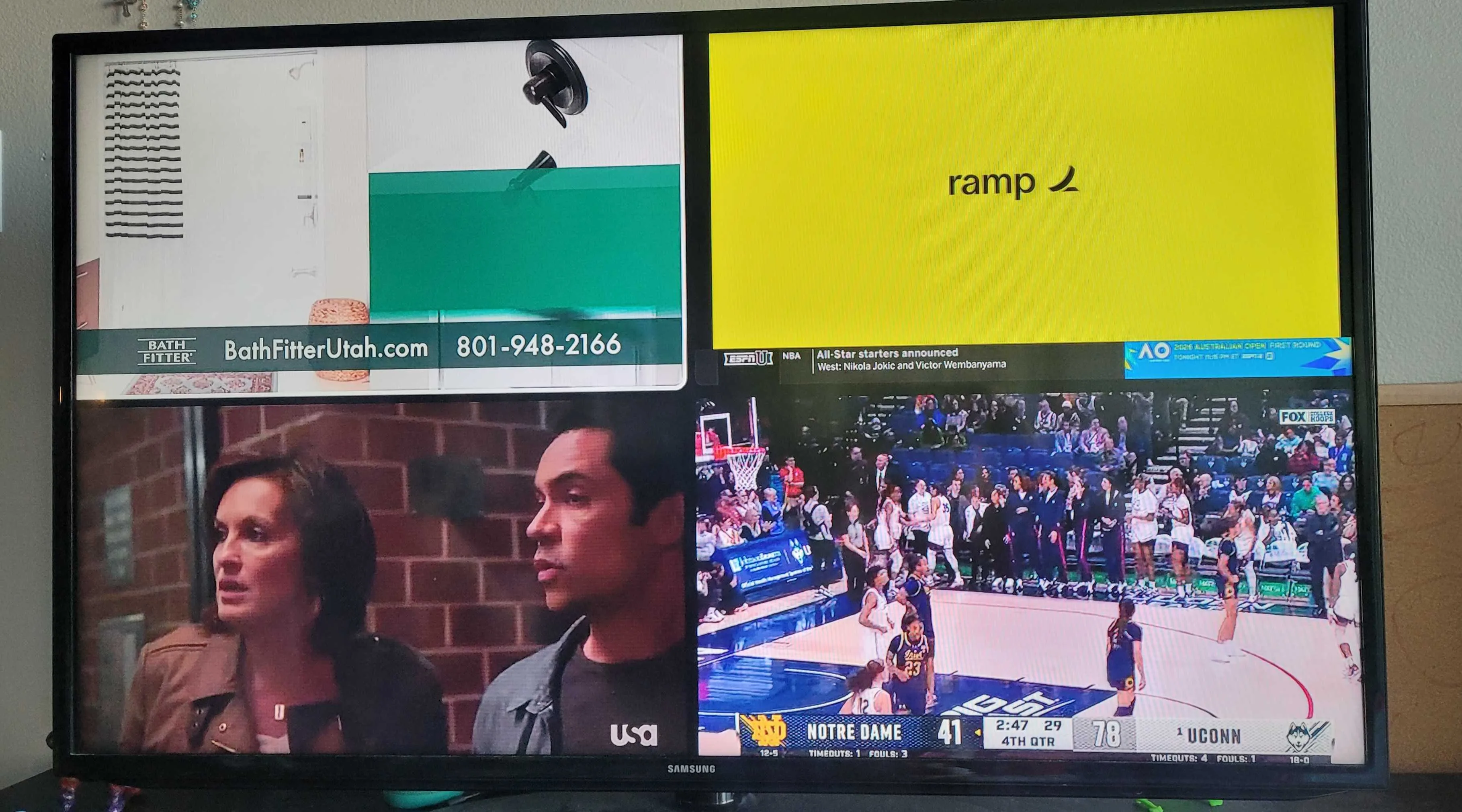
YouTube TV’s Multiview feature: Watch four different shows at the same time. Image by Monica Yoshida, Reviews.org
YouTube TV review of plans and prices
Rating: 4/5
*
Compatible device and internet connection required. Offers and availability may vary by location and are subject to change.
I think YouTube TV is especially worth the price for reality show addicts, movie buffs, and serious sports fans. Like YouTube, it curates suggestions that align with your past watching habits, it has a massive library of channels and movies, and its unlimited DVR lets you come back and enjoy whenever you want. The flexibility and convenience make it worth it, even for a busy mom like me.
When it launched in 2017, YouTube TV was super affordable at $34.99 with 40+ channels included. Its current price at $83 seems like an insane jump. But thankfully, the service offers many more features compared to almost ten years ago.
Also, keep in mind that YouTube TV is still cheaper at $83 than traditional cable TV packages. Cable packages tend to come with extra charges like a broadcast TV fee, a regional sports fee, and equipment rental, totaling over $100. You won’t find these extra fees with YouTube TV. As long as you have WiFi, YouTube TV is good to go.
If you’re like me, you might be thinking that you prefer to pay for individual streaming subscriptions. But we both know that can add up super quickly, and a movie or show you’re craving to watch could still be missing from the platforms you pay for. For example, I used to pay for Netflix, Disney+, Amazon Prime, Hulu, and the occasional one-off rental from YouTube or Amazon Prime, which came out to close to $50 per month. While it’s easier to cut those down, I also miss out on watching most of my favorite shows and movies. YouTube TV makes practically everything you love a click away.
You can also pay for specialized packages or add-ons with your main YouTube TV plan:
†
No long term contract. Cancel anytime.
*
Compatible device and internet connection required. Offers and availability may vary by location and are subject to change.
New YouTube TV plans coming in 2026!

YouTube TV plans to launch YouTube TV Plans, which are bite-sized bundles that allow you to choose from over 10 different genre-specific packages. You will also be able to “Mix & Match” to create your own custom plan.
Full details haven’t been released yet, but here’s the scoop so far:
- The Sports Plan (including ABC, CBS, FOX, NBC, FSI, the full ESPN suite, and ESPN Unlimited)
- The News Plan (including CNN, MSNBC, Fox News, and BBC World News)
- The Family & Entertainment Plan (including Disney, Nickelodeon, PBS Kids, HGTV, and Food Network)
YouTube TV reliability and experience
Rating: 5/5
No need to be tech-savvy to navigate YouTube TV. If you’ve used YouTube before, then you’ll know exactly how to navigate YouTube TV. It has an intuitive, user-friendly interface with a simple navigation bar that allows you to view your library, scroll through your homepage, go to live TV, or search for content. No need to read a manual.
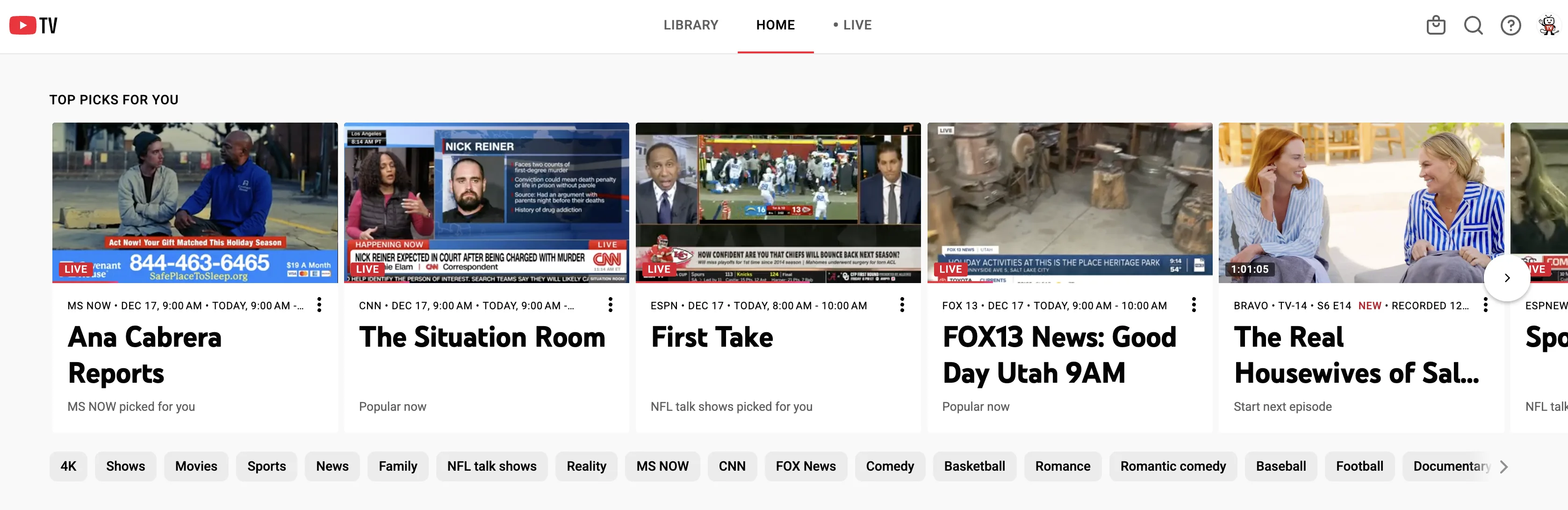
The YouTube TV homepage looks a lot like YouTube with its simple navigation, curated videos, and tons of categories to scroll through. Image by Monica Yoshida, Reviews.org
How I put YouTube TV to the test
DVR durability: I put YouTube TV’s "unlimited" claims to the test by recording everything from kids' movies to news episodes to late-night reality TV to see if the interface could handle a cluttered library. It can!
Family stream stress test: I managed two simultaneous streams across different rooms. I put Peppa Pig on the living room TV for my kids while I watched Impractical Jokers on truTV on my laptop. There was no lag and no "Screen Limit" notifications. Everyone was happy.
Extreme channel surfing: I “hate-watched” everything I could click on from episodes of popular reality TV shows like Real Housewives, multiple live sporting events, cooking shows, movies, and even some local news segments. Everything that could rot my brain was a click away, with flawless streaming, no lags, no hiccups.
Content junkies, you’re going to be in heaven.
Here are some of YouTube TV’s most exciting features:
- Unlimited DVR, recordings kept for nine months
- Up to six user profiles per subscription (with personalized recommendations for each)
- Watch on multiple device types like TVs, phones, and tablets
- Unlock unlimited simultaneous streams for only $9.99/month
- Multiview allows you to watch four games or streams at once on one screen
- See live fantasy scores and stats directly on your screen
- Hide scores for recorded games to avoid spoilers
- Smart catch-up allows you to quickly jump to important moments in recorded games for specific players or play types
YouTube TV’s Multiview feature is insanely cool
Have you ever wanted to keep tabs on four programs at once without having to use multiple devices or flip back and forth? YouTube TV offers a flexible Multiview feature that allows two to four shows to play at the same time on a single screen.
You can customize your screens with live games, news, and a variety of other channels from a pre-set list. When I used Multiview, I was able to watch a live KUTV news channel at 4:30 PM, a Law and Order episode, ESPN College GameDay, and the Notre Dame at Connecticut game on Fox.
This feature is perfect for the avid sports fan who wants to keep tabs on multiple games at once. My kids—who constantly fight over who gets to choose what to watch—excitedly told me they could each watch what they wanted on the same screen. I’m not saying it’s a good idea, I’m saying it’s possible.
Important note: While you can use the Multiview feature on your phone and TV, you cannot use it on your laptop.
“One Roof” sharing tip:

YouTube TV is designed for people under the same roof, but you can still share your access with other people while on the go. If you’re visiting family or traveling out of state, simply select that you are traveling, and it will let you keep streaming for 30 days.
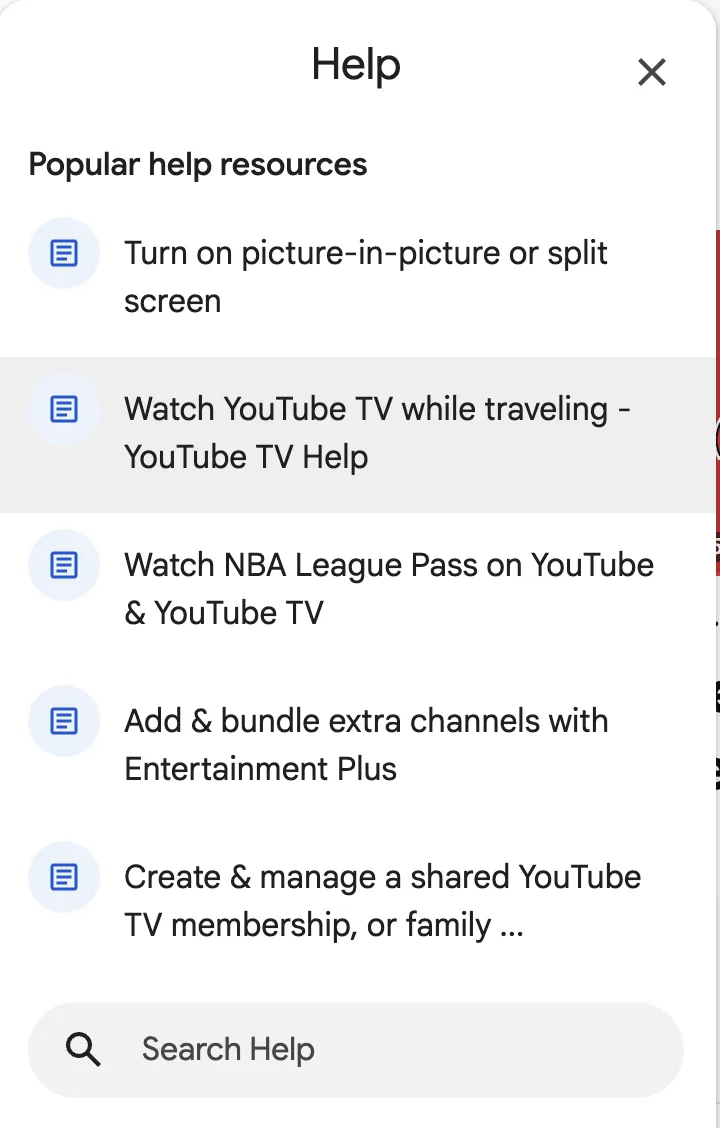
You can look up popular “help” resources that will help you activate different features, including how to watch YouTube TV while traveling. Image by Monica Yoshida, Reviews.org
YouTube TV review for channel selection
Rating: 4/5
YouTube TV’s channel lineup makes it one of the most well-rounded TV services for cord-cutters. Most people and families could live happily with the channels this live TV streaming service provides. If you just want to “turn on the TV” without having to decide what you want to watch, YouTube TV is going to make you happy.
If you’re a mom like me, you’ll love PBS kids, Nick JR. and the live TV feature of Bluey reruns. But don’t forget the massive library of reality TV channels like Bravo, HGTV, Discovery, or ABC for a marathon of Shark Tank and Real Housewives episodes. The movie channels also offer a ton of value, especially for movie marathons on Saturdays or around the holidays. When my kids wanted to watch the classic Rudolph the Red-Nosed Reindeer, I would have had to pay around $10 to buy it on Prime. Because I have YouTube TV, we were able to watch it at no extra cost when it aired on Freeform. That alone made the subscription feel worth it, especially during the holidays when you finally have the time to binge-watch seasonal classics to your heart’s content.
You won’t find these channels on YouTube TV:
- Tennis Channel
- PAC-12 Network
- MLB Network
- History Channel
- A&E
- Lifetime & Lifetime Movies
- Vice
- FYI
- Bally Sports
- YES Network
- NESN
- Marquee Sports Network
- REELZ
- Newsmax
- Science Channel
While you can buy many extra channels on your YouTube TV plan, many of the above-listed channels are not available at all. If these are important to you, you may want to consider other top streaming service providers.
Also, a bonus feature lets you hide channels you’re not interested in.
YouTube TV vs. the competition
YouTube TV is intuitive, easy to navigate, and offers a flawless watching experience.
While DirecTV carries Regional Sports Networks you won’t find on YouTube TV, get ready to pay $115 per month. Sling TV is surprisingly affordable for budget users who want a smaller range of channels. You’ll pay about half the price of YouTube TV. Hulu + Live TV is about $90, but it offers $12.99 and $19.99 bundles that include Disney+ and ESPN Select. Finally, Fubo will get you the 4K broadcasts of major games for free, while YouTube TV charges an extra $9.99 for that feature.
Compare YouTube TV channels to its competitors:
Channel Genre | Network Name | YouTube TV ($83) | Hulu + Live TV ($90) | Fubo ($85) | Sling TV ($46+) |
| Local | ABC, CBS, FOX, NBC |  | | | Select markets |
|---|---|---|---|---|---|
| Sports | ESPN, FS1, NFL Network | | | | Orange/Blue package |
| Sports | Big Ten, SEC, ACC | | | | Extra Add-on |
| Sports | MLB & Tennis Channel |  | | | Extra Add-on |
| News | CNN, MSNBC, Fox News | | | | |
| Kids | Disney, Nick, Cartoon Net | | | | |
| Movies | AMC, FX, TBS, TNT | | | | |
| Lifestyle | HGTV, Food Net, Discovery | | | | |
Ditch multiple streaming subscriptions. YouTube TV’s sports channels are the solution.
YouTube TV is the closest you can get to a one-stop shop for sports. Instead of juggling a few different streaming subscriptions and manually hunting for games every week, YouTube TV is the single solution—well, almost. Viewers still need Prime for Thursday night football. My colleague, Cai Crawford, explained the situation in a way only a true football fan can appreciate:
“YouTube TV, with the NFL Sunday Ticket add-on, is the ANSWER to get the whole deal … except for Thursday night football on Prime.”
YouTube TV offers over 35 sports-specific channels, and it also has a Sports Plus add-on package ($10.99/mo.) that includes the NFL RedZone Channel, plus 15 to 20 other sports-specific channels such as beIN Sports, Tennis Channel, Fox Soccer Plus, Fight Network, and Stadium.
So for all you NFL and soccer fans, you can get a more complete sports lineup with YouTube TV's new channels and its Sports Plus add-on for about $94 per month. And with the newest 2026 YouTube TV Sports Plan (the plan price is still up in the air), you could skip all the entertainment channels and just pay for the games, and save some extra dollars while you’re at it.
After the season is over, you can simply cancel the add-on if you'd like.
YouTube TV includes the following sports channels in its lineup:
- ACC Network (ACCN)
- Big Ten Network (BTN)
- CBS Sports Network
- ESPN, ESPN2
- ESPNews
- ESPNU
- FOX Sports (FS1), FS2
- Golf Channel
- NBA TV
- NBC Sports Network
- NFL Network
- SEC Network
- T2
- MLB Network
- NHL Network
Most NFL fans will benefit from the NFL RedZone Channel for the Sunday games, so take a look at our comparison of NFL RedZone Channel vs. NFL Sunday Ticket.
The NFL Sunday Ticket is exclusive to YouTube TV
Are you a die-hard football fan who can’t miss a Sunday afternoon game? Don’t miss out on the NFL Sunday Ticket that you can either add to your base YouTube TV plan or buy as a standalone package. It typically costs $480 for the full season, but you could potentially snag it for $200 to $300 with certain discounts.
Other than access to the teams you follow, YouTube TV allows you to watch your games on three screens at the same time, plus enjoy the Multiview feature on each screen.
Beyond just access to your favorite teams, YouTube TV lets you stream on three different devices at once. You can even use the Multiview feature on those screens to watch up to four games simultaneously—just make sure you have a strong internet connection or connect one device to an ethernet cord.
It’s perfect for:
- Out-of-market fans who want to catch every Sunday afternoon game
- Fantasy players who want to follow multiple teams or specific players
- Multi-view users who want to catch multiple simultaneous games
You should skip it if you’re:
- Just a casual fan of your local games
- Satisfied with the games you catch on CBS/FOX
- Looking for Sunday Night Football, Monday Night Football, Thursday Night Football, or playoff games
Bonus for sports fans
Click the information button on your game to get details of the current score and the lineup. If you’re watching a recording, you can even see the final score and stats.

Overall quality
4.3/5
After spending over a month testing YouTube TV, I found that it’s the perfect blend of streaming and live TV. Whether you want to just “turn on the TV” or catch up on your favorite shows from its massive library of on-demand shows and movies, you truly get the best of both worlds. The binge-watcher and sports junkie should look no further. YouTube TV is totally worth $83 per month.
Offers and availability vary by location and are subject to change. Data verified as of the article's publication date.
Next steps for your YouTube TV journey
- Is it too expensive? If the new $83 price tag is a dealbreaker, see our breakdown of the recent YouTube TV Price Hike to decide if the value still balances out.
- Having technical issues? If you already have the service but it isn't loading, check our troubleshooting guide on YouTube TV Not Working for quick fixes.
- Ready to switch? View plans and sign up to start your 21-day free trial.

To give you a clear look at YouTube TV, I didn’t just look at YouTube TV’s official site. I brought the service into my home and made it a part of my family's daily routine. As a mom of three, I put the "unlimited" claims, flexible watching, Multiview features, and its rich interface to the test.
I also spent time navigating the service across multiple devices to ensure the experience was just as "snappy" on my computer, but also on the big screen in my living room.
Here are the elements I focused on in my testing:
- Family stream stress test: I managed simultaneous streams across different rooms—one on the living room TV and one on my laptop—to check for lag and account for the "Screen Limit" notifications.
- DVR durability: I recorded entire seasons of popular shows and multiple live sporting events at once to verify the unlimited cloud storage.
- Intuitive navigation: I evaluated the homepage and guide layout, specifically looking at how easy it is for an average user to switch between "Live TV" and "Library" without needing a manual.
- Travel and sharing logistics: I discovered the "check-in" requirements for family members, including the 30-day travel window for shared household accounts.
- Multiview feature deep-dive: I explored the Multiview feature during live games, live news, and other shows to watch four streams at once.
- Price transparency vs. cable: I compared my actual YouTube TV bill against traditional cable quotes to see if the lack of "hidden fees" (like broadcast and equipment fees) held up in a real-world budget.
For more information on how we test, check out our methodology.
YouTube TV review FAQ
In many ways, yes. Unlike many traditional cable packages, YouTube TV offers flexibility, no contracts, and unlimited cloud DVR. You don’t have to pay typical cable equipment fees, lock yourself into a contract, or deal with hidden charges.
Fortunately, yes! You can test the service yourself with a 21-day free trial.
Unfortunately, no. The best way to get discounted prices is to share your plan with up to five other people in a household or snag a promotional offer for new subscribers.

Related Articles

Optimum Internet Plans and Deals
Read about Optimum Internet prices, plans, and deals for high-speed internet.

Optimum Hidden Costs: How Much Do You Really Pay?
Your Optimum Internet bill may include hidden costs and extra fees. We go over a...

Verizon Fios vs. Optimum Internet Review
Which is better, Verizon Fios or Optimum internet? Read our review on Verizon's and Optimum's...

Best Internet Plans and Deals for Students: Get Your Homework Done
We’ve done the research and come up with the four best internet plans for students,...



