Why Sling TV Feels Different From Every Other Streaming Service

Woman watching TV. Image Credit: iStock/Choreograph (Konstantin Yuganov)

// I love how Sling TV skips big fees with low-cost curated packages
Peter Holslin
Apr 01, 2026
Icon Time To Read3 min read
Icon CheckEdited ByBrenna Elieson

Being a budget-minded person who prefers books over brainrot, I’m highly indifferent to TV these days. But occasionally I can’t resist the allure of live news or sports. I just don’t want to pay for a hefty package all the time.

When Reviews.org asked me to try Sling TV for a recent review, I expected a bunch of garbage to go with the low price, but surprisingly, I had a great experience. This streaming TV service boasts two color-coded plan options (Orange and Blue) that let customers start with a small, curated channel lineup and add more based on their interests. In my case, that was news, but other subscribers can go buck-wild with sports, entertainment, or some combo thereof.

On top of that, Sling offers a dizzying list of bundle add-ons, which can get pretty confusing to keep track of. But I like this approach to TV because it lets me pay way less for TV while still giving me good TV. I’ll explain further below.
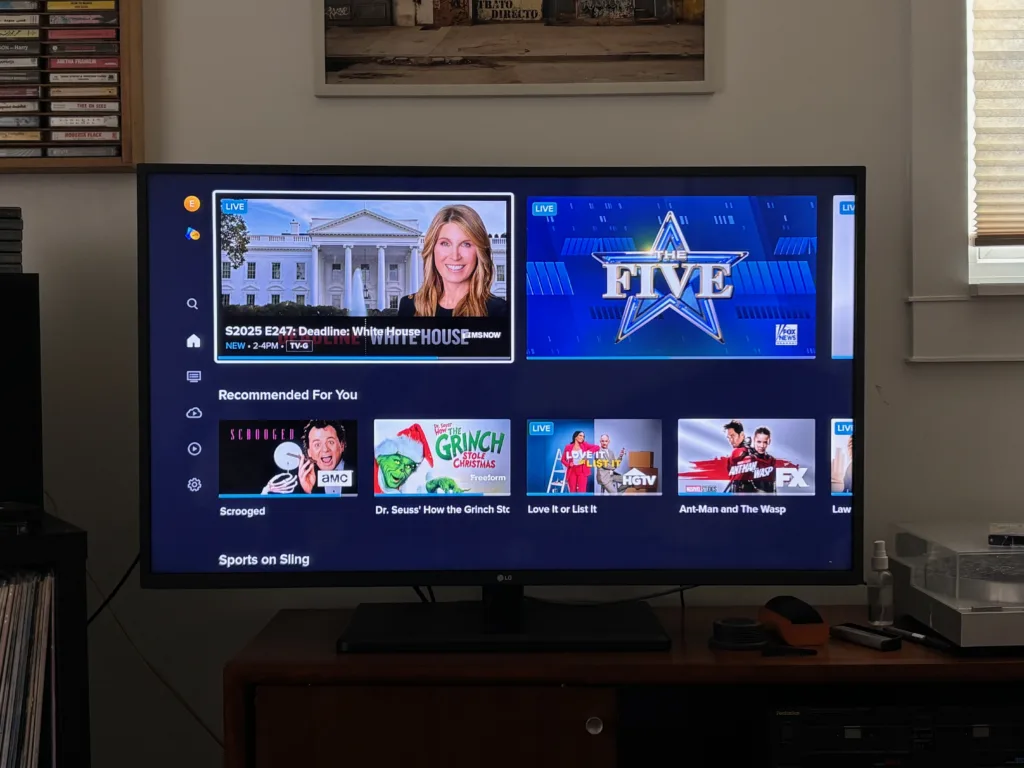
Sling TV Orange & Blue in action. Image credit: Peter Holslin

Sling TV Orange & Blue in action. Image credit: Peter Holslin

How does Sling’s “start small” setup work?

While a service like YouTube TV is known for giving subscribers a bunch of channels in a single baseline package, Sling TV breaks down its channel offerings into bits and pieces. It’s like ordering a variety of small plates instead of an entire banquet.

There are two discrete Sling packages to start: Blue and Orange. Each one starts at $45.99 a month.

  • Sling Orange is all about live sports and entertainment featuring ESPN, ESPN2, Disney, HGTV, and similar channels.
  • Sling Blue focuses on live news and reality TV with CNN, Fox News, MS Now (formerly MSNBC), TLC, Bravo, and more.

After you’ve picked your base package, you can add on to your liking. Sling’s menu includes half a dozen bundle add-ons, which give you features like unlimited DVR (Unlimited DVR+ Replays, $5/mo.) as well as additional channels (see Sports Extra, $11/mo., or News Extra, $6/mo.).

Of course, you can also simplify things and sign up for the Orange & Blue plan starting at $60.99 a month. That plan combines the channels you get from both packages, and I actually think that Sling is secretly trying to push most customers in that direction. But I’ll get to that later.

What makes Sling’s “build your own” approach better than other options

Sling TV is better than costlier TV streaming packages like YouTube TV and Hulu + Live TV because it doesn’t fill up your shopping cart with a bunch of stupid channels you don’t want and then demand a high price for it. Instead, it lets you be picky about what you actually want to watch on TV, and when.

I really like Sling’s Day Pass option that comes with the Orange plan. It’s perfect if you’re not a huge ESPN or Disney watcher, but you want to tune in on occasion: You can sign up for a 1-day, 3-day, or 7-day pass for a one-time fee, with no worries about auto-renewal or contractual obligations. The prices are totally reasonable, too, less than what you’d pay for coffee or lunch.

Day Pass pricing

  • 1-day pass: $4.99
  • 3-day pass: $9.99
  • 7-day pass: $14.99

Still, Sling isn’t for everyone—here’s why

There is something undeniably frustrating about Sling’s slice-and-dice approach. In the good old days of basic cable channel surfing, I could see what’s on and where to watch it just by picking up a “TV Guide" magazine. If you’re a serious TV fan, Sling TV’s endless add-ons will make it feel like you need multiple TV guides just to keep track of what the heck is going on.

I can’t help but notice that Sling’s programming choices gently nudge subscribers in the direction of getting a more expensive package. Although they’re clearly meant for specific customers, the Blue and Orange plans are each missing key channels in such a way that some customers will only be satisfied if they fork over at least $60.99 a month to get both packages (aka the suitably named Orange & Blue plan).

I came to this conclusion after scratching my head over Blue and Orange’s respective sports offerings. Breaking it down made me feel like Sherlock Holmes solving a murder mystery:

  • Sling Blue includes NFL Network for Thursday Night Football, even though Blue is mostly for news and reality TV.
  • Sling Orange is all about sports, but does not offer Thursday Night Football and only has Monday Night Football on ESPN.
  • Subscribing to both Orange and Blue gives you access to both games. Could it be that Sling TV is trying to get you to subscribe to both?

Should you get Sling?

Not to give Sling too much credit, but this streaming TV service has quite a liberating approach compared to how TV normally works. Old-school cable and satellite TV packages used to be notorious for locking customers into onerous contracts and tagging on a bunch of extra, needless stuff (with mind-boggling UX to boot).

Unfortunately, the streaming world has descended into the same dilemma of recurring price hikes, strict password-sharing rules, and endless licensing disputes. This leads to an endless shuffle of TV content and absurd situations, like Fubo being all about sports while being unable to air Super Bowl LX or the 2026 Winter Olympics.

Sling TV is not perfect, but at least it lets you be a penny-pinching TV watcher in the best way. I can sign up and cancel at will, switch around my plans, all with the goal of watching just the channels I want without paying extra for the junk I don’t.

Peter Holslin
Written by
Peter is a journalist and editor who has been covering tech, culture, and music since the late 2000s. Prior to joining the Reviews.org team as managing editor, he was the senior staff writer at HighSpeedInternet.com, where he covered 5G, mobile hotspots, and internet services. As a freelancer, he’s also written for Rolling Stone, VICE, BuzzFeed, Pitchfork, LA Weekly, and many other publications. He studied writing and journalism at The New School University in New York City and got his start in the media industry as the music editor of the California alt-weekly San Diego CityBeat. He’s also a musician and DJ and owns too many vinyl records for his own good.

Related Articles

Craig introducing the best streaming services for anime
The Best Ways to Watch Anime (FREE and Paid)
For casual anime, Hulu/Netflix might be good enough. But if you’re an anime addict, get...
Watching cable alternatives
Five Best Cable Alternatives
The best streaming apps like HBO Max and Netflix can replace your cable television service....
Best streaming service for spanish speakers
Best Streaming Services for Spanish Speakers
Find the best Spanish-language streaming service with our 8 top favorites. We compare pricing and...
Best_Streaming_Services_for_Movie_Lovers
Best Streaming Services for Movie Lovers
Do you love movies but hate the movie theater experience? Then this is the guide...