
Check out Reviews.org’s all-in-one guide for the best live TV streaming and on-demand services
Best Streaming Services of 2026: I Share My Top Picks So You Can Cut the Cord on Cable







 6 min read
 Edited ByKelly Huh
What is the best streaming service?
No single streaming service carries everything you want to watch, but in 2026, you don’t have to choose between streaming and cable TV to get close.
In this guide, we break down the heavy hitters: YouTube TV, Netflix, Peacock, Sling TV, and Paramount+.
Our team tested each streaming service firsthand, evaluating them on content library depth, user experience, and "bang for your buck." We’ve given each service an overall rating that weighs all these factors, but the right pick for you depends on how you watch.
Find your perfect match below.

Why you can trust us
At Reviews.org, our team takes its editorial independence seriously. We may earn money when readers click affiliate links, but we don't work for our brand partners, and they don’t approve our pieces before publication. To learn more, visit our About us page.
Meet the expert

Hi, I’m Monica Yoshida, a writer at Reviews.org and a parent of three. I
know "free time" is a precious resource, which is why I don't believe in guessing which streaming service is worth your money. For this guide, our team tested each service to give you the most honest snapshot possible — and as a Netflix and YouTube TV customer myself, I also brought in my own first-hand experience. Whether I’m hunting down the fine print or comparing live TV, movies, or DVR options, my goal is to translate complex tech specs into the essential information you need.

Monica Yoshida
Staff Writer, Reviews.org
Netflix: Best for original content
The big picture: This service turned "binge-watching" into a global pastime. Netflix remains the must-have library for high-budget originals, even as it moves toward a hybrid model of ads and premium price tiers.

Our rating
4.5/5
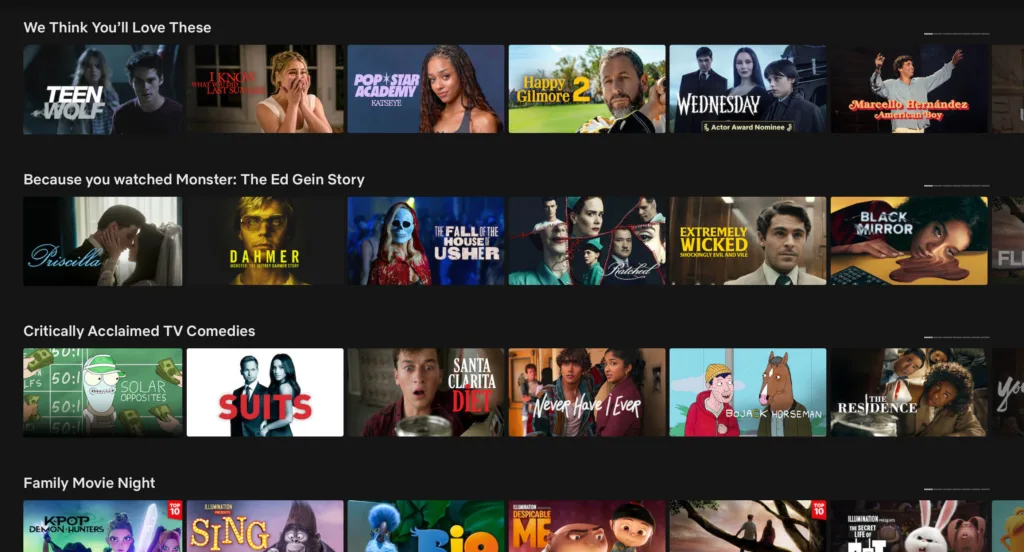
The moment you open Netflix, you can endlessly scroll through shows, movies, and exclusive-to-Netflix content. The library customizes your watching preferences, and the experience sets the stage for endless binge watching. Image courtesy of Morgan McDougal, Reviews.org

Pros
 Unmatched library of original content
Easy-to-use mobile app and offline downloads
Smooth 4K HDR performance
Unmatched library of original content
Easy-to-use mobile app and offline downloads
Smooth 4K HDR performance 
Cons
 Strict crackdown on password sharing
4K requires the most expensive $24.99 plan
Frequent cancellation of original content
Strict crackdown on password sharing
4K requires the most expensive $24.99 plan
Frequent cancellation of original content Editor’s verdict and quick specs
Despite the rise of new premium plans and frequent ad breaks, Netflix is still the one service most people can’t live without. It’s no longer just a place to watch old sitcoms — it’s a powerhouse of new, old, and exclusive content. From “Stranger Things” to high-stakes reality TV like “Love is Blind,” the sheer volume of "must-watch" cultural moments keeps it at the top of our list. My kids wouldn’t forgive me if I didn’t mention the original movie, “KPop Demon Hunters,” the most-watched Netflix film of all time, surpassing 500 million views as of early 2026 (yes, it’s freaking amazing).
The catch in 2026 is the cost. If you want 4K resolution, you have to pay $24.99 per month, and you can no longer share that account with your sibling across town without paying extra. However, for a single household that values a high-quality app and a never-ending stream of new movies and shows, Netflix remains the standard to beat — it’s even hosting video podcasts now.
Popular titles: “Stranger Things,” “Bridgerton,” “Squid Game,” “KPop Demon Hunters”
YouTube TV: Best live TV replacement
The big picture: YouTube TV offers a massive 100+ channel lineup and a multiview mode that makes it the undisputed king for households that watch a lot of live sports.
Our rating
4.3/5
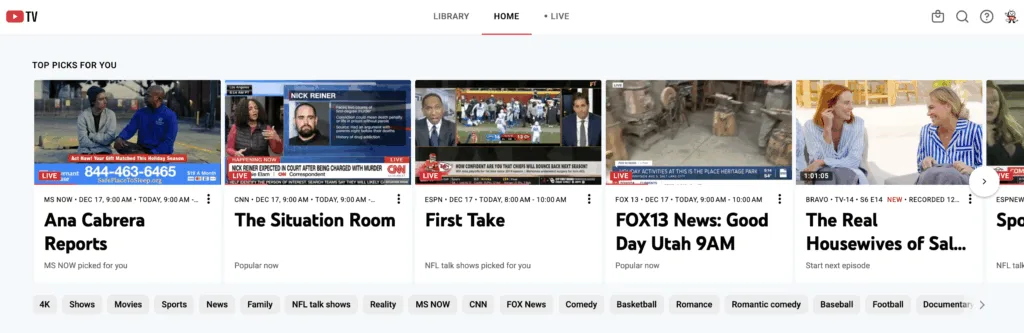
The YouTube TV homepage is as intuitive and easy to navigate as youtube.com itself. You can choose between the categories of Library, Home, and Live TV. Or you can scroll through tons of categories and types of shows. Image courtesy of Monica Yoshida, Reviews.org
Pros
Unlimited DVR storage (9-mo. limit)
Intuitive interface
Multiview feature (4 simultaneous screens) Cons
Limited RSN coverage
Frequent price hikes over the years
The “4K Plus” add-on costs an extra $10 and content must be available in 4K Editor’s verdict and quick specs
YouTube TV sets the gold standard for anyone looking to fire their cable company without losing the "live" experience. From my testing, YouTube TV has three standout features:
- Unlimited DVR storage: there are no extra fees, and you can keep recordings for up to nine months
- Multiview: which allows sports fans to watch four channels simultaneously on one screen
- Key plays: which uses AI to replay the best moments of the game
While the $82.99 price tag feels steep, it’s a transparent bill. You won't find the "broadcast fees" or "regional sports fees" that plague traditional cable. The main trade-off is the lack of RSN coverage, but for the average household, its reliability and ease of use make it well worth the investment.
As of February 2026, YouTube TV launched more affordable plans ranging from a Sports Plan starting at $54.99 per month for new users to an Entertainment Plan starting at $44.99 per month.
Popular channels: ESPN, NFL Network, HGTV, AMC, CNN.
Peacock: Best value for sports
The big picture: Peacock matured into a top-tier option by combining exclusive theatrical releases from Universal Pictures and Focus Features with a massive sports hub that is essential for Olympics, NFL, and NBA coverage.
Our rating
4.3/5
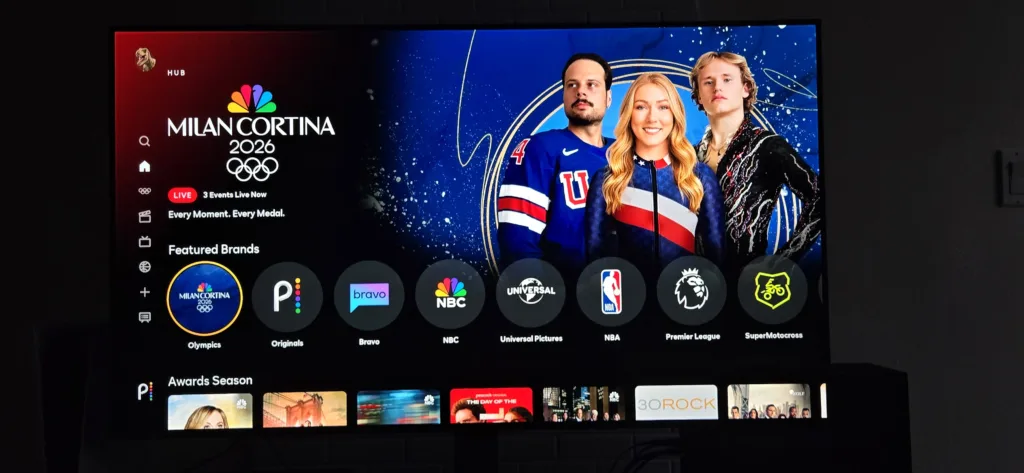
Peacock is one of the best streaming and live TV services for live sports coverage. The Olympics was the perfect place to catch big events, highlights, and everything in between. Image courtesy of Benjamin Lee, Reviews.org
Pros
Elite live sports (2026 Winter Olympics, NFL, NBA)
Next-day access to Bravo and NBC hits
Competitive pricing Cons
Heavy ad load on cheaper plans
Navigational hurdles for Editor’s verdict and quick specs
Peacock has evolved from a "hidden gem" into a heavyweight contender, especially for families and sports fans. It’s the streaming home for the Olympics, plus special uncensored Bravo reality TV episodes and “The Office” Superfan episodes (“Well, well, well. How the turntables.”). At $10.99 for the Premium tier, it offers strong value giving you access to theatrical releases from Universal Pictures just 45 days after they hit theaters.
The interface is intuitive, featuring "one-click viewing," which allows users to start watching without being sent to another menu, and interactive mini-games on mobile. However, be prepared for ads … lots of them. Even the mid-tier plan has significant ad breaks during movies. If you can tolerate the pre-roll ads, Peacock is an affordable option.
Popular titles: “The Office,” “The Traitors,” “Yellowstone” (licensed), “The Real Housewives”
Sling TV: Best for affordable live TV
The big picture: Sling TV is the "skinny bundle" pioneer, designed for cord-cutters who want to pay for the specific channels they watch rather than funding a bloated 200-channel lineup.
Our rating
4.3/5
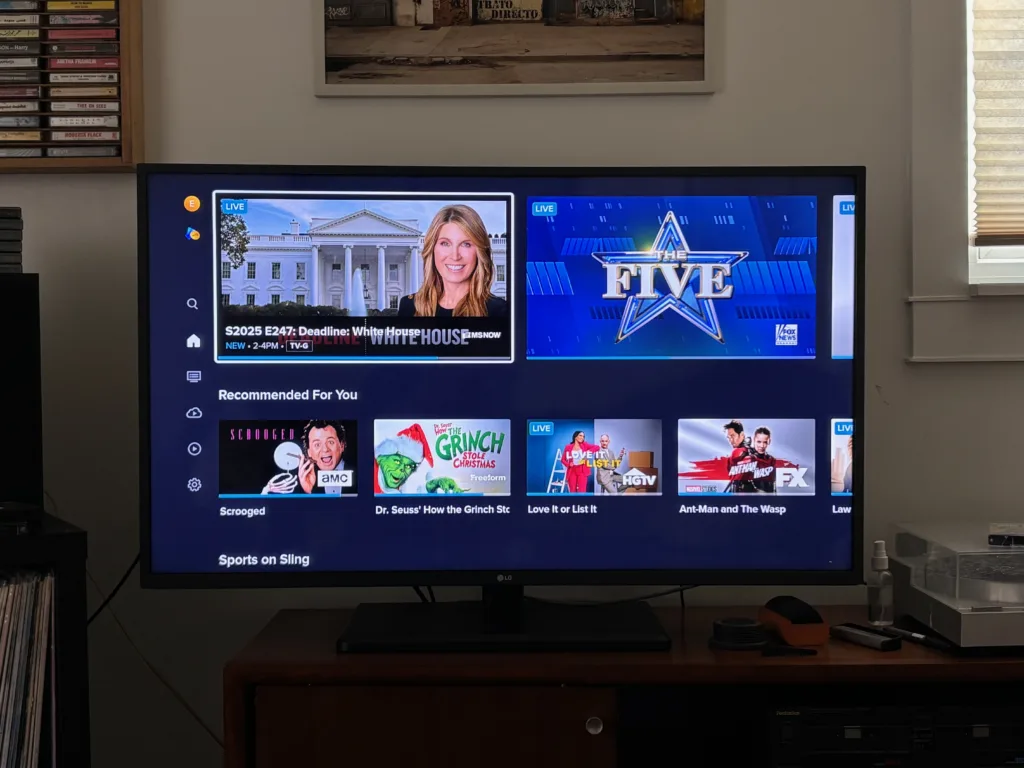
The Sling TV interface provides a mix of live cable news and on-demand movies, though local channel availability is more limited than its competitors. Image courtesy of Peter Holslin, Reviews.org
Pros
Lowest starting price for live TV
Flexible à la carte-style add-ons
No long-term contracts Cons
Limited local channel availability
50-hour DVR limit Editor’s verdict and quick specs
If YouTube TV is too expensive, Sling TV is a solid alternative. Starting at less than a quarter of YouTube TV, Sling is designed for the viewer who only cares about a few specific channels — like ESPN for Monday Night Football (on Sling Orange) or CNN for news (on Sling Orange and Sling Blue). It’s a "build-your-own" service that lets you add small "Extras" packs for $6 rather than paying for 100 channels you’ll never watch.
The trade-off: You probably won't get your local channels without an antenna. If you can live with that hurdle, Sling is a cost-effective way to keep a foot in the live TV world.
Popular channels: ESPN, TNT, TBS, Food Network, Disney Channel.
Paramount+: Best for NFL and CBS fans
The big picture: Paramount+ serves as the streaming home for the "Yellowstone" universe and the NFL on CBS, making it a powerhouse for fans of prestige Westerns and local live broadcasts.
Our rating
4.3/5
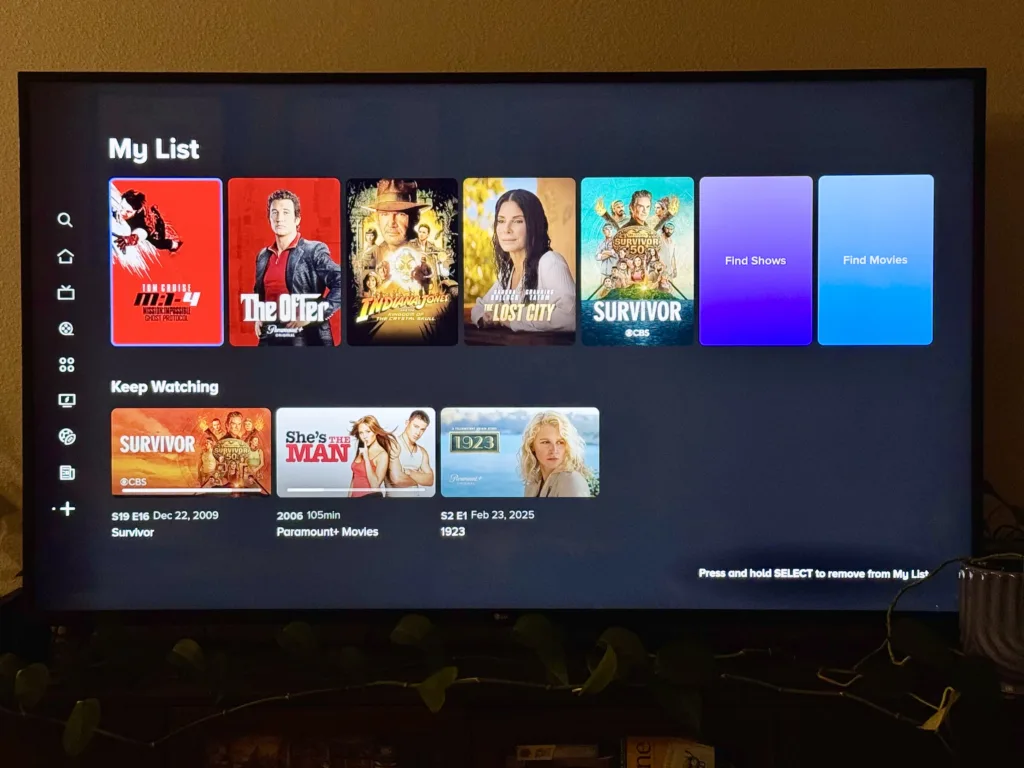
The Paramount+ interface makes it easy to jump back into Taylor Sheridan originals or CBS content through the "Keep Watching" tray, which syncs progress across all your devices. Image courtesy of Danika Miller, Reviews.org
Pros
Includes local CBS station (only on Paramount+ Premium plan)
Massive library for kids (Nickelodeon/Paw Patrol)
Home to the Yellowstone universe Cons
App can be buggy on older smart TVs
Frequent price hikes over the years Editor’s verdict and quick specs
Paramount+ is a good fit for two types of people: NFL fans who need their Sunday CBS games and parents who need the Nickelodeon library to keep their kids entertained. It’s the home of the "Taylor Sheridan-verse" (“1883,” “1923,” “Tulsa King”), which has built a loyal fan base.
While the app interface isn't as slick as Netflix, the content volume and variety is strong. If you upgrade to Paramount+ Premium, you can download movies, watch SHOWTIME Originals, and stream your local CBS station, making it a cost-effective way to get local news and sports without a full live TV subscription.
Take note: Paramount+ no longer offers a free trial, but you can get it free with a Walmart+ membership.
Popular titles: “1923,” “Survivor,” “SpongeBob SquarePants,” “Star Trek: Strange New Worlds”
Comparison table for streaming services
*Peacock: Certain pages are sponsored, and some programming will still contain ads (channels, live sports and events, and a few shows and movies). Some titles available to watch offline.
**Paramount+: Plans include trailers & sponsorship (or similar). Live TV has ads.
Is there any streaming service with no ads?
You can’t escape ads in 2026. Even if you pay for top-tier plans, most of these services will still hit you with 'promos' (which are just ads for their own shows) or unskippable commercials during live sporting events. Settle in — this is just the way it is now.
Factors to consider for cord-cutting in 2026
Ditching cable used to be a simple way to save $100 a month, but with streaming ‘price creep’ and the complication of sports rights, cutting the cord requires a strategic plan to avoid accidentally paying more for less.
Here’s what you need to evaluate before you cancel that cable contract:
Internet bandwidth
Streaming in 4K is a data hog. Plan for at least 25–50Mbps per 4K stream. If you have a family of four streaming in 4K simultaneously, 300Mbps is your ‘safe’ minimum.
The sports-fan dilemma
You can't get every game in one place anymore. In 2026, the NFL coverage via streaming platforms is split between Netflix, Amazon, Peacock, and ESPN — and the NBA is split between Amazon, Peacock, and ESPN.
Password sharing
The “household” crackdown is nearly universal. If you rely on a shared login to offset costs, factor in an "extra member" fee.
Smart TV quality
If you have an older TV from before 2018, you might find that your quality is reduced when using multiview (if you’re using YouTube TV).
How to save money on streaming
1
Third-party free trials
Services like Peacock no longer offer trials on their own sites. Look for bundles through Walmart+, Instacart+, or even fast-food apps (like McDonald’s Monopoly) to snag 1–2 months for free.
2
Consider cancelling multiple subscriptions
Do you really need five streaming services at once? Subscribe to Netflix for Stranger Things, binge it, cancel, and move on.
3
Choose annual billing
Peacock and Paramount Plus offer nearly 17% off if you pay for a full year upfront. Only do this for the platforms you know you’ll use every day.

Our team tested each of these streaming services through long-term and short-term subscriptions or free trials across TVs, mobile devices, and laptops. We specifically looked at:
- Value: prices vs. the number of high-quality titles
- Transparency: real monthly costs and whether ‘no ads’ actually means no ads.
- Performance: buffering, 4K streaming, and lag during simultaneous streams
- Content: channel selection and content library
For more information on how we test, check out our methodology.

Best streaming services FAQ
Yes, for five to 21 days. You can get a standard YouTube TV free trial for five to 10 days, but it frequently runs 21-day “Extended Trials” for new users who sign up via a fresh email.
According to our testing at Reviews.org, Netflix is the number one streaming service. It gets a 4.5 out of 5 stars for its solid value, customer experience, and extensive content library.
You can watch regional sports networks on DIRECTV's streaming service and Fubo.

Related Articles
Best Streaming Services of 2026: I Share My Top Picks So You Can Cut the Cord on Cable
If you’re planning on cutting the cord, we’ll help you find the best streaming service...
US Mobile Dark Star: Is the AT&T Network Right for You?
Curious about Dark Star and whether it's the best US Mobile network for you? Here's...
Verizon Cell Phone Plans and Deals
Verizon offers great deals and top-notch coverage for its unlimited cell phone plans. Read all...
Boost Mobile Cell Phone Plans and Deals
Boost Mobile offers unlimited data mobile plans at some of the most affordable prices available....



