
Customers who have the Light Speed network and the Unlimited Premium plan get access to the most international benefits.
US Mobile International Plans: The Definitive 2026 Guide to Roaming

 5 min read
 Edited ByBrenna Elieson
Does coffee-shop hopping make me a digital nomad? Either way, I’ve spent way too much time obsessing over the fine print of US Mobile’s 2026 international plans. Unlike other mobile plans where you must pay for daily international passes or add-ons to activate travelling perks, US Mobile’s international roaming is baked into the price of your standard plan. You barely have to think about it.
There are two ways US Mobile can help you handle international travel:
- Native roaming: You get to keep using your U.S. number when you travel. All you have to do is land, turn off Airplane Mode, and your US SIM connects directly to local towers while abroad.
- International eSIMs: If you’re travelling to a country that isn't supported by US Mobile’s native roaming, you can download a data-only digital SIM (no calls or texts).
Before you board your flight — or even buy your international ticket — here is everything you need to know about traveling with your US Mobile phone.

Why you can trust us
At Reviews.org, our team takes its editorial independence seriously. We may earn money when readers click affiliate links, but we don't work for our brand partners, and they don’t approve our pieces before publication. To learn more, visit our About us page.
US Mobile’s native roaming vs. international eSIM
US Mobile is a prepaid mobile carrier offering annual and monthly mobile plans across all three networks (T-Mobile, Verizon, and AT&T). You can choose the network you prefer at the time of sign up — and then you can switch any time too. While you get access to international benefits on every US Mobile network and plan, you get more benefits on some than others.
US Mobile keeps you connected at home and abroad in two ways:
- Native roaming: Allows users to use their primary US number while abroad to make calls, send texts, and use data. The catch is that only some plans (like the Unlimited Premium plan) come with this built-in roaming feature.
- International eSIM: Requires users to purchase a separate, data-only profile to download. This is how you access the internet on the go if your main US Mobile plan doesn’t work in your travel destination. The catch is that your US phone number won't work for calls or texts unless you have Wi-Fi Calling enabled.
Do this if you’re thinking of travelling:
What network are you on? Which plan are you paying for? Double-check both of these details to get acquainted with your plan- and network-specific international benefits.
Roaming coverage depends on your US Mobile network
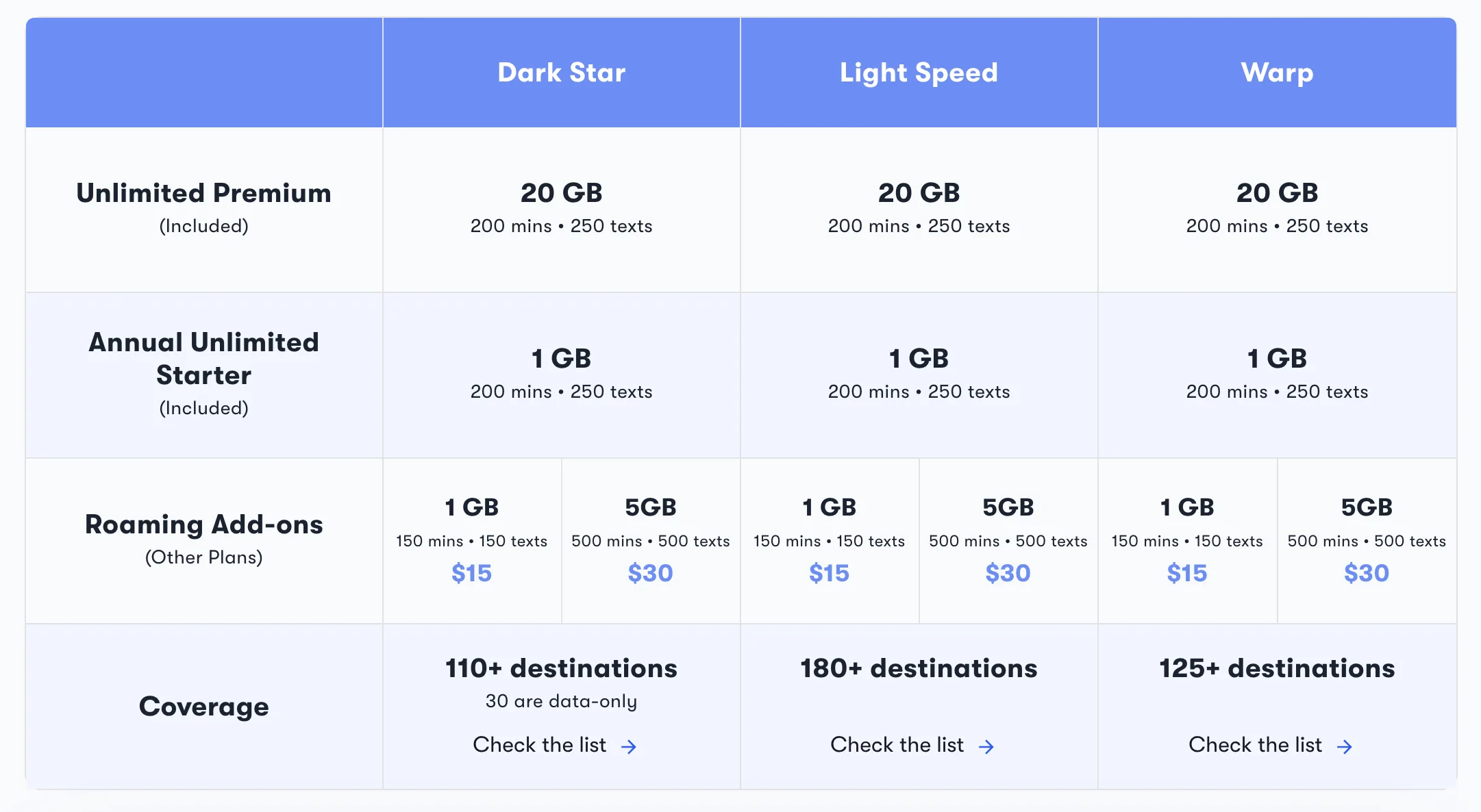
Depending on your network and plan, you can get from 20GB to 1GB of data, as well as available roaming add-ons from $15 to $30. The Light Speed network offers the most coverage in 180+ destinations. Image from US Mobile Site.
The Light Speed (T-Mobile) network gives you the most range in coverage, offering text, calls, and data in over 180 countries. So if you’re a heavy traveller, Light Speed is probably the best choice for you.
Do this before you buy an international ticket:
Check which countries are covered by your network on US Mobile’s site before you plan your international trip.
US Mobile international plan breakdown
Here’s a breakdown of the plans and the roaming top-up:
Unlimited Premium (the ultimate “set it and forget it” option)
Includes 20GB of data, 200 minutes, and 250 texts included in 125+ countries.
Unlimited Starter (best for short trips)
1GB of data included (annual plans only). For monthly users, this plan requires an add-on.
Roaming top-ups (for one-offs and emergencies)
If you aren’t on an Unlimited plan, and you just need to be able to order an Uber from the airport, you’ve got this backup option. You can still roam by purchasing a Native Roaming Top-Up:
- $15 add-on: 1GB data, 150 minutes, 150 texts
- $30 add-on: 5GB data, 500 minutes, 500 texts
So if you know you’re a frequent traveler, a US Mobile Unlimited Premium plan is the way to go.
To give you an example of how your international benefits look if you want to travel to Albania, your network and plan will help you plan ahead:
On the other hand, if you want to visit the Canary Islands in Spain, you need to have the Light Speed network to use roaming since data, calling, or texts are unavailable with the Dark Star and Warp 5G network.
Do this after buying your international ticket:
Check how well your travel destination is covered on US Mobile’s site by directly typing in your country of interest in the search bar.
How to set up roaming for your specific network
International roaming on Light Speed and Dark Star
- Light Speed (T-Mobile): All you have to do is toggle “Data Roaming” on your phone settings. Upon landing, your phone should automatically connect to a local partner like Vodafone or Orange.
- Dark Star (AT&T): You may need to select your roaming destination in the US Mobile app before departure to enable the international profile. Log in to your dashboard to set it up.
International roaming on Warp
A fair warning: The Warp network (Verizon) hasn’t always been the easiest network for international travel. In the past, there was some trouble with a pilot feature requiring a $50 deposit to use your phone abroad. Thankfully, in 2026, international roaming is already baked into the plan, but you can always check the app for “Roaming Trip Planner” activation.
The Roaming Trip Planner exists within the US Mobile app, and ensures your 5G connection is ready to go the moment your plane lands (no clapping, please).
Activating an international eSIM
If your specific country isn’t covered by Native Roaming, Unlimited Premium customers can still get a free data-only eSIM.
Do this to activate your international eSIM:
- Open the US Mobile Dashboard
- Select “Add International Data” and choose your destination
- Install the generated eSIM profile (remember, your US phone number can’t be used for calls).
Expert tips for smooth travel and phone use
Don’t just hope that everything will go well for your international trip (it never does, trust me). Use these important tips to keep it as smooth as possible:
- Enable Wi-Fi calling BEFORE you leave: In this way, you can receive US 2FA texts (like from your bank) for free while on hotel Wi-Fi or for situations where your native roaming is acting up.
- Toggle “Data Roaming” on: With US Mobile, you need this toggled ON for your plan to actually connect with foreign towers.
- The "Dual SIM" trick: If you have an Unlimited Premium plan, keep your US line on “Low Data Mode” in your settings. This will keep your phone from burning through your data allowance with automatic background app updates.
- Network manual selection: If your phone is stuck in “No Service,” go into your settings and turn off “Automatic Network Selection.” At this point, you can manually try native carriers like Vodafone, Orange, or Deutsche Telekom until you pick up a signal.
Do this to protect your roaming settings:
Set a device passcode in your Kindle or phone settings if you’re traveling with kids so that you can lock settings, and those little munchkins can’t accidentally toggle off the roaming.
Choose US Mobile for convenience, and local SIMs for massive data
If you want to keep your US Mobile number while traveling, then US Mobile is the way to go (with its 20 GB of data on the Unlimited Premium plan). However, if you want to be able to use massive amounts of data (50GB or more) while abroad, local SIMs should be your go-to choice.
For example, if you are going on an extended backpacking trip, local SIM cards usually cost $20 to $30 and will come out cheaper than US Mobile’s roaming top-ups (each worth $15 and $30, and only up to 5GB).
Do this if you plan to use a local international SIM:
If you think you’ll need a local SIM for a bigger data allotment, do some research about what’s available and reliable in your travel destination.
US Mobile international plans FAQ
Yes, native roaming is available on Warp in 125+ countries, typically included in Unlimited Premium or as an add-on.
Yes, if you have native roaming enabled or use Wi-Fi Calling.
This was a pilot program for the Warp network. Most users now use the Roaming Trip Planner or standard plan inclusions.

Related Articles

US Mobile International Plans: The Definitive 2026 Guide to Roaming
Compare US Mobile international plans for 2026. Learn about native roaming on Warp, Light Speed,...

The Complete Guide to T-Mobile Phone and Internet Bundle Deals in 2026
Compare T-Mobile phone and internet bundle deals for 2026. Learn how to save $15/mo on...
My Google Fi Review (2026): Why I’m a Long-Time User
Google Fi offers affordable, pay-as-you-go cell phone plans, but performance and coverage depends on if...

Mint Mobile International Roaming Review: How To Choose a Pass, Set It Up, and Use It Abroad
With Mint Mobile, you can buy a Minternational Pass that allows you to text, call,...



