
Formerly known as GreatCall, Lively is one of our top choices for a senior phone plan and minimalist device in 2026. But it’s got minor quirks.
My Lively Mobile Review 2026: I Tested Its Unique Flip Phone Features




 13 min read
 Edited ByKelly Huh
I’ve been testing prepaid mobile plans over the last few months. But my firsthand testing of Lively Mobile—a senior-friendly mobile service with a safety-first approach— has been the most compelling experience so far.
Formerly known as GreatCall, Lively Mobile continues to offer affordable phone plans on branded Lively smart phone and flip phone devices with an impressive built-in emergency system. Operating off of Verizon’s network, Lively customers can take advantage of its robust coverage, especially in more rural areas.
After testing its Preferred plan on the Jitterbug Flip2, I recommend Lively to caregivers and family members who prioritize safety of individuals who are elderly, cognitively impaired, or live with a serious medical condition. While not perfectly designed for the tech-averse person, its minimalist hardware is a much more straightforward option than typical smart phones.

Why you can trust us
At Reviews.org, our team takes its editorial independence seriously. We may earn money when readers click affiliate links, but we don't work for our brand partners, and they don’t approve our pieces before publication. To learn more, visit our About us page.
What to expect with a Lively Jitterbug Flip2 device
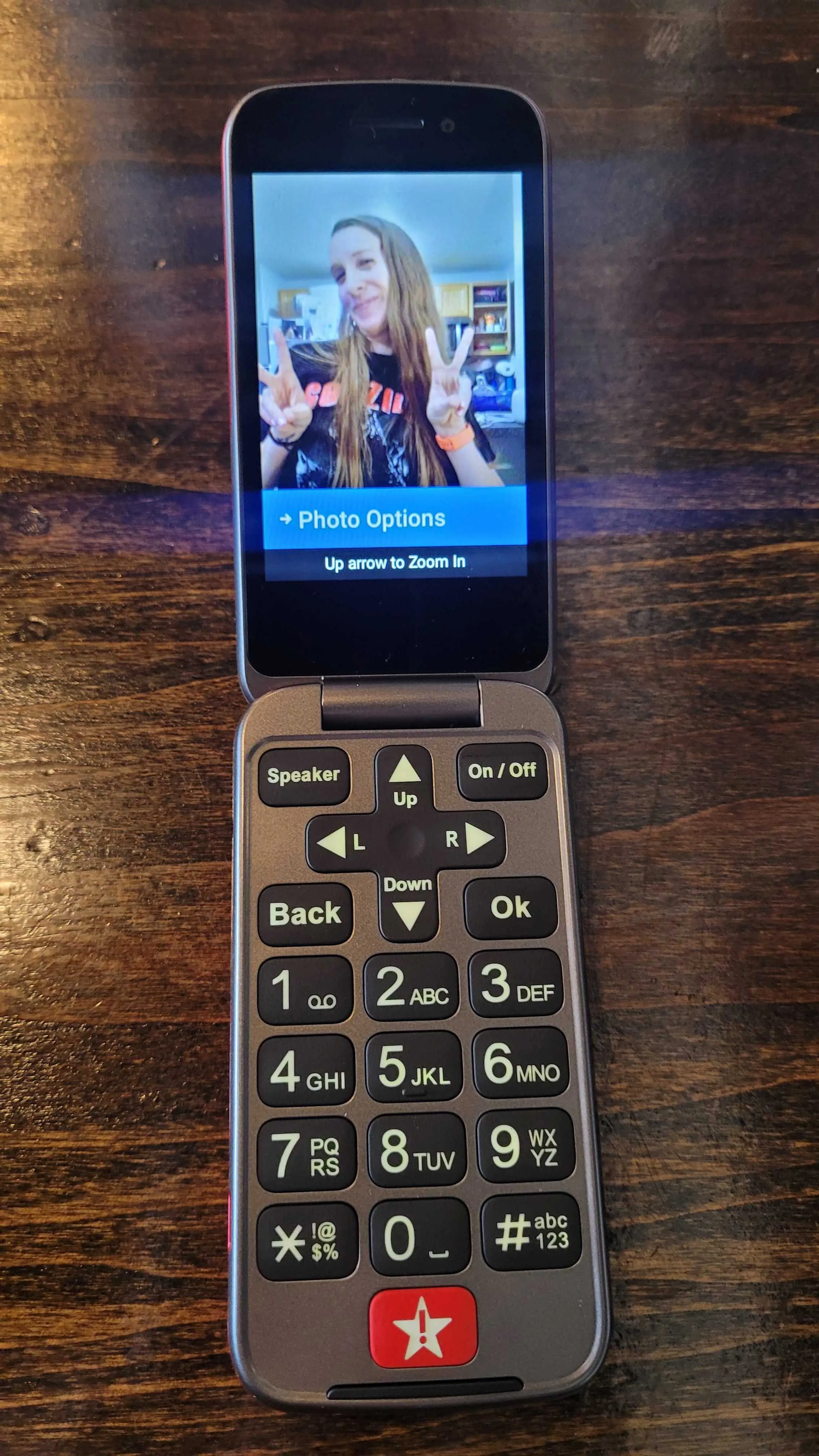
The Lively Jitterbug Flip2 allows you to take photos and selfies. While the quality of the photo itself is not the highest resolution, you still have the option to zoom into the photo itself. Image by Monica Yoshida, Reviews.org
To get started with Lively Mobile service, you FIRST have to purchase a device through them. While you have the option to bring your own device, you’d miss out on the unique Lively phone features including the unique emergency button (so I don’t recommend using your own phone).
Lively gives you two phone options: a Lively smart phone or a Lively Jitterbug Flip2 flip phone. I chose the flip phone because this seems like it would be the best basic choice for Lively’s target audience, a senior individual. Also, I’m a millennial. I yearn for the flip phone.
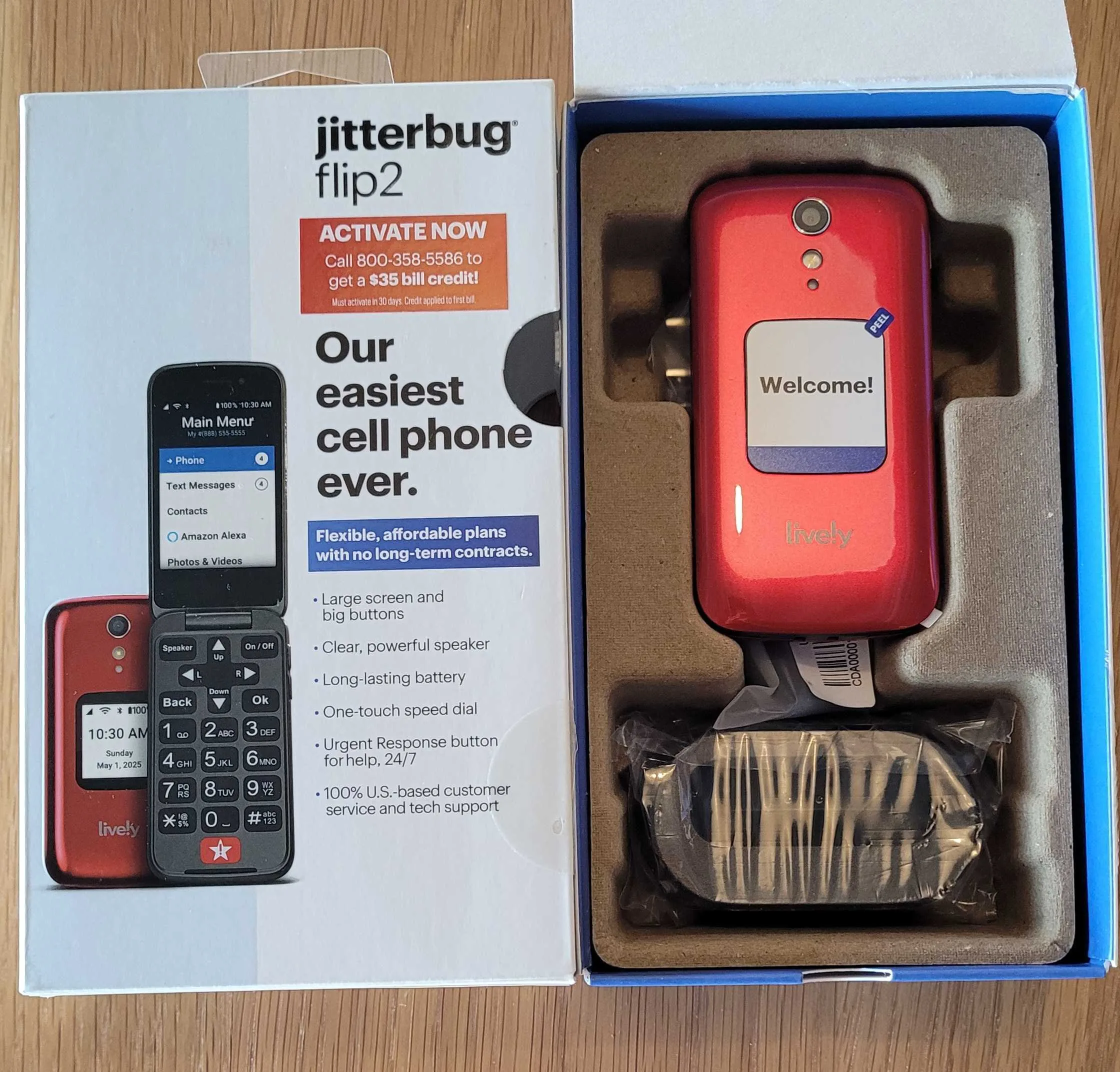
I ordered the Lively flip phone and it arrived a couple days later in a box with instructions about how to activate service. You can either activate online or by calling into Lively support. Image by Monica Yoshida, Reviews.org
Lively Jitterbug Flip2 features
Bright red exterior: I recommend purchasing the bright red color over the black color option as the whole point is to keep it close to you and be able to spot it quickly in case of emergency.
Big buttons and screen: Your thumb fits on each button, so it’s less likely you’ll press multiple buttons at the same time. There are no confusing icons or symbols on the keypad (minus the red dedicated SOS button).
The red emergency button: The emergency call button is at the bottom of the phone. It’s bright red, but it’s the same size as the other buttons. Unfortunately, it seems easy to accidentally press.
Audio clarity: On the side of the phone are volume buttons that give you options for maximum, high, medium, low, and silent. I’ve seen product reviews complain that their senior parent pressed them accidentally and couldn’t figure out why they couldn’t hear anything. The max and high volume are decently loud, and I wish there was a way to lock that setting.
“Read aloud” feature: In the “Accessibility” setting, you can turn on a “Read aloud” feature that reads everything on the screen out loud for you. This seems initially helpful for someone that is visually impaired or prefers audio instructions. However, it gets annoying and repetitive after a while, and I could imagine someone deciding to not open their phone at all to avoid it (if they can’t figure out how to turn it off).
Open flip answer feature: You can turn this feature on so that when you get a call and flip open your phone, the call starts automatically.
Reminders setting: You can set reminders for yourself or a senior person so they remember appointments, times to take medicine, or even to call you. However, you only get one little beep and that’s it, so it’s easy to miss.
Extra basic features: Flashlight, magnifier (allows you to take a picture and zoom in), calculator, FM radio (wired headphones required), and basic games.
Here’s my Lively Mobile review based on weeks of testing
In this mobile review, we give a rating based on four main criteria:
Then, we average the scores to make an overall rating.
2026 Lively flip phone plans
Here’s a quick overview of a Lively Mobile cell phone plan:
- No contracts
- Three phone plan options
- 24/7 live-person operators included on all plans
- Urgent response not included on Basic plan
- Unlimited talk and text add-on for $5/month
- On-call nurse available on Premium plan only
- No data included in flip phone plans
- $35 one-time activation fee
Lively’s current flip phone plans tiers include a $5 paperless billing discount.
Lively also offers smart phone plans with data from $19.99/mo.

Dollar value
3/5
Lively Mobile offers three flip phone plans ranging from $14.99 to $44.99 per month. The flip phone plans all include 300 minutes and 300 texts unless you pay $5 more for unlimited talk and text. A Lively customer service rep warned me that if you go over 300 minutes (an automated system will give you a call), it will cost you $0.35 per minute. He’s had to help customers with hundreds of dollars in overage charges. For this reason, if you get this phone for someone else, it may be worth paying an extra $5 for that peace of mind.
Financial pros and cons (Jitterbug Flip2)

Pros
 Free 24/7 live-person operator
Free emergency on-call operator
30-day money back guarantee
Free 24/7 live-person operator
Free emergency on-call operator
30-day money back guarantee 
Cons
 High activation fee ($35)
Monthly costs are significantly higher than standard budget carriers
Must purchase a specific Lively flip phone or device to get started
High activation fee ($35)
Monthly costs are significantly higher than standard budget carriers
Must purchase a specific Lively flip phone or device to get started I paid for the Preferred plan since it comes with the emergency help feature (not available on Basic plan) and the Lively Link app for family and caregiver alerts. The Premium plan ($10 per month more) comes with the on-call nurse as well as the care advocate. Ironically, I could see these premium features not being ideal as you may prefer being the primary contact over the on-call nurse in case of a real medical concern.
If a cheap bill is important to you, Tello might be a better choice
Lively’s Preferred plan at $34.99 per month is not exactly budget-friendly. For the most basic phone functions plus the emergency medical support, and a high $35 activation fee, it’s not exactly a basic bill.
If a cheap phone bill is what you’re after, you might be better off with a cheaper MVNO. I’d recommend Tello, a smaller prepaid provider that runs off of T-Mobile’s network. For no data, 100 minutes, and free text, you’d only pay $5 per month. It’s as basic as basic can get. Of course, there’s no emergency button and no 24/7 live support agent. But you can upload tracking and emergency apps so that you can track the primary user.
Perks and add-ons
Lively Mobile is a cell phone service that bridges basic communication needs and a full medical alert system. The features are built into the plans, and there are very few discounts and accessories available. See some below, and visit Lively’s site for all Lively deals.
AARP member discount
Save $60 per year (or $5 per month) on the Preferred and Premium plans, and occasional discounts on phones and activation fees.
Discounted Lively phones through Amazon and Walmart
You don’t need to purchase a phone through the Lively site. Amazon and Walmart offer online deals. You can also go to Best Buy and buy a Lively phone today.
Jitterbug Flip Cradle Charger
This accessory is a hassle-free way to keep your phone powered and ready. Drop the phone in to charge. Available on the Lively site for $29.99.
My Expert Take
“I’m super impressed with my Lively Mobile flip phone and its 24/7 emergency and live-person operator support. But I wish it was more basic. For a non-tech-savvy person, this phone might not be a good fit.”
-Monica Yoshida, Lively Mobile reviewer in Utah
-Monica Yoshida, Lively Mobile reviewer in Utah

Network coverage
4/5
Lively Mobile operates as an MVNO, meaning that it uses existing wireless infrastructure to provide its services. Lively runs on the Verizon network, which gives you access to widespread coverage especially in rural areas. You can make phone calls and send SMS texts over the 4G LTE network. Even if there is no data, the network sends these as data over their 4G LTE network. Since it’s one of the largest and most reliable 4G LTE networks in the U.S., Lively Mobile ensures that your ability to communicate and press that medical emergency button is as accessible as possible.
While Verizon is the overall winner in the category of Coverage Experience in the Opensignal Mobile Report of 2026, and ensures wide-ranging coverage across the U.S., I would not recommend seniors, cognitively impaired individuals, or someone with a medical condition to test its rural limits. For people who venture more into rural areas for hiking and camping activities, a satellite phone may be a better fit.

Performance & hands-on testing
5/5
For being a basic and minimalist flip phone, my Lively Mobile Jitterbug phone can do a lot. I didn’t charge it for four days, and its battery life was still going strong (though I also didn’t use it actively all day long either).
At first, I laughed when I saw a review elsewhere that mentioned that it does too much, when the flip phone can’t even access the internet. But when you see it through the lens of a non-tech-savvy senior or a cognitively impaired individual, this flip phone can seem overwhelming.
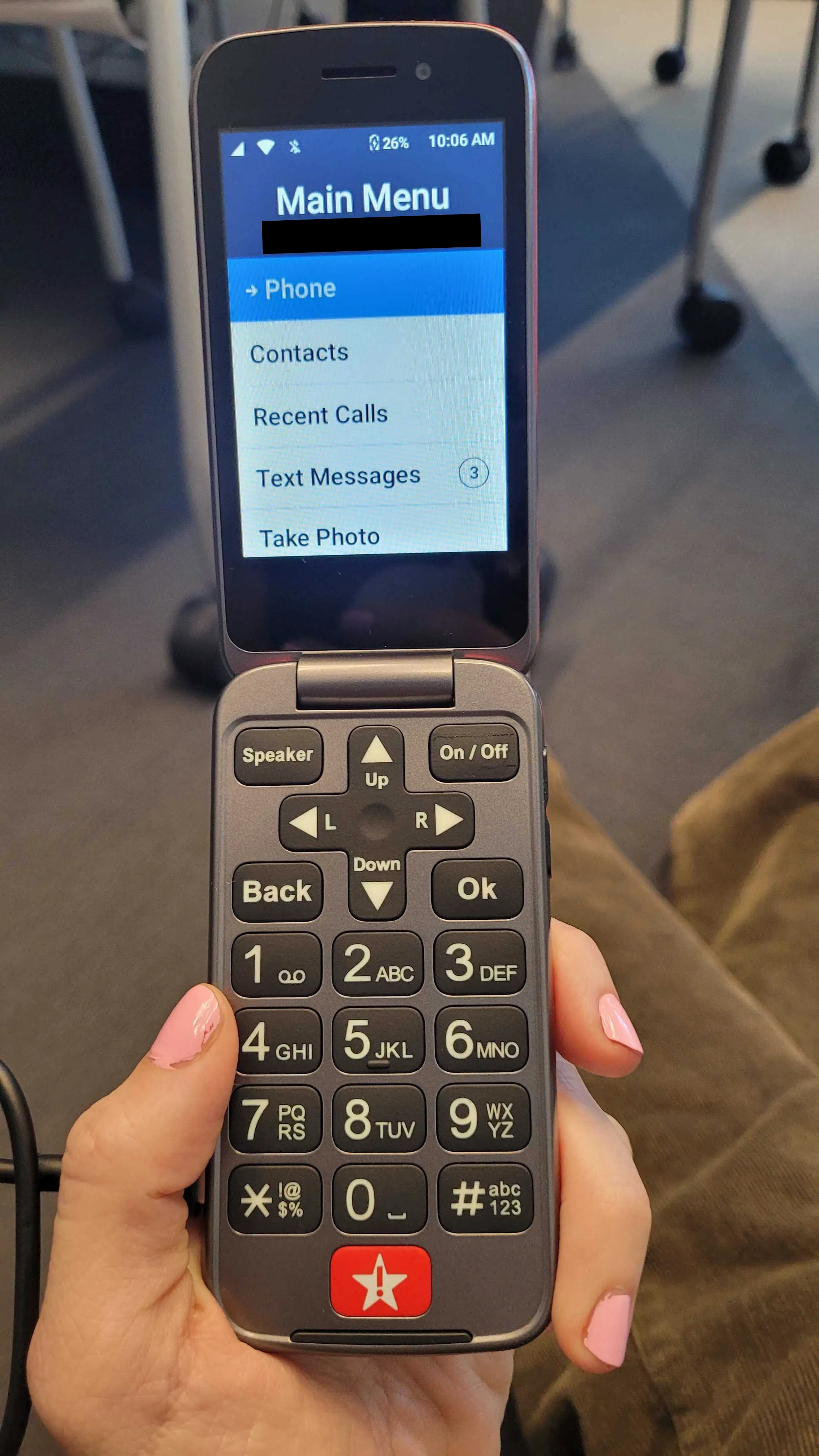
When you open your Lively flip phone, you’ll see the Main Menu with your phone number right at the top for reference. Then you can scroll through a few options like Phone, Contacts, Recent Calls, Text Messages, and Take Photo to get started. Image by Monica Yoshida, Reviews.org
Texts
Texting won’t be easy on this flip phone. The text messaging itself relies on the multi-press entry system where you have to press a number multiple times to get the correct letter. A tech-averse or cognitively impaired person will struggle to navigate these steps.
Calls and speaker phone
Answering a call is easy with a Lively flip phone: No swiping. Big buttons. Flip the phone open, and just start talking.
You can also press the “Speaker” button at the top left part of the phone. When I tested out a phone call and put the call on maximum volume, I was actually a bit disappointed that it wasn’t louder. It’s loud, but I imagine someone with a hearing impairment could use another level of loudness.
Another issue I foresee is that the volume buttons on the side of the phone where your thumb rests during a phone call are easy to press by accident. If an elderly person tried to make it louder and pressed the down volume button by accident, they could mute the call completely. I advise you to carefully explain this to the primary user for future communications.
Alexa integration
I was excited to use the Alexa feature on my flip phone. Supposedly, a user could open their phone and ask Alexa to make a call or send a text message. Unfortunately, this feature never worked for me.
Activating Alexa was a struggle. First, you have to enable Alexa by signing into your Amazon account on the phone. This means that you have to first be connected to a Wi-Fi network on your Lively phone. Then, you have to log in to Amazon through your computer using a code that your flip phone sends to it.
It took me a few days to connect to Amazon because when I initially tried to connect, it gave you the option to “Skip sign in.” Don’t “Skip sign in” if you want to use Alexa. For some reason, it wouldn’t give me this option again until I turned my phone off and on after a couple days. Then, once I successfully signed in, the feature still wouldn’t work at all.
According to a Lively customer service rep, this feature has been temporarily down on the Lively flip phones, but is expected to be up and running again at some point.
Alexa script
Customers need to use a specific script to get Alexa to respond. I looked up different online forums and found that on top of being very finicky, you have to use a specific script or this feature won’t work at all.
Supposedly, you have to say:
“Alexa, ask Lively to [insert action].”
24/7 live-person operator
The 24/7 live-person operator is probably its best feature. This free concierge feature comes with every Lively plan.
Here’s how to use the 24/7 operator:
- Open your flip phone
- Dial 0
- Press “Ok”
- Say out loud “speak with an agent”
- Get connected to a live operator within seconds
The live operator can help you with these tasks:
- Make a phone call
- Find phone numbers
- Transfer to your voicemail
- Speak to Lively customer service
- Ask them for your location
- Ask them to look something up on the internet
Lively Rides
Best of all: The 24/7 operator can call a “Lively Ride” for you.
Lively partners with Lyft to bring transportation services to Lively customers. They can order a Lyft for you, give you details about the vehicle, and track your vehicle until you get to your intended destination. The Lyft charge is put onto your monthly Lively Mobile bill.
This feature alone makes a Lively plan worth it for a senior user, a cognitively impaired person, or even a child. You can open your phone and immediately get connected to someone that can help you with anything. Even if you do nothing else on this phone, to have this 24/7 support service is worth its weight in gold.
The red emergency button
The emergency button experience is fast and genuinely human. I triggered the “SOS button” to simulate a safety situation. Once I pressed the button, there’s a countdown timer of five seconds (I imagine this countdown is to give you the opportunity to cancel the call if pressed by accident). Then, I was connected immediately to a person. This person is a certified Urgent Response Agent (an IAED-certified response agent), which is the same level of certification held by many 911 dispatchers.
The best part of the experience is that the call automatically went to speaker phone. I didn’t have to put the phone up to my face to speak or hear the responder. I imagine if an elderly person or someone with a medical disability falls (and potentially drops the phone), this feature is extremely critical as they can speak out loud and the agent on the other line can hear them. They also don’t have to hold the phone during the emergency.
The emergency operator can do a few things:
- Help you get an ambulance, family member, or a locksmith
- Conference in 911 for you (using your personal emergency profile to relay medical history, allergies, and precise GPS location)
- Stay on the line until help arrives
- Provide support when you’re walking to your car at night, feeling nervous, or in an unfamiliar location
- Notify family or caregivers through the Lively Link app that the SOS button was pushed
- Bring a family member or friend into the call while you wait for assistance
- Use GPS to give you directions if you’re disoriented or lost
- Call a Lyft to get you to your location
Lively Link app
If you’re a caregiver or family member who bought a Lively Mobile phone for a senior, child, or disabled individual, then you will want to download the Lively Link app (not to be confused with the Lively app). This app can connect to the Preferred and Premium plans, not the Basic plan.
This app allows you to track their location, see if they missed appointments, and get notified if they press the emergency button.
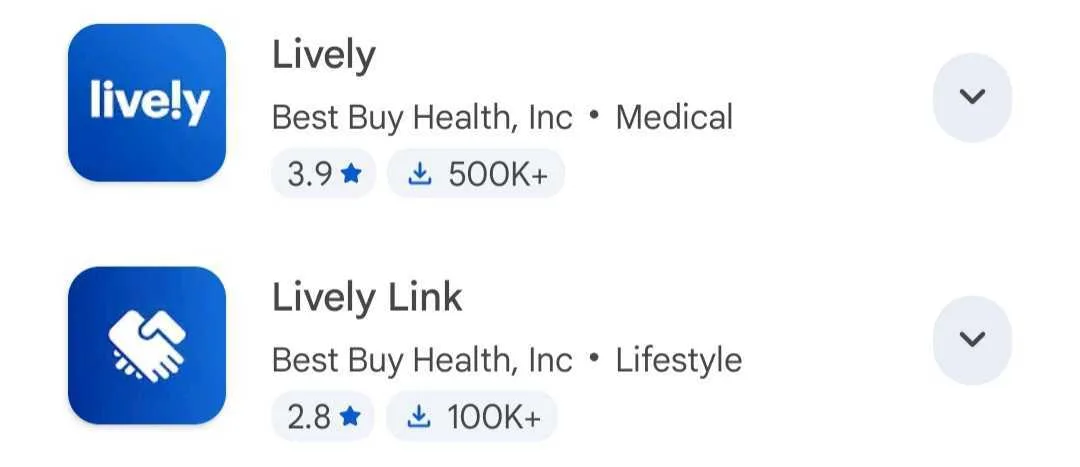
Caregivers and family will want to download the Lively Link app (the second app option above) so they can track, get notifications, and see general activity of the Lively phone primary user. Contrastingly, the Lively app (the first option above) is designed for members who get the Lively smart phone (not the flip phone). Image by Monica Yoshida, Reviews.org
Also, you get notifications if the battery level of the phone is running low so you can remind the primary user to charge their phone. I had to chuckle when I saw a notification in the app that my device battery was critical—it was at 60%. Calm down, Lively.
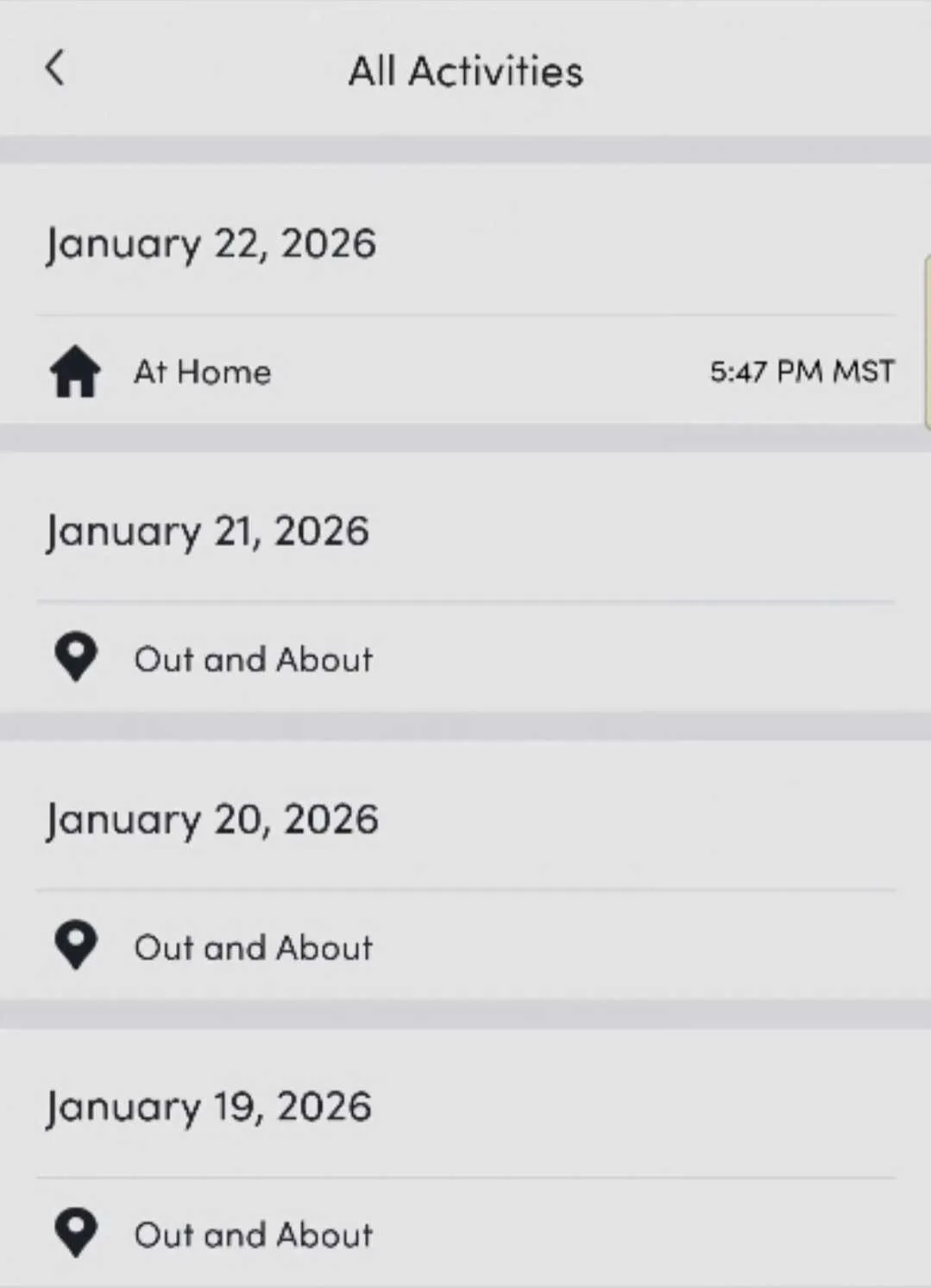
The Lively Link app allows you to track the location of the user with the Lively phone, which could be a great way to make sure they make appointments or for general safety information. Image by Monica Yoshida, Reviews.org

Customer service
5/5
Lively Mobile customer service is one of the (if not THE) standout feature of this mobile service plan. Because of my first-hand testing of the Preferred plan, I personally saw how quickly I got connected to a person, and how thoughtful their conversations and interactions were.
The first time I spoke to a Lively customer service rep asking how to get started with Lively, they directed me to buy a Lively phone. They took the time to suggest I look at Amazon and Walmart since their phones were more discounted than the Lively site.
When I tested the SOS button and let them know I was testing out this service, the emergency responder kindly stayed on the phone with me and gave me generous answers to all my questions.
No scripts. No hurry. Just genuine help. This is the kind of service support that I’d want for a loved one if I wasn’t around to help them.
I read in a few online forums and device reviews that activating the Lively Mobile service was a hassle. My tip: The caregiver or family member should activate this phone service for the primary user. Set it up completely for them because it is not intuitive for a tech-averse individual.
After I got my phone, I followed instructions on the Lively box to activate a plan online or call an agent. The online activation was fast and straightforward, taking less than 10 minutes. I picked a plan, that was it. My flip phone automatically finished the activation process.
Need to contact Lively Mobile?
- Call +1-888-946-9631
- Send an email through the Lively website
Quality of Lively customer service
Calling customer service at +1-888-946-9631: They answered all of my questions about billing and the 30-day money-back guarantee.
Final take: Is Lively Mobile worth your money?
Dollar value
3/5
Network coverage
4/5
Performance & hands-on testing
5/5
Customer service
5/5

Overall quality
4.3/5
If you’re a senior individual, someone with a medical condition, a cognitively impaired person, the parent of a child, or even if you want the most basic service outside of a smart phone, I highly recommend getting Lively Mobile. With its 24/7 live operator, an emergency SOS button, and its ability to communicate without all the frills and complexities of social media apps, the flip phone will be a gamechanger for the tech-averse senior and the caregiver or family member.
I personally recommend the Preferred plan unless you need an on-call nurse, which only exists in the Premium plan.

Here are the specific ways I tested the Lively Mobile service and Jitterbug flip phone hardware:
- Setup and activation: I went through the activation process, testing both the online method and calling customer support
- Emergency response (the "SOS" button): I triggered the red emergency button to simulate a safety situation. I tested the five-second countdown, the automatic speakerphone connection, and the response time of the IAED-certified agent.
- 24/7 live operator (Dial "0"): I tested the "Ask Lively" concierge service by dialing "0" to see how quickly I was connected to a live person and what tasks they could perform, such as looking up information or transferring calls.
- Hardware durability and battery life: I conducted a four-day battery stress test without charging the device and found it was still "going strong.” I also tested the physical build, noting it was "solid, not bulky" and fit well in a pocket.
- Audio and accessibility features: I tested the volume levels (Maximum to Silent) and the "Read Aloud" accessibility feature.
- Communication features: I tested the "Open Flip to Answer" feature and the T9-style multi-press texting system
- Amazon Alexa integration: I attempted to set up and use the Alexa voice-control feature, documenting the difficulties with the sign-in process and specific "script" requirements.
- Caregiver app (Lively Link): I downloaded and used the Lively Link app to test tracking features, battery life alerts, and location history from a caregiver's perspective.
- Camera quality: I took photos and "selfies" with the device
For more information on how we test, check out our methodology.
Lively Mobile FAQ
Yes. It offers simple and accessible on-the-go protection. All you have to do is press the red SOS button and it will immediately (technically within 15 seconds) connect you on speakerphone with a certified Urgent Response Agent.
Lively Mobile offers services and devices that operate over Verizon’s network, known for its especially reliable coverage in rural areas.
Caregivers or family members should download the Lively Link app on their own smart phone. It can track the primary Lively user’s location, battery life, and use of the SOS button. Do not confuse it with the Lively app that is designed for the primary user of the Lively smart phone device.

Related Articles

Why the Paramount+ Free Trial Died for Survivor 50
Paramount Plus is the latest villain to drop its free trial in January (paired with...
Netflix is Hosting Podcasts Now—Here’s What You Need To Know
Netflix users can access some of their go-to favorite — and new — podcasts through...
The $11 Commercial: Peacock’s Great Bait-and-Switch
Peacock Premium promises a superior experience but delivers Cable 2.0 — here's why ads, exclusivity...

The Pink Monopoly: T-Mobile’s Illusion of Choice
Based on recent base cost changes, T-Mobile has become less of an un-carrier and more...



