
First, you must have a Mint Family plan in order to activate a Mint Kids plan.
The Complete Guide to the Mint Mobile Kids Plan: Features, Pricing, and Parent Reviews




 4 min read
 Edited ByBrenna Elieson
Not all kids need a phone plan. But if yours does, there’s a good chance you want to be in charge of it.
As a Mint Mobile customer myself and a mom of very young kids, I’m not planning to get a Mint Kids plan for them any time soon (sorry, Ryan). But there are many reasons a Mint Kids plan may work for your older child.
In short, there are two big benefits of getting a Mint Mobile kids plan:
- You can completely control and manage your child’s account.
- You can pay for 12-month prices (as low as $15 per month) every three months — instead of a whole 12 months in advance.
Current Mint Mobile customers can simply add an additional Mint plan and activate it as a kid’s line. (Remember, it only takes two to make a Mint Family.)
However, beware! Activating a Mint Kids plan is a permanent setting. I don’t recommend it for everyone. So let’s get into the details below.

Why you can trust us
At Reviews.org, our team takes its editorial independence seriously. We may earn money when readers click affiliate links, but we don't work for our brand partners, and they don’t approve our pieces before publication. To learn more, visit our About us page.
What is the Mint Kids plan?
In a nutshell: Your kid stays connected, but you stay in control of their line.
In a Mint Family plan, there is a primary account holder (already a Mint Mobile customer) who can control the management of the Mint Kids line. All correspondence about the kid’s line (including marketing communications) goes to the main account holder. This person also controls all the features and capabilities regarding the Kids line.
Key Mint Kids features at a glance:
- Network: Runs on the same T-Mobile network as standard Mint plans (can be deprioritized during network congestion)
- Control: Grants the primary account holder full management of the line
- Price: Starts at just $15 per month for a 5GB plan ($45 paid every three months)
- Compatibility: Supports bringing your own number or getting a new one
- Freedom: Skips the hassle of long-term contracts
- Protection: Blocks all incoming marketing communications

When activating a new line with Mint Mobile, simply select that it will be for a kid. That’s it! A word of caution that once you select the kid option, you can never revert back to a standard plan. Image from Mint Mobile’s site.
You cannot buy a Mint Kids plan as a standalone plan.

Unlike a standard Mint Mobile plan, a Mint Kids plan can only receive an invitation to join an already-existing family plan (it cannot initiate a family plan). This safeguards the child from creating Mint Family plans with other friends or even strangers outside the primary Mint Family group.
How Mint’s payment model saves you money
Unlike most prepaid carriers that bill month-to-month, Mint uses an upfront bulk model to keep your costs significantly lower.
With Mint, you pay for three, six, or 12 months in advance. The good news is that a Mint Family Plan unlocks 12-month prices while still only paying in three-month installments.
And the extra good news is that Mint Mobile is one of the cheapest prepaid mobile services available. It starts at $15 per month, and constantly runs new-customer promos. So you can sign up for three months, and then if it works for you and your family, renew for 12 months to keep that $15 monthly rate.
And overage protection? Mint throttles speeds at the data cap rather than hitting you with extra fees, so there’s nothing to worry about.
When you compare Mint Mobile vs. T-Mobile Wireless plans, the financial difference is steep. T-Mobile plans start at $65 per month and go up to over $100 for a single line. With Mint Mobile, your kid will still be connected to T-Mobile's coverage, but you’ll be paying less than $20 per month total.
To learn more about how to set up a Mint family plan, check out this Mint Mobile Family Plan Review with all the tips and information you need to get started.
Mint Kids offers account oversight, not content filters
The biggest reason to get a Mint Kids plan is for account control and supervision. You ensure that your kid doesn’t accidentally spend money on plan updates or data top-ups, but beyond managing service settings, you can’t do much else. Unlike parental control apps that flag bullying or concerning activity, Mint won’t show you what your kid is actually doing.
If you want more visibility into your child’s phone activities, consider these top apps:
Bark: Available for Android and iOS starting at $29/month, this app uses AI to monitor texts (even deleted ones), social media, and photos. It offers 24/7 GPS tracking, website blocking, and screen time rules, though its features are better suited for Android phones.
Google Family Link: A free app available for both Android and iOS that links to your child’s Google Account. Parents get a main dashboard, allowing you monitoring access of their digital life. However, once kids turn 13, Google legally allows them to manage their own account.
Apple Screen Time: A free iOS feature that lets a parent’s iPhone manage all other Apple devices in the house such as limiting usage, restricting content, and delivers personal usage reports.
My honest take: Skip the “Kids” label for more long-term flexibility
If you plan to keep this Mint plan for your child for as long as you can, I would suggest NOT activating it as a kid’s line — it’s permanent. The primary account holder for a Mint Family plan can already track data usage for all Mint members (regardless of whether they are on a kid’s plan or not). The only thing a Kids plan does is force the primary account holder to make all changes for the kid’s line—an extra hurdle that offers no real benefit over a standard line.
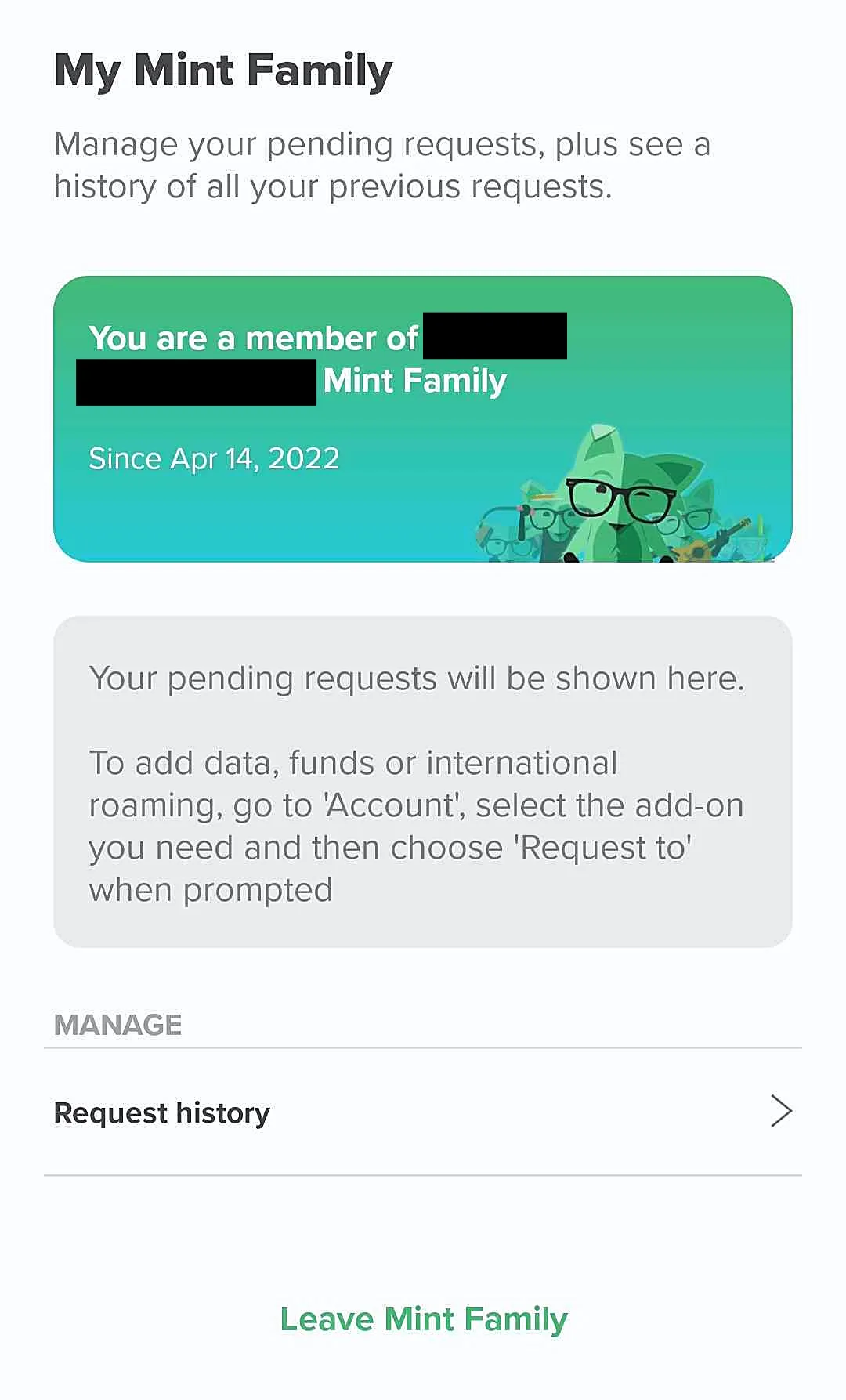
The Mint app allows you to track activity and pending requests as a member of your Mint Family. This screen is unavailable on any Mint Kids plan since they don’t have any visibility or control over their own line. Image by Monica Yoshida, Reviews.org
A final note: If you want your older child to have a phone without internet access, you’re probably better off with Tello Mobile — it’s cheaper and offers no-data plans. For example, you can build a plan with no data and 100 minutes (free texting), for just $5 every month.
Did you know?

To use group texts, you actually need data. So if you want your kid to be in a family group text, you’ll need to consider a mobile plan with data.
How to set up and manage a Mint Kids line
It’s so easy to set up a Mint Kids line that I would caution you to reconsider if you really need it. Once you activate it, it will be a Mint Kids line forever. If you don’t plan on monitoring your kid’s Mint plan for the rest of your life, then skip this step.
What to do:
- Sign in as an active Mint Mobile customer
- Set up a new line and select the “Kids plan” option
- Invite the new line to your Mint Family
Note: You can’t turn an already-active standard plan into a Kid plan.
Mint Mobile Kids Plan FAQ
Yes. Make sure your phone is unlocked and compatible with the T-Mobile network. If you’re not sure, check your phone’s IMEI number, brand, or model directly on Mint’s site.
There is no minimum age to get started. As long as they are old enough to use a phone, a parent can select the option at the time of activation for the kid’s plan, and then this line will remain a kid’s plan permanently.
No. Mint Mobile does not currently support the Apple Watch’s cellular features.

Related Articles

US Mobile International Plans: The Definitive 2026 Guide to Roaming
Compare US Mobile international plans for 2026. Learn about native roaming on Warp, Light Speed,...

How to Get the US Mobile 30-Day Free Trial (2026 Guide)
Looking for a US Mobile free trial? Get 30 days of free service and 30GB...

The Complete Guide to the Mint Mobile Kids Plan: Features, Pricing, and Parent Reviews
Considering the Mint Kids plan? Learn how Mint Mobile’s new $15/mo kid-sized plan works, including...

The Complete Guide to T-Mobile Phone and Internet Bundle Deals in 2026
Compare T-Mobile phone and internet bundle deals for 2026. Learn how to save $15/mo on...



