
A step-by-step guide on how to disable 5G on your phone—and why you might want to
How to Turn Off 5G on Android and iPhone

 5 min read
 Edited ByBrenna Elieson
Fun fact: If your battery is about to die, or your signal sucks, 5G is your enemy.
Let me explain.
While 5G offers unparalleled capacity, it can leave you with a scorching-hot device before lunch — especially in weak signal areas. Knowing when to flip back to LTE is a critical mobile survival skill.
Here’s my cheat sheet for taking control of your 2026 mobile connection:
- Why do it? Locking to 4G LTE can save 10%–20% of your battery, stop your phone from overheating in weak signal areas, and provide faster speeds in crowded stadiums where 5G is congested.
- iPhone: Settings > Mobile Service > [SIM] > Voice & Data > LTE.
- Android: Settings > Connections > Mobile Networks > Network Mode > LTE/3G/2G.
- Google Pixel: Settings > Network & internet > SIMs > Preferred network type > LTE.
- The Golden Rule: Keep 5G ON for gaming and 4K streaming; flip it OFF for travel, work commutes, and basements.

Why you can trust us
At Reviews.org, our team takes its editorial independence seriously. We may earn money when readers click affiliate links, but we don't work for our brand partners, and they don’t approve our pieces before publication. To learn more, visit our About us page.
What does a 5G connection do for you?
A 5G connection is about more than speed—it’s also about responsiveness and capacity
Here’s what a 5G connection does:
- Fast average speeds: 100–400Mbps (10x faster than average 4G speeds).
- Transfer speeds: Uploading videos to social media or syncing backups is more stable with 5G. On 4G, a 2GB movie takes about three to five minutes to download. On a solid 5G connection, it takes 10–30 seconds.
- Reduced latency: Opening a web page or performing an online task drops from 30–50ms on 4G to 1–10ms on 5G.
- Increased capacity: 5G can handle far more simultaneous connections than 4G, which means better reliability in a packed public place.
So if 5G is the ideal connection for speed and reliability, then wouldn’t it be better to stay on 5G no matter what?
As Dwight from “The Office” would say: false.
Why should you disable 5G on your phone?
Sometimes, less is more. While a 5G connection makes your phone fast and easy to use, it also makes it work hard, encourages heavier browsing and activities, and naturally drains your battery faster.
Here are three ways that 5G affects your phone:
1. Drains your battery
- How: Most 5G in the U.S. still runs on architecture that tethers to LTE signals. That means your phone isn’t only on 5G and is constantly switching between 5G and 4G, especially in areas with spotty coverage.
- Why 4G LTE can be better: Disabling 5G stops your phone from constantly switching between 5G and LTE, which saves battery.
2. Overheats your phone
- How: 5G signals don’t travel as far as 4G and have a harder time going through thick walls. These types of environments force your phone to hunt for a 5G signal, which can cause your phone to heat up.
- Why 4G LTE can be better: By disabling 5G in areas with weak signal, your phone not only gets faster and more stable speeds on LTE, but it also stops overheating from hunting for a signal it can't find.
3. Encourages higher data consumption
- How: Your phone’s 5G capabilities can encourage higher data consumption, which will naturally drain your battery fast. For example, your phone may want to enable 4K/8K video on YouTube and Netflix instead of the standard 1080p.
- Why 4G LTE can be better: By disabling 5G, you basically tell your phone it doesn’t have to work so hard. Apps might load slower, which tends to mean lighter browsing, which also conserves battery life.
Important note:
Disabling 5G does not affect 911/Emergency services. Your device can still handle emergency calls even with 4G LTE or lower, and may even create a more stable connection for those calls.
Disable 5G in these real-world situations in 2026
While 5G is widespread in 2026, most 5G in the U.S. still runs on Non-Standalone (NSA) architecture — meaning your phone is still tethered to LTE signals while using 5G data.
Toggle off your 5G in these situations:
The “basement” situation
Where: You’re in a basement, a large store like Costco, or a concrete parking garage.
Why disable: Phones will aggressively try to hold onto a weak 5G signal instead of switching to a strong LTE signal. The signal hunting will drain your battery, heat up your phone, and slow down your data.
The “stadium” situation
Where: You’re at a crowded event like a soccer game or a concert.
Why disable: By disabling 5G, it’s like getting on a surprisingly empty 4G LTE highway because most phones are programmed to stay on 5G. Your data might actually work faster now.
The “battery is almost dead” situation
Where: You’re on a long flight, hiking trip, or significant commute, and your battery is below 10%. You have no charger.
Why disable: The 5G radio in your phone consumes 15–20% more power than LTE radios. By forcing your phone to LTE mode, you’re basically telling your phone to stop working so hard, which can buy you around 60 extra minutes of battery life. It can be the difference between being stranded without a phone and having just enough to make it home.
The “traveling” situation
Where: You're on a road trip, train, or just landed in a foreign country.
Why disable: On a road trip, your phone is tower hopping every few minutes, draining your battery and making your data hiccup every time it tries to latch onto the next 5G tower. Traveling internationally? Roaming agreements don't always play nice with a local carrier's 5G network. Forcing LTE almost always fixes both problems. It's the marathon runner of signals, holding on longer and switching less often.
How to disable 5G on iPhone
iOS 26 allows you to create a "Personal Automation" that flips your network for you.
Apple has streamlined its "Mobile Service" menus to account for the move away from physical SIM cards in most regions.
- Settings > Mobile Service (or Cellular)
- Select your active SIM (e.g., "Primary")
- Tap Voice & Data
- Select LTE
Tip: If you see “5G Auto,” that is Apple's "Smart Data Mode," which toggles 5G off for you when you don't need the speed, effectively doing the battery-saving work automatically.
How to disable 5G on Samsung
The latest Samsung One UI 8.0 update still keeps these settings nested within the connections menu.
- Settings > Connections
- Mobile Networks
- Network Mode
- Select LTE/3G/2G (auto connect)
Tip: On some carrier-locked Android phones (like those from AT&T or Verizon), this menu might be hidden. If you don't see "Network Mode," you can often find a "Turn off 5G" toggle within the Power Saving mode settings.
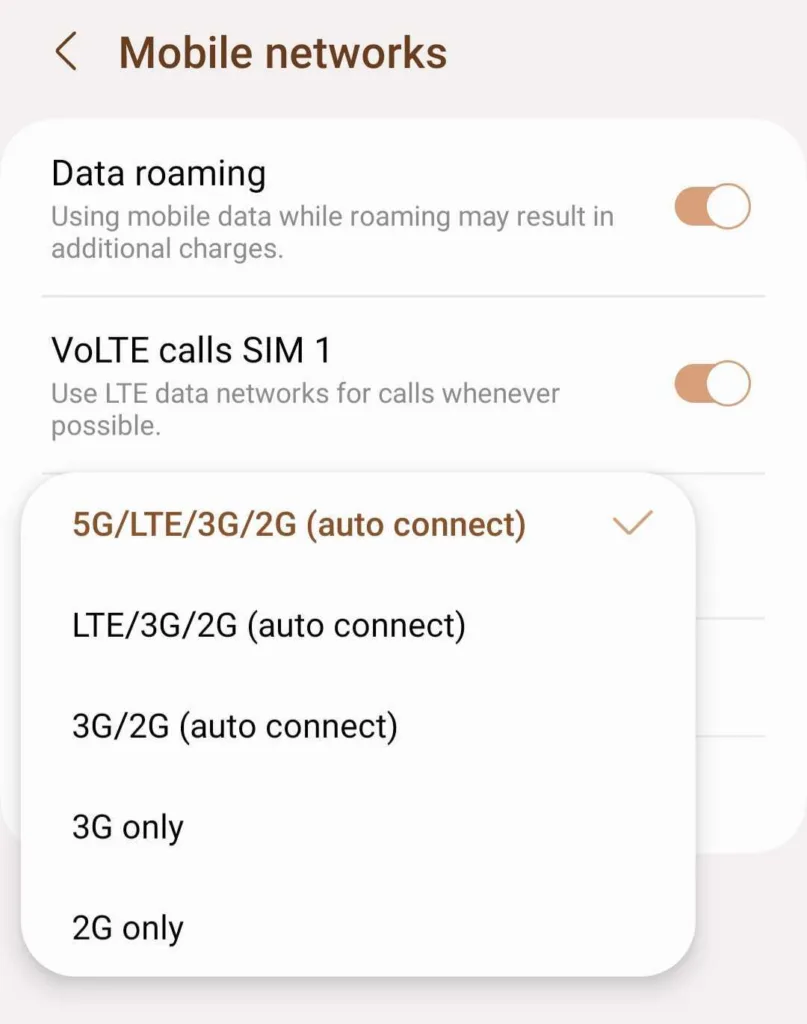
I followed the steps above to disable my 5G and enable an exclusive LTE connection. It was very straightforward! Image by Monica Yoshida, Reviews.org
How to disable 5G on Google Pixel
Pixel devices have stayed very close to "Stock Android" for their connectivity settings.
- Settings > Network & internet
- SIMs > [Select your Carrier]
- Preferred network type
- Select LTE
Important note:
Major carriers — specifically Verizon and AT&T — frequently hide the "Network Mode" or "Preferred Network Type" settings at a firmware level. They do this to ensure users stay on the most advanced network possible (5G), as it's more efficient for their towers to handle thousands of 5G devices than older LTE ones.
Should you leave 5G off forever?
No, please use 5G. Advanced technology is a good thing.
Keep 5G on for anything requiring an instant response:
- Competitive gaming
- Video calls
- Work-from-phone
- Mobile hotspot
- Uploading content
Disable 5G in these situations to save battery or stabilize your data:
- Road trip and public transport
- International trips
- Public crowded areas
- Concrete basement or structures
How to turn off 5G FAQ
Not necessarily. By switching to 4G LTE, you could actually get faster and more stable speeds, especially if you are experiencing a weak 5G signal or are in a congested area. While 5G has higher speed potential, 4G is often more consistent.
No. Your hotspot mirrors your phone data, so if you turn off the 5G network capability on your phone, your mobile hotspot will not use 5G.
Not exactly. It’s not going away today or tomorrow, but the era of 4G is coming to an end. Some carriers are starting to repurpose 4G spectrum for 5G with plans for major reductions. No major carriers have announced plans to shut down 4G infrastructure entirely.

Related Articles

How to Turn Off 5G on Android and iPhone
Learn how to turn off 5G on iPhone, Samsung Galaxy, and Google Pixel. Follow our...

My HBO Max Review (2026): After a Year, I’m Still Impressed
What is HBO Max? Check out which TV shows and movies are available, pricing, and...

Best Internet Deals and Discounts for Veterans and Active Military
Veterans and military families may qualify for free or discounted internet; check out our guide...

Our ISP Reviewer’s Guide to Choosing the Best Internet Service
Don’t let analysis paralysis keep you from choosing a new internet provider! Look at availability,...



