
The $130 streaming device is perfect for those who don’t want to skimp on the best home theater.
Apple TV 4K Review: We Tested Performance, Features, and Smart Home Power

 5 min read
 Edited ByKelly Huh
After having Apple TV 4K for four months, I can honestly say that it completes my home theater. The picture is clearer than other devices and the sound penetrates my surroundings, creating a cinematic experience in my own home.
You might be wondering: Is Apple TV 4K worth it starting at $129 when you can get the Google TV Streamer (4K) for $99.99 or the Amazon Fire TV Stick 4K Select for just $39.99?
For entertainment quality, I knew that Apple TV 4K would be my best choice. Let’s see if it is the right choice for you.

Why you can trust us
At Reviews.org, our team takes its editorial independence seriously. We may earn money when readers click affiliate links, but we don't work for our brand partners, and they don’t approve our pieces before publication. To learn more, visit our About us page.
Hardware and build quality
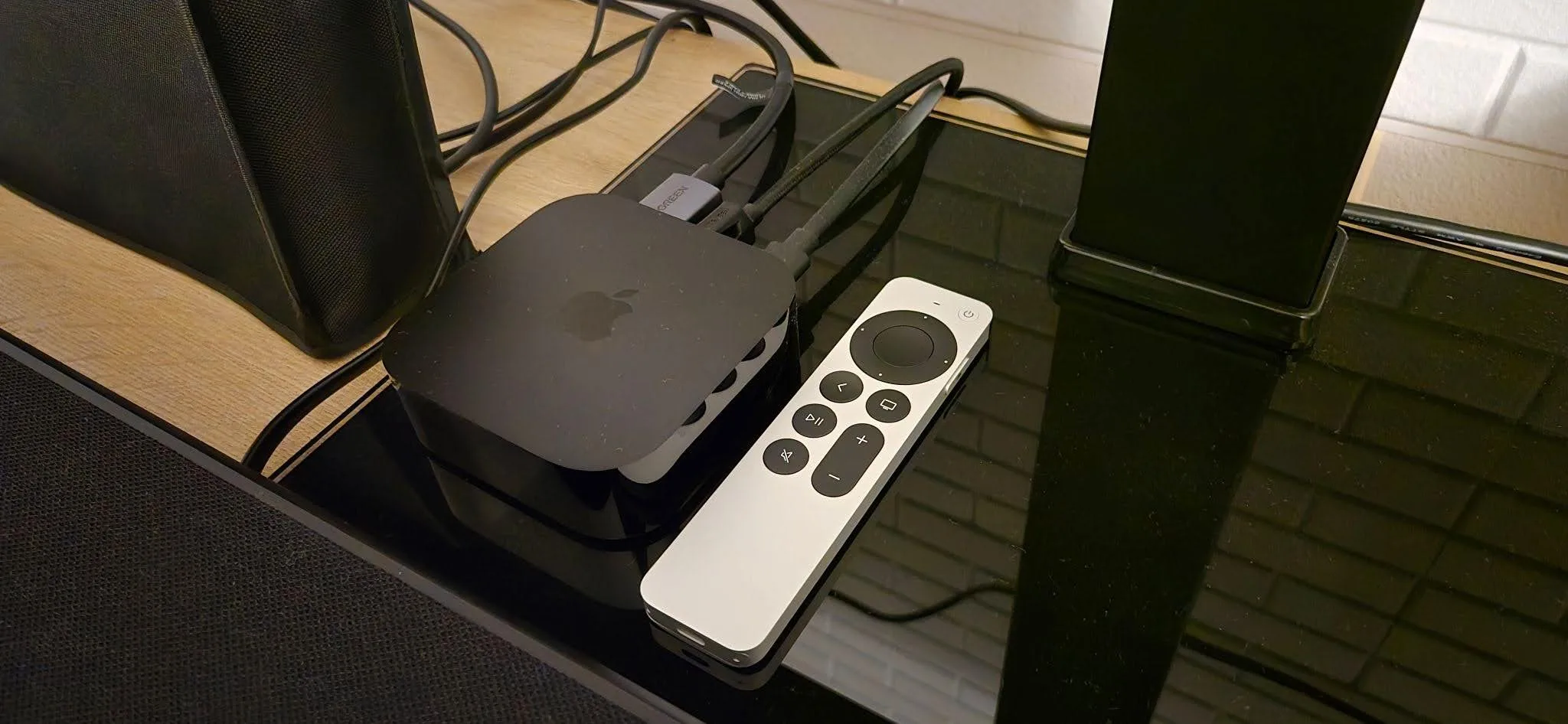
My Apple TV 4K device sits on the base of my LG TV alongside the Siri remote. Due to its matte and glossy material, dust is visible. It takes up little space in the overall setup. The Siri remote is silver with basic buttons. Image by Benjamin Lee, Reviews.org
The Apple TV 4K device resembles a square-ish hockey puck. I keep it at the base of my LG TV, blending with the black setup. The device is matte at the top and bottom and glossy on the sides which, unfortunately, attracts a lot of dust. After about three hours of testing, the device was warm, but not hot – my phone feels hotter after an hour of gaming.
A quick overview of the Apple TV 4K features and specs that matter the most:
- Two versions: 64GB Wi-Fi model (7.3oz) and 128GB Wi-Fi and ethernet model (7.5oz)
- A15 Bionic chip
- Wi-Fi 6
- Bluetooth 5.0
- Smart home integration
- Dolby Vision, Dolby Atmos, HDR10
I have the third-generation Apple TV 4K with 128GB, unchanged since 2022. Unlike the second-generation, the third has the A15 Bionic chip which has a 50% faster CPU and 30% faster GPU, allowing you to navigate the UI with minimal lag and quicker response time. It also creates fluid gameplay and improved graphics for gaming apps. The third-generation also adds HDR10+ which enhances color and brightness, making everything pop with realism. All streaming services will run at peak quality – there is a reason why this model has not been upgraded since 2022.
The most significant difference is the price. When the second-generation launched, it was priced at $179 for 32GB and $199 for 64GB. The 64GB for the third-generation is only $129 with the 128GB + Ethernet at $149. The additional $30 for the 128GB and ethernet will allow you to download more apps and guarantee a more stable connection; however, Apple TV 4K still maintains stellar quality on Wi-Fi alone.
The Siri remote: switching to USB-C
The latest Siri remote replaces the Lightning connector with USB-C. One of my pet peeves with Apple is its proprietary connector requiring a separate cable. However, with USB-C, I can charge my Siri remote with the same cable as my phone, Playstation, Switch, and Xbox controllers. Instead of being coerced into the Apple ecosystem, the Apple TV 4K has entered my personal ecosystem.
Here are some of the Siri remote’s unique features:
- Siri button and mic
- Touch-enabled clickpad allowing you to navigate by swiping
- Voice recognition for making personalized recommendations
Smart home integration
If you have a smart home, Apple TV 4K can serve as the central hub for your smart home accessories due to its Thread networking support.
Some things that Apple TV 4K can do as a home hub:
- Control lights, curtains, and locks
- Adjust thermostat
- Display multiple security camera feeds live on your screen
- Automate smart accessories to your specifications
Ecosystem with Apple products
Of course, Apple TV 4K will also become a big part of your Apple ecosystem:
- Quick access to Apple TV streaming, Apple Arcade, iCloud, etc
- Stream audio, videos, and even FaceTime from other Apple devices onto Apple TV 4K
- Connect the TV’s audio directly to your Airpods
- Use your iPhone as the remote and for color calibration on Apple TV 4K and to find your Siri remote if you lose it
Performance and video quality
Apple TV 4K provides unique specs that create stunning visuals.
4K HDR10+ and Dolby Vision testing
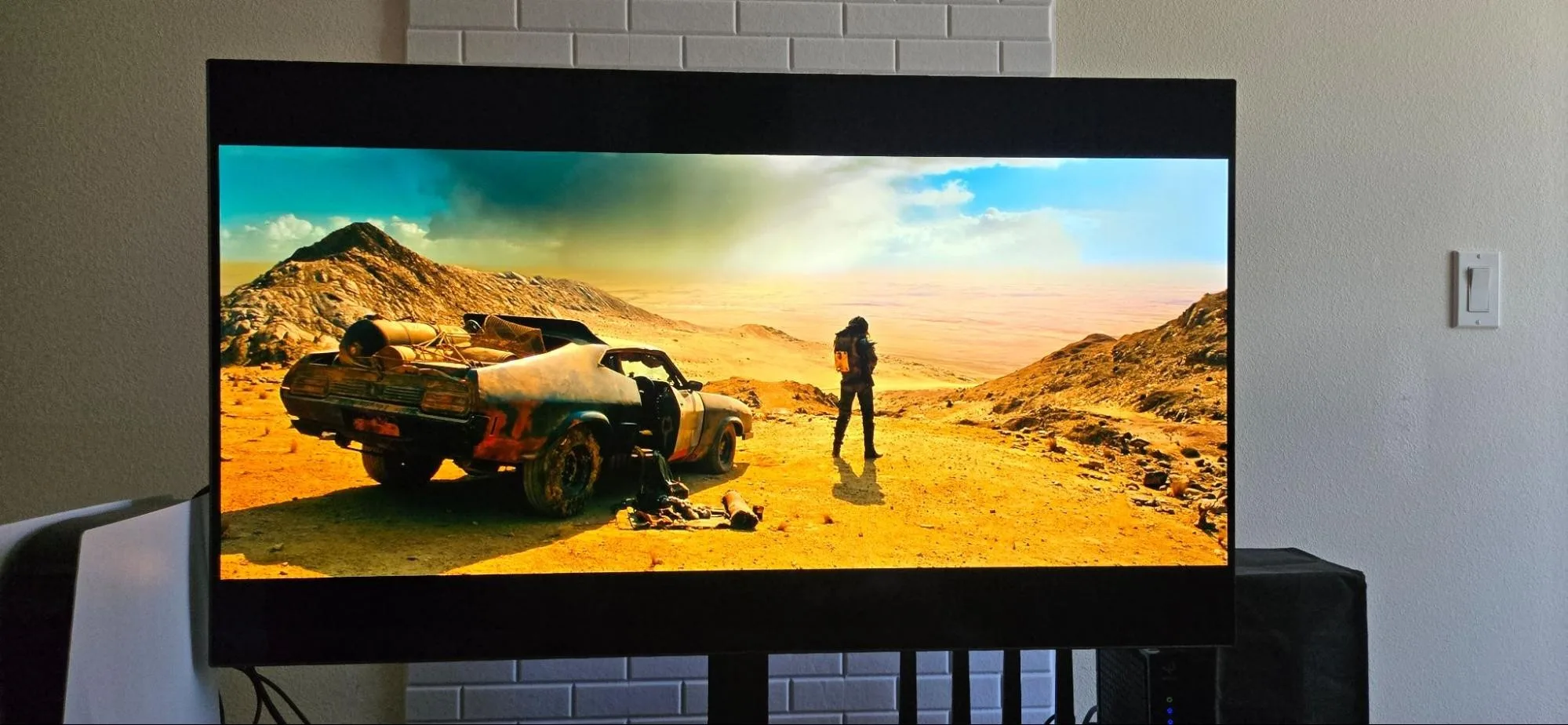
The opening shot of “Mad Max: Fury Road” showing off the film’s impressive color grading. Image by Benjamin Lee, Reviews.org
Whenever I test out a new TV for quality, I always watch “Mad Max: Fury Road” for its stylized color grading. It opens with a shot of Max looking at the vast horizon. From left to right, you see ever-changing gradients of blue skies and white clouds. The contrast between the enlightened sands and the darkened shadows makes every color pop out. Of course, you need to have a TV that supports 4K HDR10+ and Dolby Vision.
You may be thinking: “If my smart TV already supports 4K HDR10+ and Dolby Vision, why do I need an Apple TV 4K device?” The A15 Bionic chip processes compressed streaming feeds differently from a smart TV’s built-in app, resulting in the highest intended quality of content without any buffering.
App load speeds and UI navigation
The Apple TV 4K homepage is minimalistic, true to the Apple brand. The top of the homepage consists of Apple apps followed by rows of apps of your choosing. It is very easy to navigate and even has a search option.
I was very surprised by the load speeds during testing. I compared opening Netflix on the LG TV webOS to Apple TV 4K. On webOS, it took 2.64 seconds. On Apple TV 4K, it only took 0.79 seconds. I retested this multiple times with slightly different results, but Apple TV 4K always won with less than a second.
If you are looking for more free apps to test on your Apple TV 4K, click here to get an idea.
Audio performance: theatrical depth at home
Apple TV 4K supports Dolby Atmos, creating a truly cinematic experience in your own home.
Dolby Atmos and spatial audio integration
For those who do not know, Dolby Atmos produces 3D sound that follows you 360-degrees. It can even create height channels for overhead sound. To achieve this in my home theater, I use a Polk Audio Signa S4 soundbar.
To test the sound on Apple TV 4K, I watched “Ready Player One.” The opening sequence features a chaotic, action-packed race. Closing my eyes, I can hear cars revving up and scraps of metal flying in all directions. Every crash triggers the bass, rocking my seat and the floor. When a truck appears on the left and drives across the screen, I can hear the honk travel from left to right. At one point, I can hear a T-rex roar overhead.
If you want to utilize Dolby Atmos, you need to ensure that your sound system supports it. If you have basic TV speakers, it’s meaningless.
Apple TV 4K vs. Google TV 4K and Fire TV Stick
I can spend a lot of time mulling over the differences between Apple TV 4K, Google TV Streamer (4K), and Amazon Fire TV Stick, but here are the key differences.
The Amazon Fire TV Stick is the economical option and has multiple models to choose from. The premium option is the Fire TV Stick 4K Max for $59.99 with a storage space of 16GB; this is ideal for those who want quality streaming on a budget. To add to the affordability, all models are often discounted. Furthermore, if you are invested in Amazon products like Echo speakers and Alexa, then the Fire TV Stick would consolidate your Amazon ecosystem.
The Google Streamer (4K) is set at $99.99 with a storage of 32GB. This is cheaper than Apple TV 4K but I would not consider this budget-friendly. If you want quality streaming and decent storage space while still saving money, Google TV Streaming (4K) is a fine compromise. If you are an Android-user and have a Google ecosystem, then it would be the consistent choice.
Despite the obvious price difference, the quality of Apple TV 4K speaks for itself. What sets it apart from the competition is the A15 Bionic chip’s superior picture processing, the Apple ecosystem’s stable and smooth integration with Apple products and smart homes, and – my personal favorite – its ad-free interface.
If you want full side-by-side comparisons of different streaming devices, click here.
Final verdict: should you buy the Apple TV 4K?
After using Apple TV 4K for four months, I can honestly say it is worth it. As long as you have a TV and sound system that supports it, you will be able to enjoy it at its fullest.
Despite my dislike of Apple products, I have no regrets with Apple TV 4K – my home theater is now a mini IMAX.

Related Articles

She Quit Social Media for 30 Days—Including Dating Apps. Here’s What She Learned.
I spend 27 hours a week on social media. I wanted freedom from it. Danika...
Viasat Internet Plans and Deals
Read about Viasat internet prices, plans, and deals for high-speed internet.

Did You Just Get Hacked? Here’s What to Do in the Next 10 Minutes
Getting hacked cost me $4,500 in fraudulent charges. Here's what to do immediately after getting...

Your Mom Could Save $50/Month With This One Trick
Cut down your monthly phone bill by switching to a more affordable carrier that offers...



